S3 Storage Class Comparison
Choose the right S3 storage class based on access frequency and retrieval speed requirements.
Sponsored by Archil
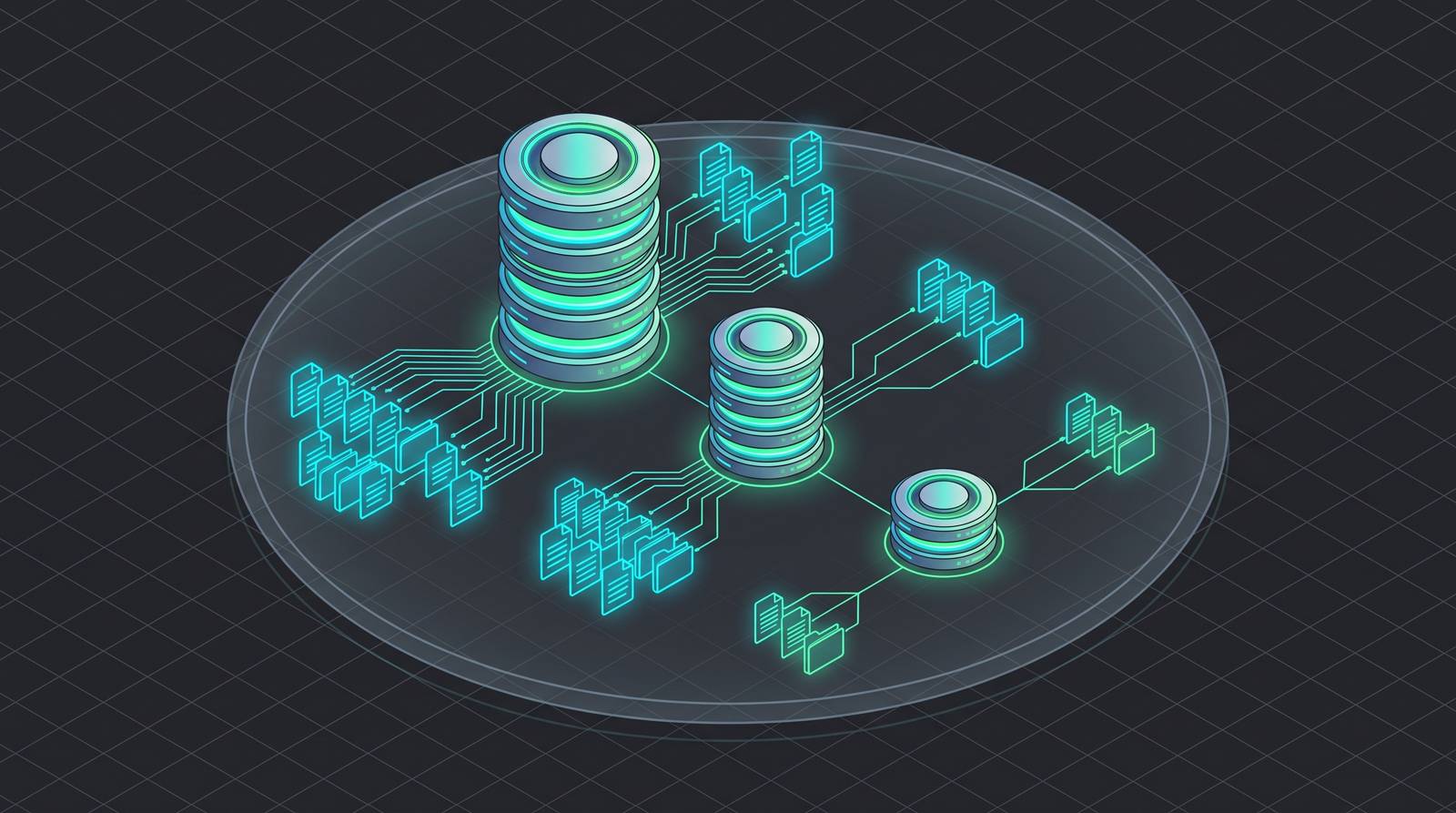
S3 Standard: what you pay for when you need data available immediately, always
S3 Standard is the default. You do not configure anything to land here. Objects show up in Standard unless you say otherwise, which means a lot of data sits here that probably should not.
Standard-IA's storage rate of $0.0125 per GB per month is roughly half of Standard's $0.023, but three conditions lock in with it that determine whether the math actually works in your favor. Every object is billed at a 128 KB minimum, every object stored fewer than 90 days is charged as if it stayed the full 90, and every retrieval carries a fee that Standard never charges. The IA class pencils out when objects are large, retention is long, and access is genuinely infrequent and predictable, a monthly-validated reference dataset or a compliance copy read only during an audit. Where it backfires is on small objects, on data deleted or transitioned before 90 days have elapsed, and on workloads with any chance of a burst retrieval large enough to wipe out the storage savings.
What you actually get: single-digit millisecond latency, no retrieval fees, no minimum storage duration, no minimum object size. Access it once a day or a thousand times a day. The bill does not care either way.
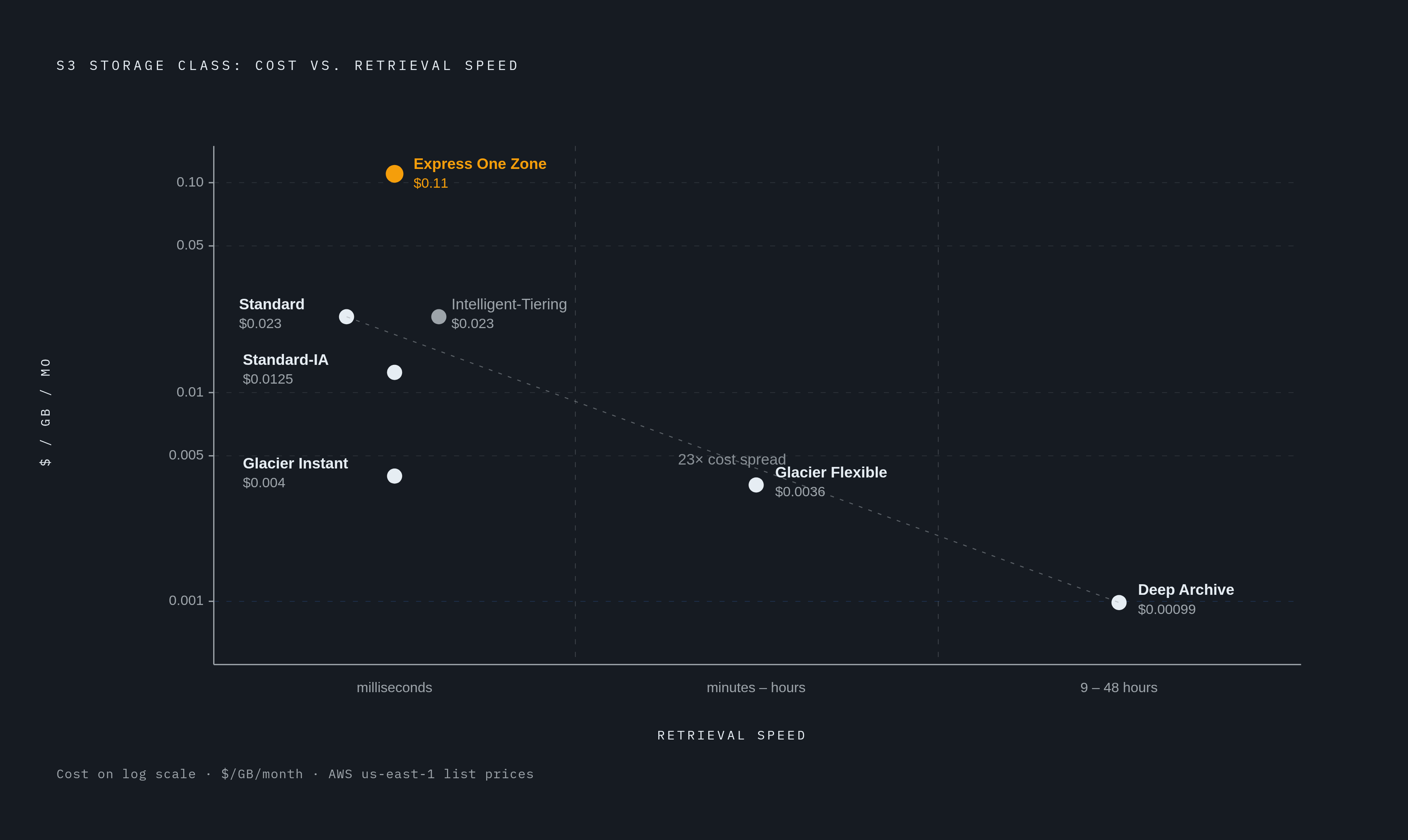
Pricing lands at $0.023 per GB for the first 50 TB per month, $0.022 for the next 450 TB, and $0.021 above 500 TB.
Standard is the right call when:
Access frequency is high or genuinely unpredictable
Retrieval latency is a hard product or pipeline requirement
Objects are small enough that the minimum-size billing on IA classes would wipe out any savings
Standard is the wrong call when data sits untouched for weeks or months at a stretch. You are paying for instant availability on data nobody is actually touching. That is the exact situation every other storage class was designed to undercut.
Before you move anything out of Standard, use it as your cost benchmark. Ask whether Standard is genuinely overcharging you given how often the data gets accessed. If the answer is no, stay put. If yes, keep reading.
When does S3 Standard-IA's 90-day minimum and retrieval fee actually make it cheaper than Standard?
Standard-IA cuts the storage price roughly in half. At $0.0125 per GB per month versus Standard's $0.023, the math looks like a no-brainer. It is not.
Two conditions come locked in with Standard-IA: a 90-day minimum storage duration and a 128 KB minimum billable object size. Retrievals are also priced separately, which Standard does not charge for at all. Those three things together are where people get burned — like ordering the cheaper menu item only to find that utensils cost extra.
One Zone-IA goes further, dropping to around $0.01 per GB per month. The catch is data lives in a single Availability Zone instead of three. That durability trade-off is real. If that AZ has a problem, your data goes with it. One Zone-IA is defensible for secondary backups or data you can reconstruct from somewhere else. It is a bad idea for anything where losing it means starting from scratch.
Here is where the IA classes specifically backfire:
Small objects. Anything under 128 KB gets billed as 128 KB. A bucket full of 4 KB files in Standard-IA costs more than the same bucket in Standard would.
Short-lived objects. Delete or transition data before 90 days and you still owe for the full 90.
Burst access. One surprise high-volume retrieval can generate fees that exceed what Standard would have cost for the whole period.
Good fits: disaster recovery secondaries, reference datasets validated on a monthly schedule, compliance copies that only get read during an audit.
The IA classes reward predictability. If you know access is infrequent, objects are large enough, and retention is long enough, the math works. If any of those conditions are fuzzy, Intelligent-Tiering is the safer call.
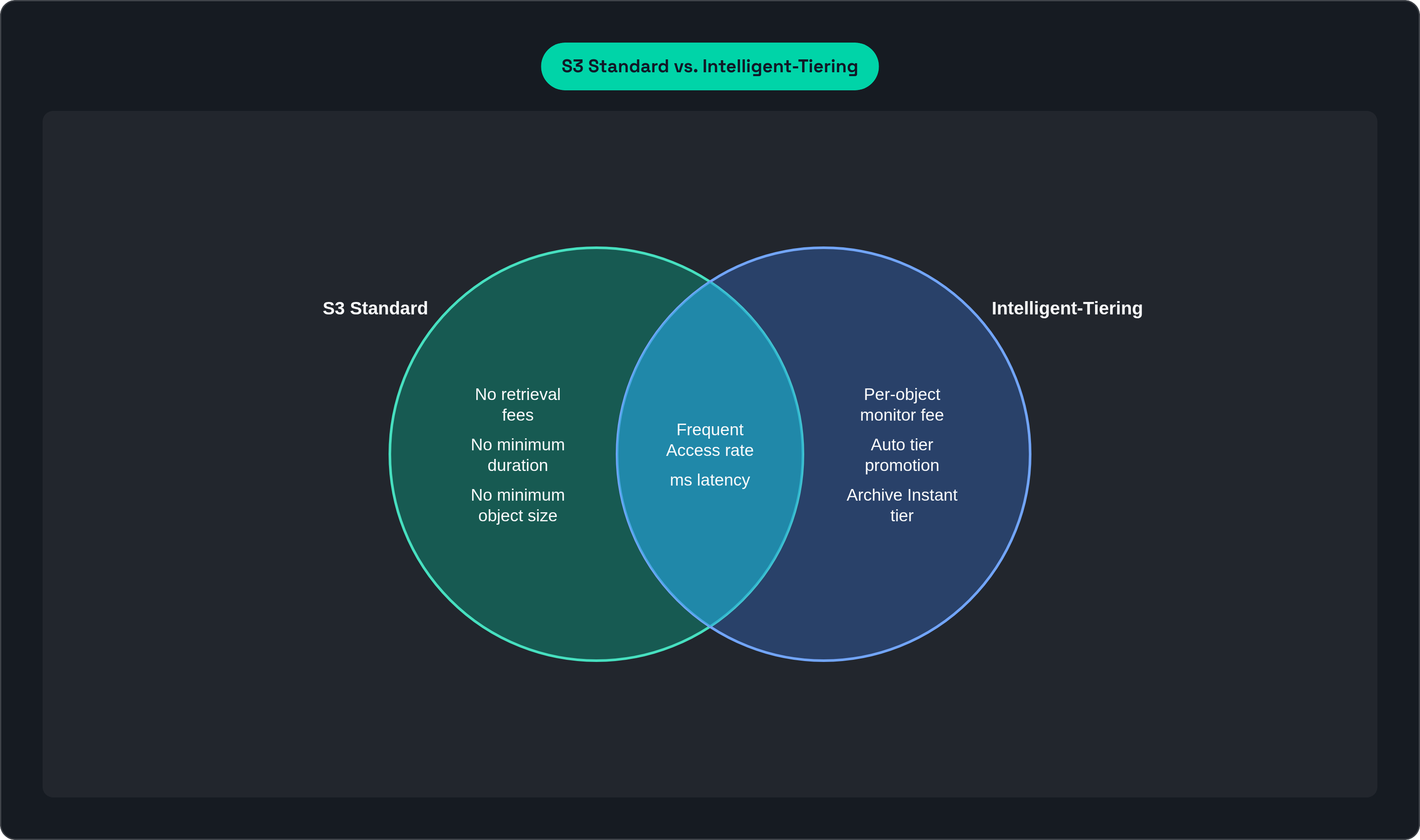
S3 Intelligent-Tiering: the right default when access patterns are unpredictable or change over time
Intelligent-Tiering is what you use when you are unsure, and that is not a cop-out. It is a legitimate answer to a real problem.
Here is how it works. The class monitors each object individually and moves it across tiers automatically:
Frequent Access tier. Objects land here by default, priced at Standard rates.
Infrequent Access tier. After 30 consecutive days without access, objects move here. About 40% savings versus Standard.
Archive Instant Access tier. After 90 days without access, objects move here. Around 68% savings versus Standard.
When an object gets accessed, it moves back to Frequent Access automatically. No retrieval fee for the promotion. No manual intervention.
The cost of running all this is a small per-object monitoring charge each month. That charge is the trade-off. For very large numbers of very small objects, the monitoring fee can exceed what you are saving on storage. Run the math at your actual object count before committing.
Where Intelligent-Tiering earns its keep most clearly: AI and ML workloads where a dataset is heavily accessed during a training sprint and then goes cold between runs. No lifecycle policy you write manually will track that as cleanly.
Where it loses: when you are already certain data will sit untouched for months or years. A seven-year financial compliance archive that nobody is reading does not benefit from a monitoring charge. Go directly to Glacier Deep Archive.
Intelligent-Tiering is for uncertainty. Glacier is for certainty of inactivity. That is the real decision boundary.
The three Glacier classes are not interchangeable — retrieval time is the deciding variable
All three have "Glacier" in the name. All three are dramatically cheaper than Standard. They are not the same product. The one question that separates them is how fast you need your data back.
Glacier Instant Retrieval
Storage at $0.004 per GB per month. Millisecond retrieval. Same latency profile as Standard-IA. 90-day minimum duration, 128 KB minimum billable size.
This class was built for data you access roughly once a quarter but need immediately when you do. Medical images. Media archives. Compliance records with ad-hoc audit queries. The price is 83% lower than Standard, which more than offsets the retrieval fee at quarterly-or-less access frequency. Breakeven sits at roughly once every five to six weeks.
Access it more often than that and you should be in Standard-IA or Standard. Can you tolerate hours of wait time? Then move down to Flexible.
Glacier Flexible Retrieval
Storage at $0.0036 per GB per month. Retrieval ranges from minutes to hours depending on which retrieval tier you use. 90-day minimum duration. No minimum object size, but every object carries 40 KB of per-object metadata overhead billed separately, which matters more than people expect.
Bulk retrieval is free. That is the part worth sitting with. If you can batch and schedule retrievals in advance, Glacier Flexible Retrieval gets very cost-effective. The right pattern is annual or biannual access: DR testing, year-end reporting, backup restoration drills.
The gating question is simple. Can your team plan retrievals hours ahead? If yes, Flexible is cheaper than Instant. If no, Instant is the right call.
Glacier Deep Archive
About $0.00099 per GB per month. The cheapest cloud storage class on the market. Retrieval within 9 to 48 hours. 180-day minimum storage duration.
The gap versus Standard is staggering at scale. Storing 10 TB for a year in Deep Archive costs roughly $120. The same 10 TB in S3 Standard runs around $2,830. That gap — like the difference between renting a storage unit and keeping everything in a downtown showroom — is why correctly classifying archival data is one of the highest-ROI optimizations in cloud cost management, and also why misclassifying it in the other direction is so painful.
The right fit: data that must be retained but will almost never be read. Seven-year financial records. Long-term compliance archives. Digital media preservation. If the only reason the data exists is to satisfy a retention requirement, Deep Archive is the answer.
The small-object trap in Glacier
Both Flexible Retrieval and Deep Archive carry 40 KB of per-object overhead. 32 KB billed at the Glacier rate, 8 KB at the S3 Standard rate. For large objects this is negligible. For millions of small files it is punishing. Ten million 4 KB files means the metadata overhead dwarfs the actual data cost.
The fix: aggregate small files into larger archive packages before writing to Glacier. Zip them, tar them, bundle them. Do this before you archive, not after the bill arrives.
Glacier Instant for quarterly access that needs immediate response. Glacier Flexible for annual access that can tolerate hours. Glacier Deep Archive for data that exists to satisfy a retention requirement and almost never needs to be read.
S3 Express One Zone: when standard object storage latency is the bottleneck, not the price
Express One Zone is not trying to be cheap. It is trying to be fast. Consistent single-digit millisecond access, up to 10 times faster than S3 Standard, supporting up to 2 million requests per second per directory bucket.
It stores data in a single AZ by design, same durability trade-off as One Zone-IA. The entire point is co-location with your compute in the same AZ, which eliminates cross-AZ latency from the equation.
After AWS cut prices in April 2025 (storage down 31%, GET requests down 85%, PUT down 55%, data transfer down 60%), pricing landed around $0.11 per GB per month. Still roughly 4.8 times more expensive than Standard. The price cuts moved it into viable territory for high-value workloads where the old pricing made it a non-starter.
The problem this class actually solves is specific. When a GPU training job on a large dataset spends meaningful time in each epoch waiting for data rather than computing, the bottleneck is the storage layer, not the model. Migrations to Express One Zone have achieved epoch time reductions of up to 35% without touching model code. SageMaker training jobs reading from colocated Express One Zone storage see 40 to 60% shorter training times from eliminated I/O wait. At GPU cluster pricing, that time savings typically outweighs the storage premium by a wide margin.
Other good fits: interactive analytics, key-value caching in AI search pipelines, anything where retrieval latency variability directly degrades throughput.
Hard disqualifiers:
Infrequently accessed data (you are paying a speed premium you are not using)
Compliance-critical data requiring multi-AZ durability
Any workload where the performance premium has no downstream compute savings to offset it
As of mid-2026, Express One Zone is available in eight AWS Regions.
The newer purpose-built bucket types and where they sit relative to the eight classes
Keep these clearly separate in your mental model. S3 Tables, S3 Vectors, and S3 Express One Zone are not differently priced tiers on a general-purpose bucket. They are different underlying architectures. A storage class is a tier on top of a bucket. These are different bucket types entirely.
S3 Tables
S3 Tables reached general availability between 2024 and 2025. It is purpose-built for Apache Iceberg tabular data and delivers roughly 3x faster query performance and 10x higher transactions per second versus general-purpose buckets for Iceberg workloads.
Storage sits at $0.0265 per GB, about 15% more than S3 Standard. That premium is only worth paying if the query performance improvement actually matters to your workload. It integrates with Athena, EMR, Spark, Databricks, and SageMaker Lakehouse. S3 Tables also supports Intelligent-Tiering as of 2025, so analytics workloads can get automatic tiering without manual lifecycle management.
Right fit: ML feature stores, structured training data management, business analytics on Iceberg tables. Wrong fit: unstructured data, infrequent-access archives, anything that is not tabular.
S3 Vectors
S3 Vectors went GA in December 2025. It is the first cloud object store with native vector embedding storage and querying built in. It scales to 2 billion vectors per index, 10,000 indexes per bucket, up to 20 trillion vectors per bucket.
AWS claims up to 90% lower cost versus standalone vector databases. If you are already deep in the S3 ecosystem and want to add semantic search or RAG retrieval, this avoids standing up separate vector infrastructure. That is the case for it in one sentence.
Object size limit increase
Late 2025, AWS raised the maximum object size from 5 TB to 50 TB. Worth knowing if you store large AI training datasets, high-resolution video, or seismic data that previously had to be split across multiple objects.
What these do not replace
General-purpose buckets with the eight storage classes remain the right default for the overwhelming majority of workloads. These purpose-built types solve specific architectural problems. If you do not have that problem, the standard classes are the right place to be.
Matching access pattern to storage class: a practical decision framework
At the end of the day, every storage class decision comes down to four questions. Ask these about any dataset before you assign a class.
How often is this data actually accessed? Daily, weekly, monthly, quarterly, annually, almost never.
What is the acceptable retrieval latency? Milliseconds, minutes, hours.
How predictable is the access pattern? Known and stable, or variable and uncertain?
What is the typical object size, and how many objects are there? Small-object overhead can flip the math on IA and Glacier classes entirely.
With those answers in hand, the mapping looks like this:
| Access pattern | Storage class | |---|---| | Daily access or unpredictable timing | S3 Standard | | Monthly access, large objects, seconds of latency acceptable | Standard-IA | | Access pattern changes or is hard to predict | Intelligent-Tiering | | Roughly quarterly, millisecond response required | Glacier Instant Retrieval | | Once or twice a year, can plan retrieval hours ahead | Glacier Flexible Retrieval | | Retained for compliance, rarely if ever read | Glacier Deep Archive | | High-frequency I/O, latency-sensitive, co-located with GPU compute | Express One Zone | | Tabular Iceberg workloads with high query throughput | S3 Tables |
One more thing worth using: lifecycle policies. These let you define rules that automatically transition objects between classes based on age or last-accessed date. A common pattern is landing new objects in Standard, transitioning them to Standard-IA after 30 days, and moving them to Glacier Deep Archive after a year. You write the rules once and stop thinking about it.
None of the eight classes is universally optimal. Each one is the cheapest for exactly one access pattern. Get that match right, and the 23x cost spread works in your favor instead of against you.
This article is sponsored by Archil.