S3 vs EFS vs EBS Latency Benchmarks
EBS outpaces S3 and EFS by orders of magnitude on latency.
Sponsored by Archil
The Latency Hierarchy at a Glance, from Sub-Millisecond to Hundreds of Milliseconds
If you are choosing between S3, EFS, and EBS for a storage layer, the latency difference between them is not a footnote. It is the decision. Pick the wrong one and you will spend real money on GPUs that spend their time waiting for storage to catch up.
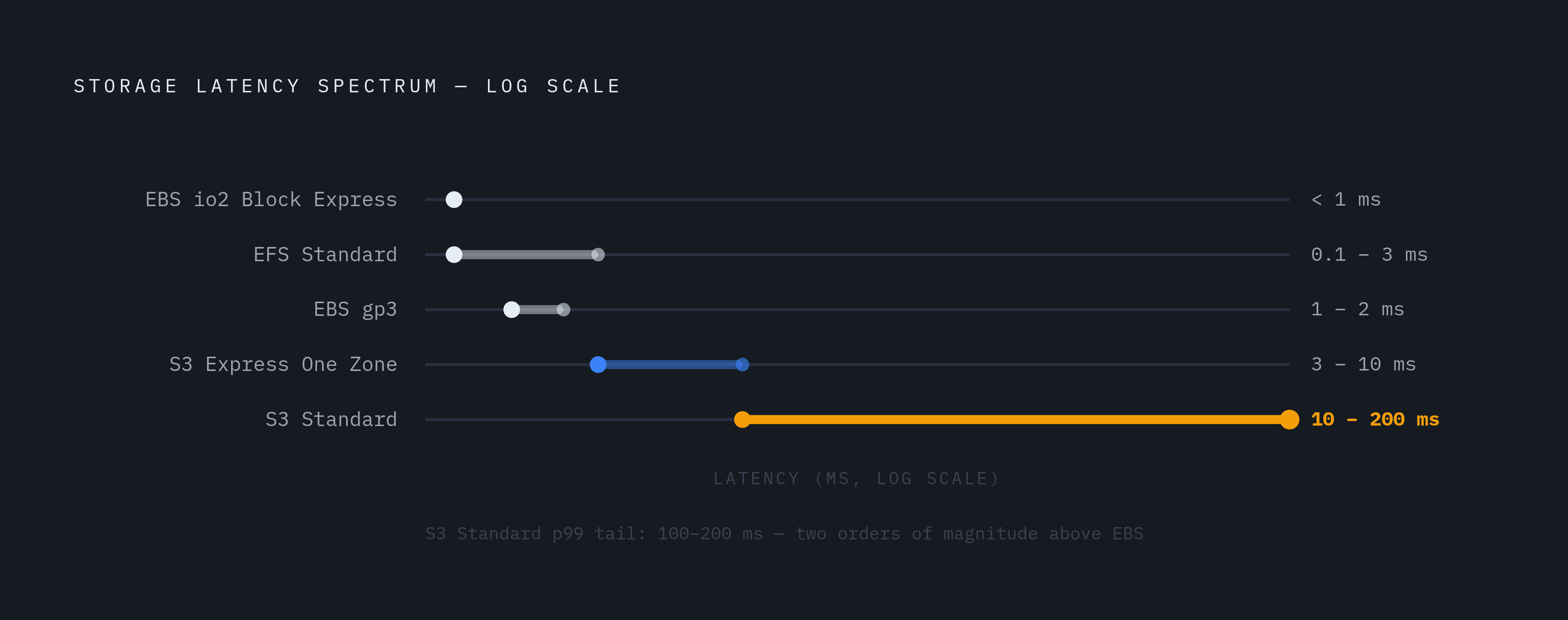
Here is the rough ordering, fastest to slowest, for small-block random reads:
EBS io2 Block Express: sub-millisecond at provisioned IOPS
EBS gp3: 1–2 ms, the default most teams reach for
EFS Standard (General Purpose mode): sub-millisecond to low single-digit milliseconds under ideal conditions
S3 Express One Zone: 3–10 ms, per AWS Distinguished Engineer Andy Warfield
S3 Standard: 10–200 ms depending on object size and request pattern, with p99 tail latency routinely exceeding 100 ms
That gap between EBS and S3 Standard is not marginal. At the tail, you are looking at two orders of magnitude. S3 Express One Zone sits in the middle but is still 5–10 times slower than EBS in head-to-head benchmarks.
This hierarchy is stable across sources. What changes is how far each service's latency moves under different configurations. That is what the rest of this piece unpacks.
EBS Latency in Practice: What Sub-Millisecond Actually Requires
EBS behaves like a local disk attached to a single EC2 instance. That is its superpower and its constraint at the same time.
The gp3 volume type gets you up to 16,000 IOPS and sits comfortably in the 1–2 ms range. That covers most workloads. If you need sub-millisecond, you are looking at io2 Block Express, which supports up to 256,000 IOPS and is built for database-style random access where consistent response time matters more than almost anything else.
A few things that actually matter here:
EBS lives in a single Availability Zone. No cross-AZ shared access.
It is single-instance by default. Multi-Attach exists but is narrow in scope.
Durability is five nines. S3 and EFS are eleven nines. Use snapshots if disaster recovery matters to you.
The sub-millisecond number is real, but it is narrow. You only get there with io2 Block Express at provisioned IOPS, on a workload that is not bursting past its limits. Think of gp3 as the workhorse and io2 Block Express as the race car you rent when you genuinely need it, not just when you want to feel good about your architecture.
EBS falls short the moment you need shared access across nodes or storage that scales independently of compute. That is a constraint worth knowing before you design around it.
EFS Latency: The Distributed-Filesystem Tax and How Configuration Shifts It
EFS gives you shared file storage that multiple instances can access simultaneously across Availability Zones. That capability has a cost. Every file operation carries per-operation overhead because EFS is coordinating across a distributed backend, and that coordination is not free.
In General Purpose mode, best case, you get sub-millisecond to low single-digit millisecond latency. Large sequential reads amortize the overhead well. Small random reads feel the tax more acutely.
Configuration details that actually move the numbers:
Max I/O mode is designed for highly parallelized workloads, but it adds latency. It is not supported for One Zone file systems or Elastic throughput.
EFS Infrequent Access and Archive storage classes have first-byte latency in the tens of milliseconds range. That is closer to S3 Standard than to EFS Standard. Teams using Intelligent-Tiering need to account for this or they will be confused when their latency quietly degrades.
Elastic throughput with EFS client v2.0 or later supports up to 1,500 MiBps combined read/write throughput when configured correctly.
That last point about silent tiering is where teams get burned more often than they expect. An active EFS file sits in Standard and responds quickly. A file that silently moved to Infrequent Access responds like S3. If you are not watching your lifecycle policies, you will spend time debugging a latency problem that is actually a data placement problem.
EFS beats S3 Standard on latency for active files and beats EBS on shared access. The latency cost is the price of that flexibility. Usually a fair trade. Not always.
S3 Standard Latency: What the 100 ms P99 Tail Means for Workloads That Touch Small Files
S3 Standard is cheap at $0.023 per GB per month and scales without a ceiling. The latency is not a bug. It is the trade-off that makes the cost and durability model possible in the first place.
But the implications are real. For small objects in the 4 KB range, p99 tail latency routinely exceeds 100 ms in benchmarks measuring random-read patterns. The reasons stack on each other: per-request HTTP overhead, authentication, metadata lookup. S3 was optimized for large objects, massive parallelism, and durable storage. Small files at high request rates are asking it to do something outside its design center.
There is also no in-place modification. Random-write workloads require full object replacement. That is a fundamentally different behavior from block or file storage, and it catches people off guard.
For AI training, this has a direct consequence. A model training on millions of small files stored in S3 Standard spends a meaningful fraction of each epoch waiting for data. The storage layer becomes the bottleneck. One benchmark description called running fast lookups directly against S3 Standard "painfully slow," which is consistent with what 100-plus millisecond p99 tail latency looks like under sustained load. Nobody wants to rediscover that description in production.
S3 Express One Zone Closes Part of the Gap, and Where It Still Falls Short
AWS claims Express One Zone delivers data access up to 10 times faster than S3 Standard, with request costs up to 80% lower, targeting consistent single-digit millisecond latency. That claim holds up. Andy Warfield's 3–10 ms benchmark is materially faster than what you see with S3 Standard under comparable conditions.
What makes it faster: streamlined authentication, reduced metadata overhead, a directory bucket structure that supports high throughput at scale. The per-request friction that hurts S3 Standard is reduced here.
The trade-offs are real:
Data lives in a single Availability Zone. You are trading regional durability for speed.
Storage cost is $0.11 per GB per month, nearly five times S3 Standard. The 80% request cost reduction matters most for high-request-rate workloads where request costs were already your problem.
It requires explicit zonal endpoint configuration. Not a drop-in replacement in durability-sensitive contexts.
One AWS solutions team reported that migrating ML training pipelines to Express One Zone cut epoch times by up to 35% with no changes to model code. That is a purely storage-layer effect, which is a remarkable thing to get for free.
Where Express One Zone still loses: any workload needing sub-2 ms consistency at scale. Database-style random reads, inference parameter fetching in high-volume serving. EBS or a caching layer is still faster there, and the gap is not small.
One more thing. At re:Invent 2025, AWS announced S3 Files, which brings NFS-mount capability directly to S3 buckets. Reads of 1 MiB or larger stream from S3 with no S3 Files charge. AWS claims up to 90% lower costs compared to cycling data between S3 and EFS. If that holds in production, it narrows the architectural gap between S3 and EFS considerably for large-file ML workloads. Worth watching.
How the Latency Gap Translates into GPU Stall and Training Throughput Losses
The core mismatch in AI workloads is this: training generates large sequential writes (multi-terabyte checkpoints requiring sustained throughput), while inference creates small random reads (parameter fetches requiring low-latency IOPS). These are different problems that point to different storage choices. Treating them the same way is expensive.
Meta documented a case where 56% of GPU cycles were sitting stalled waiting for training data. The storage layer was the bottleneck, not the model, not the GPU. That led them to build a dedicated data preprocessing service to eliminate the stalls, and separately, GPUDirect Storage work that enabled streaming training data directly to GPUs at 192 GB/s versus their previous ceiling of 50 GB/s. The result was a 3.8 times improvement in training speed. Storage was the lever.
In benchmarks involving Gemma 3 12B and a GPT-class model, optimal storage selection alone sped up checkpointing by close to two times. Combined with InfiniBand networking, the end-to-end speedup reached six to seven times. Storage was a meaningful contributor. Some tools take a similar angle, mounting existing S3 or GCS buckets as an NVMe-cached POSIX filesystem to close the latency gap without moving the data.
On the caching side, NVMe caching layers in front of S3 have demonstrated sub-millisecond cache-hit latency, 45 times faster than S3 Standard, with 99-plus percent GPU utilization in MLPerf Storage v2.0 benchmarks. That shows an NVMe cache layer in front of S3 can functionally close the gap to EBS for read-heavy training workloads. Which is a useful thing to know if you are trying to avoid EBS pricing at volume.
The latency hierarchy is not an abstract benchmark concern at this scale. It is a direct multiplier on GPU cost and training wall-clock time.
The Standard Three-Tier Pattern Teams Use to Match Each Service to the Right Workload
Most mature ML infrastructure teams end up at the same pattern. It is not particularly clever. It is just each service doing what it is actually good at.
S3 Standard (or Express One Zone for latency-sensitive pipelines): raw training datasets. Cost-effective at scale, durable, parallelizable across many workers.
EFS Standard (General Purpose, Elastic throughput): shared model artifacts across cluster nodes. NFSv4 shared access across AZs, write-once-read-frequently pattern. Lifecycle policy to IA tier for infrequently accessed artifacts keeps cost manageable.
EBS (gp3 or io2 depending on IOPS requirement): GPU instance local scratch. Lowest latency for active computation, single-instance scratch that does not need to persist beyond the job.
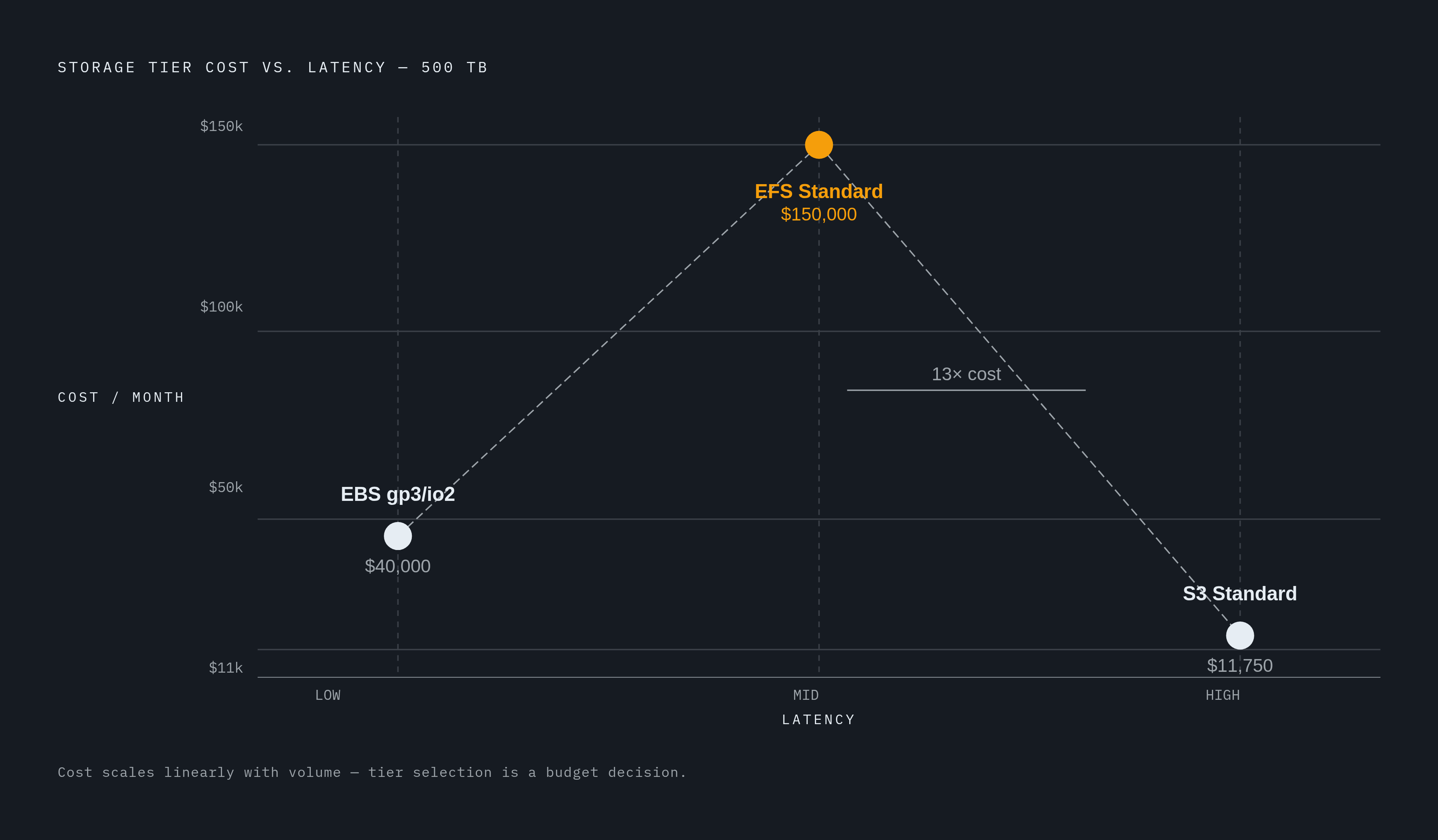
The cost difference at volume makes the trade-offs concrete. At 500 TB, S3 runs roughly $11,750 per month. EBS runs roughly $40,000 per month. EFS runs roughly $150,000 per month. The latency premium for EFS and EBS scales linearly with data volume, which means getting a tier wrong is not just a performance problem. It is a budget problem.
Where this pattern breaks down: workloads that do not fit neatly into raw, shared, or scratch categories. Agents that need persistent, writable workspaces across sessions push against this model in ways that are not cleanly solved yet. The emerging caching layer approach is also starting to collapse the EBS and EFS tiers for read-heavy workloads by serving reads at NVMe latency directly from S3. When that works, it changes where the cost-latency trade-off lands. Not always, but often enough to complicate the standard pattern.
Breaking the pattern is where the latency hierarchy stops being a benchmark conversation and starts being a production incident.
Reading Benchmark Numbers Correctly: The Configuration Variables That Move Each Service's Latency
The hierarchy is stable. What moves is where each service sits within its own range. That range is wide enough to matter, and published benchmarks are not always honest about which end of the range they are reporting from.
EBS sub-millisecond only happens with io2 Block Express at provisioned IOPS. gp3 sits at 1–2 ms. The headline requires both the right volume type and a workload that is not bursting past its provisioned limits. If you are below provisioned IOPS, you are below sub-millisecond.
EFS low single-digit milliseconds requires General Purpose mode, Elastic throughput, EFS client v2.0 or later, and Standard storage class. Files tiered to IA or Archive read at tens of milliseconds. Same file system, very different behavior depending on where the file landed. This is the silent tiering problem again.
S3 Express One Zone single-digit milliseconds requires directory bucket configuration and a zonal endpoint. Median latency is fast. Tail behavior under sustained load is what determines training throughput, and that is not always what the headline number captures.
I/O size matters more than most teams expect. EFS throughput increases with average I/O size because per-operation overhead gets amortized across more data. A benchmark on 4 KB blocks will look worse relative to EBS than a benchmark on 1 MB blocks. This is why two benchmarks from different sources can both be accurate and still appear to contradict each other. They are probably measuring different things.
Same-region, same-AZ placement is assumed in most published benchmarks. Cross-AZ or cross-region access adds network latency that the service's own numbers do not include.
When you see a benchmark, the median is often the least useful number for production decisions. The questions that matter are: what I/O size, what request pattern (sequential or random), what concurrency level, what storage class and performance mode, and what does the p99 tail look like? If those variables are not disclosed, the number is not really telling you what you think it is.
This article is sponsored by Archil.