S3 Glacier Flexible Retrieval vs Deep Archive Latency

The numbers are pretty straightforward, so let's just look at them directly.
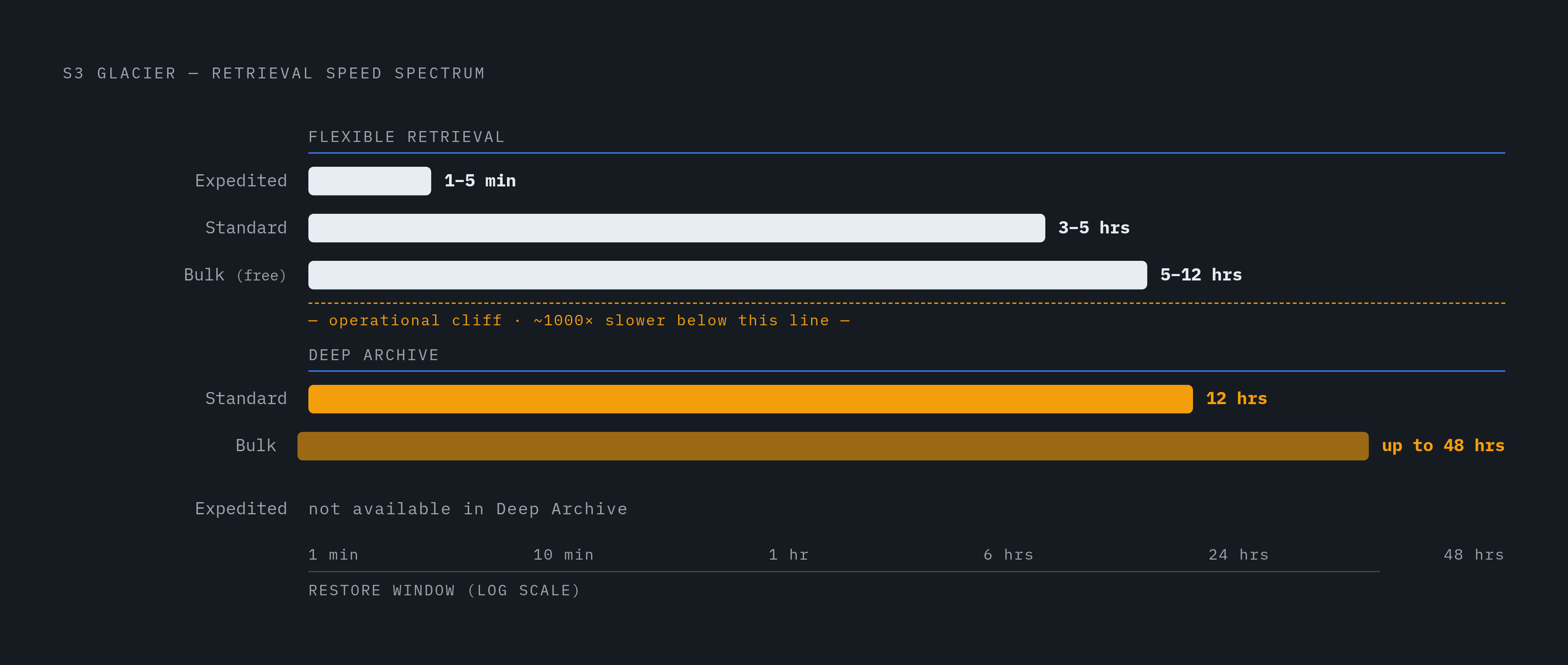
Flexible Retrieval gives you three speeds:
Deep Archive gives you two:
- Standard: 12 hours
- Bulk: up to 48 hours
No Expedited option in Deep Archive. None. If something comes up and you need data fast, you're waiting at least half a day no matter what.
The gap between Flexible Retrieval Expedited and Deep Archive Standard is roughly three orders of magnitude in wall-clock time. I don't mean that as a rhetorical flourish. One is a lunch break. The other is a full business day plus overtime.
One thing worth clarifying: throughput stopped being the bottleneck a while back. Both classes support up to 1,000 MB/s for large restores, and objects over 5 TB typically finish within 48 hours at meaningful speed. The real operational distinction is the waiting window before a single byte is available to you — that's what determines operational impact, not data transfer speed once a restore starts.
Before going further, a naming thing that catches people: in the S3 lifecycle and storage-class APIs, GLACIER refers to Flexible Retrieval, not Instant Retrieval (which is GLACIER_IR). Write a lifecycle rule pointing to GLACIER expecting millisecond reads and you will get multi-hour restores instead. Common enough mistake that it deserves an early mention. Also, as of December 2025, the original vault-based Amazon Glacier stopped accepting new customers. The S3 Glacier storage classes via the S3 API are the current path.
How the Batch Operations Acceleration Changes Flexible Retrieval's Standard Tier
This one doesn't get nearly enough attention.
Since 2023, Flexible Retrieval Standard restores triggered through S3 Batch Operations start returning objects within minutes, rather than the usual 3 to 5 hours. No extra charge. It kicks in automatically when you structure the job as a bulk, multi-object Batch Operations job.
So if you're restoring a large number of objects at once, you can get near-Expedited speed at Standard-tier pricing. That's genuinely useful, and the "3 to 5 hours" headline understates what this tier can actually do.
The catch, and it matters: this doesn't apply to single-object restores. It also doesn't apply to Deep Archive at all. Deep Archive has no equivalent acceleration path. So Flexible Retrieval's middle option is more operationally capable than it looks on a spec sheet, but only when you're doing bulk jobs.
What the Pricing Structure Rewards and Penalizes in Each Class
Storage costs first, since they're the obvious headline number:
- Deep Archive: roughly $0.00099 per GB per month in US East. About $1.01 per TB per month.
- Flexible Retrieval: $0.0036 per GB per month. About 3.6x more expensive.
Deep Archive is up to 75% cheaper on storage. Across the full S3 range from Standard down to Deep Archive, the spread is 23x. So yes, Deep Archive is much cheaper to park data in long-term.
But retrieval costs are where teams miscalculate.
Flexible Retrieval retrieval costs:
Deep Archive retrieval costs:
- Standard: $0.02 per GB (1 TB restore runs about $20.48)
- Bulk: $0.0025 per GB (1 TB restore runs about $2.56)
- No free retrieval tier. Every restore costs something.
That free Bulk tier in Flexible Retrieval is the most important asymmetry between these two classes. If your access pattern is infrequent, planned, and not time-sensitive, you get the restore for nothing.
Two more costs that get forgotten:
Dual billing during restore. While an object is restoring, both the archived copy (billed at Glacier rate) and the temporary restored copy (billed at S3 Standard rate) run concurrently for the full restore window. For small datasets with short windows, it's noise. For large restores held open for days, it adds up in ways that surprise people.
Minimum storage commitments. Flexible Retrieval requires 90 days. Deep Archive requires 180 days. Delete early and you're billed as if you kept the object for the full minimum. If your data has a short shelf life or unpredictable usage, this is a real cost to factor in before you commit.
Small-File Overhead That Makes Naive Archiving Expensive at Scale
Every object archived to either Flexible Retrieval or Deep Archive carries 40 KB of mandatory metadata overhead. Specifically: 32 KB billed at the Glacier rate and 8 KB billed at S3 Standard rates.
For a 5 GB backup, completely negligible. For ten million 4 KB files, the metadata cost dwarfs the actual data cost. The math just flips on you. Storing small files in Glacier is like shipping packing peanuts in boxes bigger than your actual product — you're mostly paying for the packaging.
The solution is a pre-archive decision. Aggregate small files into larger archives (tar, zip, columnar format) before they land in Glacier. This applies equally to both classes.
One more wrinkle on small files: as of September 2024, S3 no longer transitions objects smaller than 128 KB by default. If your bucket has a lot of small files and a lifecycle rule you expected to send them to Glacier, those objects will silently skip the transition unless you explicitly override the size filter. Worth checking if you've set up lifecycle rules and aren't sure everything ended up where you thought it did.
The Decision the Latency Gap Actually Forces: Matching Restore Window to Operational Need
The real question is simple: do you know in advance when you'll need this data, and can you plan around a waiting window?
Flexible Retrieval fits when:
- Retrieval happens once or twice a year but the timing is roughly predictable (quarterly audits, seasonal reprocessing)
- Free bulk retrieval at 5 to 12 hours is an acceptable window
- You want Expedited available as an emergency option, even at higher cost
Deep Archive fits when:
- Retention is genuinely long. Seven or more years is the canonical compliance scenario.
- Retrieval is rare, possibly never, or at most once every few years
- A 12 to 48 hour window is operationally acceptable and can be built into planning
- You're confident in the 180-day minimum commitment
Neither class fits when:
- You need data back in seconds or low single-digit minutes reliably. That's Instant Retrieval territory, or a caching layer in front of S3.
A concrete tradeoff to make this tangible: say you're storing 10 TB and restoring 200 GB once a year. Deep Archive stores 10 TB for a relatively modest sum per year. A 200 GB Standard restore costs a few dollars plus request fees, and you wait 12 hours. S3 Instant Retrieval stores the same 10 TB for significantly more per year with no restore wait. The annual difference is the price of eliminating the wait. Some teams look at that and pay it without a second thought. Others realize the 12-hour window is fine for their actual use case, and that difference compounds into real money at scale. Neither answer is wrong. It depends entirely on whether the latency is a genuine operational constraint or just an uncomfortable feeling.
Where Glacier Latency Becomes a Hard Wall for AI and Data Pipeline Workloads
This isn't about edge cases. It's about a real collision between archival storage economics and what AI infrastructure actually needs.
MinIO's 2025 analysis found that more than 50% of organizations report data and storage bottlenecks that limit AI performance and scalability. Meta found that 56% of GPU cycles stalled waiting on training data, even with distributed file system infrastructure. These aren't small shops with sloppy setups. The storage I/O ceiling is a genuine constraint at scale.
Standard S3 GetObject latency typically lands somewhere in the 30 to 200 millisecond range, which is already pushing it for iterative training loops. Glacier restore windows measured in hours to days aren't in the same conversation. They're categorically incompatible with active training.
What that means for teams with Glacier data:
- Deep Archive and Flexible Retrieval work as long-term holding layers for raw or versioned training data that isn't actively in use
- Any dataset re-entering an active training or fine-tuning run needs to be restored ahead of time. That restore window has to be a planned pipeline dependency, not an on-demand fetch.
- For teams whose data lifecycle includes both archival storage and active AI use, the architecture question shifts from "which Glacier class" to "how is data staged out of archive before it's needed"
At a certain point, the latency gap between Glacier classes stops mattering. Once any restore takes longer than your training pipeline can tolerate, the class choice becomes less important than the staging strategy around it.
Bridging the Gap Between Archived Data and Active AI Workloads
The architecture pattern that actually works here is tiered storage: a capacity layer (cold archive) separated from an access layer (hot cache), so GPUs and inference systems never sit idle waiting on a restore.
A filesystem-level caching layer sits in front of object storage, mounts S3 buckets, and serves NVMe-cached reads at sub-millisecond latency. This decouples the archival cost question from the access latency question. You keep deep archival economics for long-lived data while feeding active workloads from cache, without building bespoke data-movement pipelines or pre-downloading datasets before training starts.
Some caching filesystem tools mount against an existing S3 (or GCS, R2, or Azure Blob) bucket with no migration, no ETL, and no code changes. Reads that miss cache are fetched and served. The bucket stays the source of truth, and no persistent copy is kept outside the customer's own account. For AI agent workloads, persistent filesystem access across sessions means the agent can iteratively discover and operate on data without a separate restore step or a pre-loaded prompt context. I've seen teams spend weeks building data-movement pipelines that this kind of caching layer would have made unnecessary.
For teams deciding between Flexible Retrieval and Deep Archive: the class choice governs archival cost and the restore window for planned data access. A caching filesystem layer is what makes any archived data usable at AI speed, without changing the archive decision itself. Cheap storage and fast access can coexist — you just have to architect for both.