S3 vs EBS Throughput for Sequential Read Workloads
S3 scales horizontally for large sequential reads; EBS wins on latency and single-node caching.

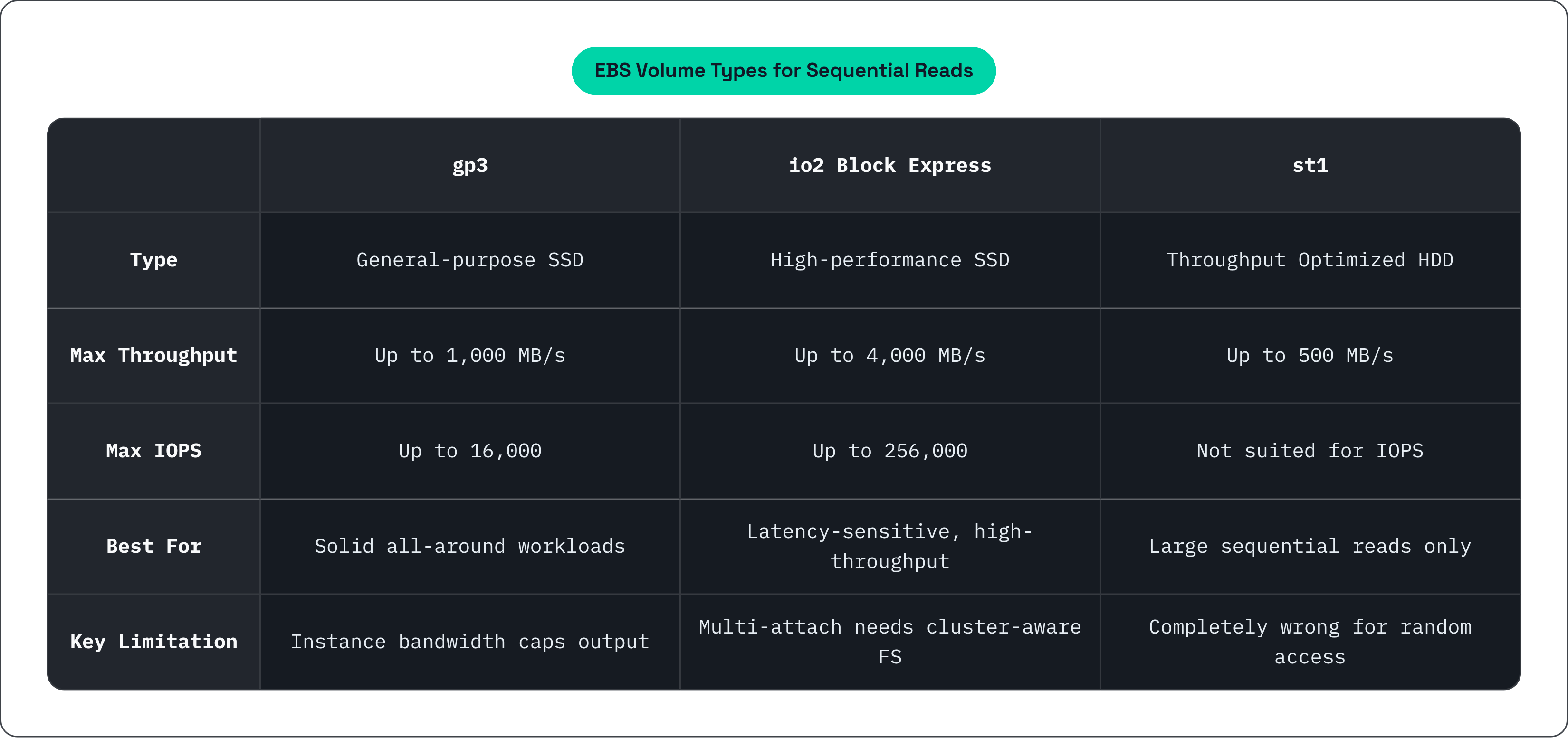
EBS gives you a virtual block device attached to an EC2 instance. It behaves like a local SSD or HDD — think of it as a leash that keeps your storage tethered to a single machine. Three volume types matter for sequential reads:
- gp3 (general-purpose SSD): Up to 1,000 MB/s throughput, up to 16,000 IOPS. IOPS and throughput are decoupled from size. Solid all-around option.
- io2 Block Express (high-performance SSD): Up to 4,000 MB/s throughput, up to 256,000 IOPS, sub-millisecond latency. Supports multi-attach across up to 16 instances. The premium tier.
- st1 (Throughput Optimized HDD): Up to 500 MB/s. Cheaper per GB than gp3. Purpose-built for large sequential reads. Think Hadoop data nodes and Kafka log segments. Completely wrong tool for random access.
Here's the thing people miss: the volume spec is often not the binding constraint. The instance's own network bandwidth to EBS caps your throughput in practice. You can provision all the IOPS you want, but if the instance can't push that much data across the wire, the number on paper is irrelevant.
Multi-attach on io2 Block Express sounds like it solves the shared-read problem. It doesn't, really. It requires cluster-aware file systems like GFS2 or OCFS2 to prevent data corruption. That's a real coordination cost, and it is not a drop-in solution by any stretch.
How S3 Scales Throughput — and What Its Latency Costs
S3 doesn't publish a single throughput ceiling. It scales by partitioning the namespace across prefixes. Per AWS documentation, each prefix supports at least 5,500 GET/HEAD requests per second. Spread your reads across 10 prefixes and you're at 55,000 read requests per second. The number of prefixes is uncapped. This is the kind of horizontal scalability no single EBS volume can touch.
The cost of that scalability is latency. S3 Standard runs 50 to 150ms or more. In a December 2025 benchmark from nixiesearch, p99 tail latency on search-style workloads exceeded 100ms. S3 Express One Zone narrows that to 5 to 10ms. Still 5 to 10 times slower than EBS io2 Block Express.
For some workloads, that latency is a dealbreaker. For sequential reads of large objects, though, the math changes. You pay the latency cost once at the start of the request, then stream megabytes of data behind it. The penalty gets amortized across the transfer — like paying a toll at the start of a highway and then driving for free the rest of the way. Whether that amortization is good enough depends entirely on what you're building.
Where Sequential Reads Favor EBS: Latency-Sensitive, Single-Node Workloads
EBS wins clearly in a few scenarios:
- Sub-millisecond latency is a hard requirement. Databases, boot volumes, interactive analytics. Even on large sequential reads, these workloads care about response time.
- Data gets re-read repeatedly within a session. EBS benefits from the OS page cache. Once data lands in memory, subsequent reads skip the wire entirely. S3 doesn't get that. Every read hits the network.
- Single-node or small-cluster configurations. io2 Block Express's multi-attach covers up to 16 instances, which handles a surprising range of HPC scenarios without needing a distributed storage layer.
- Predictability matters more than elasticity. EBS provisioned IOPS and throughput are deterministic. S3 throughput depends on prefix design and parallelism tuning. If you need guarantees rather than estimates, EBS is the safer bet.
For raw sequential read performance at the hardware level, PCIe Gen5 NVMe SSDs exceed 14 GB/s per node. A WEKApod configuration achieved 720 GB/s aggregate throughput from 8 nodes powering 768 H100 GPUs. Impressive numbers. They also require provisioning, upfront cost, and AZ attachment decisions that don't flex when your workload changes.
Where Sequential Reads Favor S3: Large Objects, Multi-Node Access, and Elastic Scale
S3's structural advantages show up under different conditions:
- Reads are large sequential objects in the hundreds of MB to GB range. Latency overhead is amortized. Throughput per byte is what matters.
- Multiple nodes need to read the same dataset simultaneously. S3 has no lock semantics, no AZ attachment constraints, no coordination layer. Every node just reads.
- Dataset size exceeds what a single EBS volume or instance can hold locally. This happens faster than people expect.
- Write-once, read-many access patterns. S3's consistency model is clean for this.
AWS guidance on object sizing is specific: consolidate training data into objects in the 100 MB to 1 GB range and read them sequentially. That alone delivers significantly higher S3 throughput than reading many small files. The S3 Connector for PyTorch reaches near GPU saturation at roughly 138 samples per second with 16 or more parallel workers using sequential, iterable-style dataset access. Saving ML model checkpoints to S3 via that connector is also up to 40% faster than saving to EC2 instance storage.
S3 scales horizontally without reprovisioning. EBS scales vertically within instance and AZ constraints. For large, shared, multi-node workloads, that architectural difference is the whole ballgame.
Why AI Training Exposes the Limits of EBS as a Primary Data Layer
AI training is, at its core, a sustained sequential read problem at aggregate scale. A multi-GPU cluster pulls multiple gigabytes per second per node, across hundreds or thousands of concurrent processes, repeated across many training epochs. When storage can't keep up, GPUs idle. And idle GPUs are expensive in a way that makes everyone uncomfortable.
The numbers reflect a real problem. As of a May 2026 analysis, more than 50% of organizations report data and storage bottlenecks that limit AI performance and scalability. Meta's own experience found that 56% of GPU cycles sat stalled waiting for training data, even with exabyte-scale distributed storage. The pipeline simply couldn't keep petabyte-scale datasets close enough to the hardware.
EBS hits specific walls in this context:
- AZ attachment means your dataset either lives replicated per AZ or traffic crosses AZ boundaries.
- Scaling a training cluster means reprovisioning EBS volumes across instances. Not elastic by design.
- Native shared reads across thousands of nodes require a coordination layer that becomes its own bottleneck.
And it's not just infrastructure mechanics. 57% of enterprises report their data is not AI-ready even as AI experimentation accelerates (per the same May 2026 analysis). McKinsey's 2024 Global Survey on AI found that roughly one-third of companies succeed in scaling AI beyond pilots, with data readiness and infrastructure constraints cited more often than model limitations.
EBS is excellent at what it does. The problem is that what it does wasn't designed for this. It's like bringing a sports car to a demolition derby — impressive machine, wrong arena.
The S3 Express One Zone Tradeoff: Faster Latency, Real Constraints
S3 Express One Zone is AWS's answer to the latency complaint. Latency drops to 5 to 10ms versus S3 Standard's 50 to 150ms or more. AWS positions it specifically for AI/ML training and real-time analytics.
The tradeoffs are real:
- Still 5 to 10 times slower than EBS io2 Block Express. For latency-sensitive sequential workloads, that gap matters. For large-object streaming where transfer time dominates, it matters much less.
- Approximately 2 times more expensive than gp3 SSD storage per GB.
- Approximately 30% more expensive than io2 SSD storage.
- Single-AZ durability. Teams that need multi-AZ resilience have to replicate manually, which adds operational overhead and cost.
S3 Express narrows the latency gap but doesn't close it. For pure sequential throughput of large objects, standard S3 with good prefix parallelism is often sufficient and cheaper. Benchmark your workload before paying the Express premium. A lot of workloads aren't actually latency-bound in the way that justifies it.
Engineering S3 for Sequential Read Throughput: The Decisions That Actually Move the Needle
Configuration choices matter more than most people expect when you're running sequential read workloads on S3. A few decisions consistently make the biggest difference:
Prefix design. Fan out across multiple prefixes. More prefixes means more parallelism headroom. This is the most important lever, and it's the one most teams underinvest in. Seriously. Sort this one out first.
Object sizing. Aim for 100 MB to 1 GB per object for sequential reads. Millions of small files will kill your throughput regardless of how many prefixes you've set up.
Client choice. AWS Mountpoint for Amazon S3 and the S3 Connector for PyTorch both handle request parallelization, connection reuse, retries, and timeouts by default. The S3 Connector supports both map-style and iterable-style datasets. For large sequential training reads, iterable-style is the right call.
Parallelism tuning. AWS benchmarks show near-GPU-saturation throughput requires 16 or more parallel workers. Fewer workers leave significant throughput on the table.
Multipart reads. For very large objects, range requests allow parallel download of object segments, enabling higher per-object throughput than a single sequential GET.
One thing you cannot engineer around: the page cache gap. S3 doesn't benefit from the OS page cache. Repeated reads of the same data in multi-epoch training hit the network every single time. In epoch-heavy training runs, that cost accumulates. Eventually it becomes the bottleneck, and no amount of prefix tuning fixes it.
When a Caching Layer Between S3 and Compute Resolves the Tradeoff
S3's throughput model is elastic and cheap at rest. EBS latency is excellent but its attachment model doesn't suit large multi-node sequential workloads. Neither option is wrong in any absolute sense. They just have gaps shaped differently.
The pattern that resolves this is an NVMe cache layer sitting in front of the object store. It absorbs the latency penalty and the page-cache gap while the bucket stays the source of truth.
In practice:
- The first read fetches from the object store and populates the cache. Subsequent reads, including every additional epoch, hit NVMe at sub-millisecond latency.
- No data migration. No ETL. No copy of the dataset living outside your own bucket.
- A POSIX filesystem interface means your existing training code, data loaders, and tooling run unmodified. No SDK swap required.
Archil implements this directly. You mount an existing S3, GCS, R2, or Azure Blob bucket as a POSIX filesystem. Reads hit an NVMe cache first. Writes replicate before returning, then flush asynchronously to the bucket. Capacity is elastic and billed on what's actively cached.
For the sequential read problem specifically, the caching model converts repeated S3 GETs in multi-epoch training into local NVMe reads. That closes the latency gap without reprovisioning block storage. Archil also ships serverless execution, so agent-written code can run commands directly against the filesystem. That's useful for teams building AI pipelines where storage and compute need to be tightly coupled.
How to Choose Between S3, EBS, and a Caching Layer for Sequential Read Workloads
There's no universal right answer. There's a right answer for your specific workload.
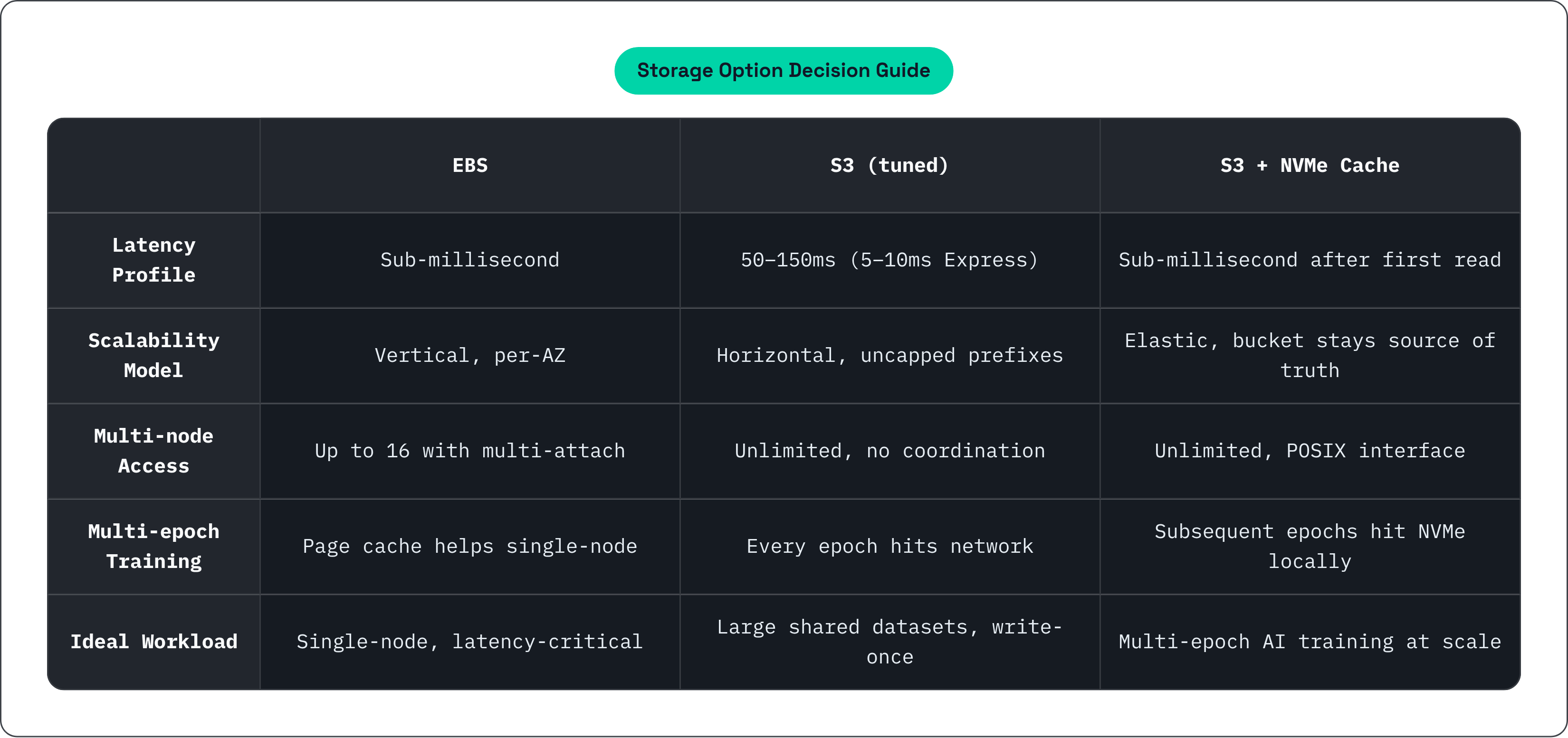
Choose EBS when:
- Workload is single-node or small-cluster (up to roughly 16 instances with multi-attach)
- Sub-millisecond sequential read latency is a hard requirement
- Dataset is repeatedly re-read within a session and the OS page cache provides real benefit
- Predictable, provisioned throughput matters more than elastic scalability
Choose S3 with proper prefix and client tuning when:
- Dataset is large, shared across many nodes, and written once then read many times
- Objects can be sized appropriately (100 MB to 1 GB) for sequential streaming
- Elastic scalability and per-use pricing matter more than deterministic latency
- Workload is not epoch-heavy, or the repeated-read cost is acceptable
Add a caching layer when:
- Dataset lives in an object store but latency or repeated-read cost is a real bottleneck
- Multi-epoch training is in the picture and hitting S3 on every epoch is too costly
- Workload spans multiple nodes or clouds and EBS's AZ attachment model creates friction
- You want the cost and scalability model of object storage alongside the performance of block storage
Defaulting to EBS because it's familiar is a real pattern, and it often means a mismatch between architecture and access pattern. Sequential reads are exactly the workload where S3's design starts genuinely competing with EBS, and where a caching layer can give you both without forcing you to pick a side.