S3 Lifecycle Policy Configuration
Misconfigurations silently break transitions or delete data you need—here's how to get them right.

S3 lifecycle policies are one of those features that looks simple until you actually try to configure one correctly. The concept is clean: write a rule, attach it to a bucket, let AWS handle the rest. The reality is that a misconfigured policy either silently misses half your objects or quietly deletes things you needed. Getting it right means understanding how the pieces fit together.
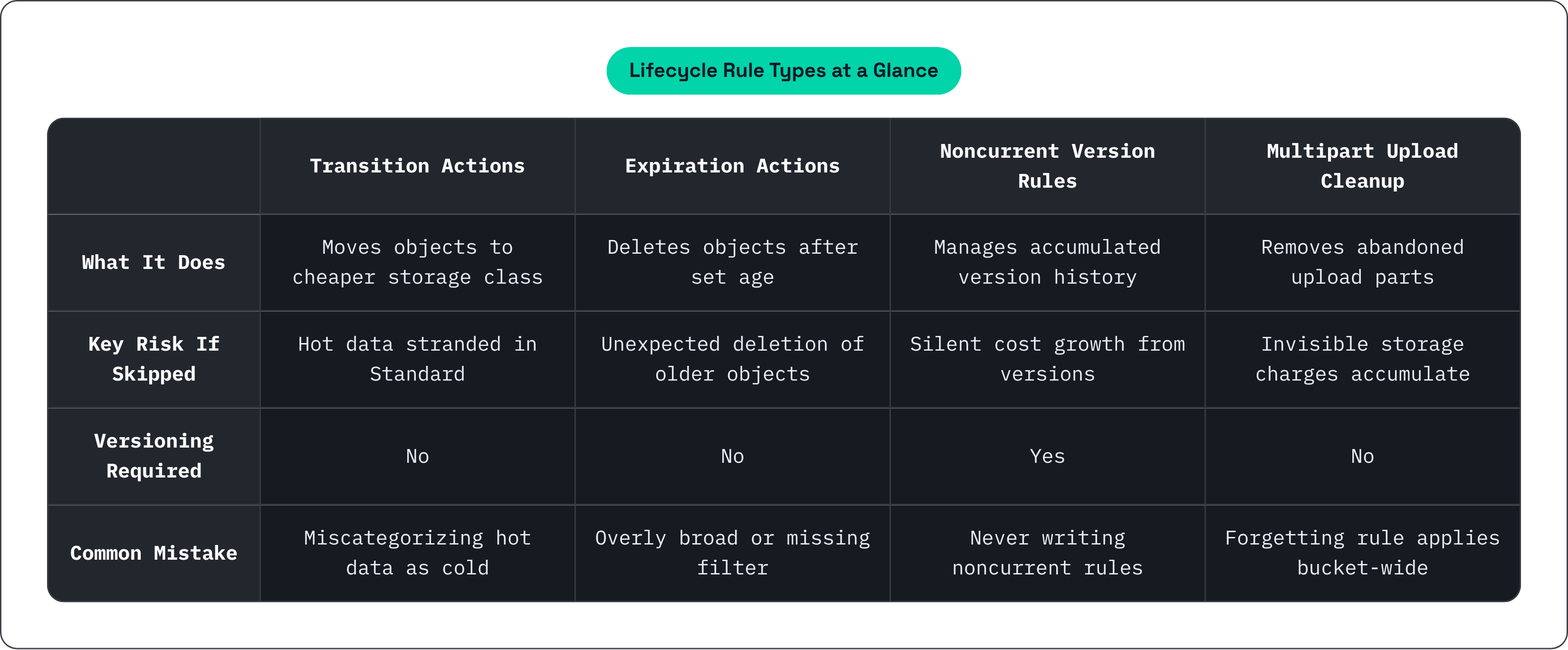
A lifecycle policy is a set of automated rules evaluated against objects in a bucket. Rules fall into two camps. Transition actions move objects between storage classes at defined age intervals. Expiration actions delete objects after a specified period. That's it. Two types, kept distinct in your mental model.
What lifecycle is not worth spelling out. It is not a replication strategy. It is not a backup system. It is not a cost dashboard. It implements part of a storage strategy, but it cannot substitute for one.
One thing that catches teams off guard on first deployment: rules apply to both existing objects and new ones. If you write a rule with a 30-day expiration and enable it on a bucket where objects have been sitting for months, those older objects get queued for removal almost immediately. That's not a bug. It's working as designed. It's just a really bad day if you failed to expect it.
The appeal at enterprise scale is system-wide rule enforcement. When you're managing billions of objects, you're not doing file-by-file management. You write the rules once and let them run.
The Storage Class Ladder and What Drives Transitions Between Tiers
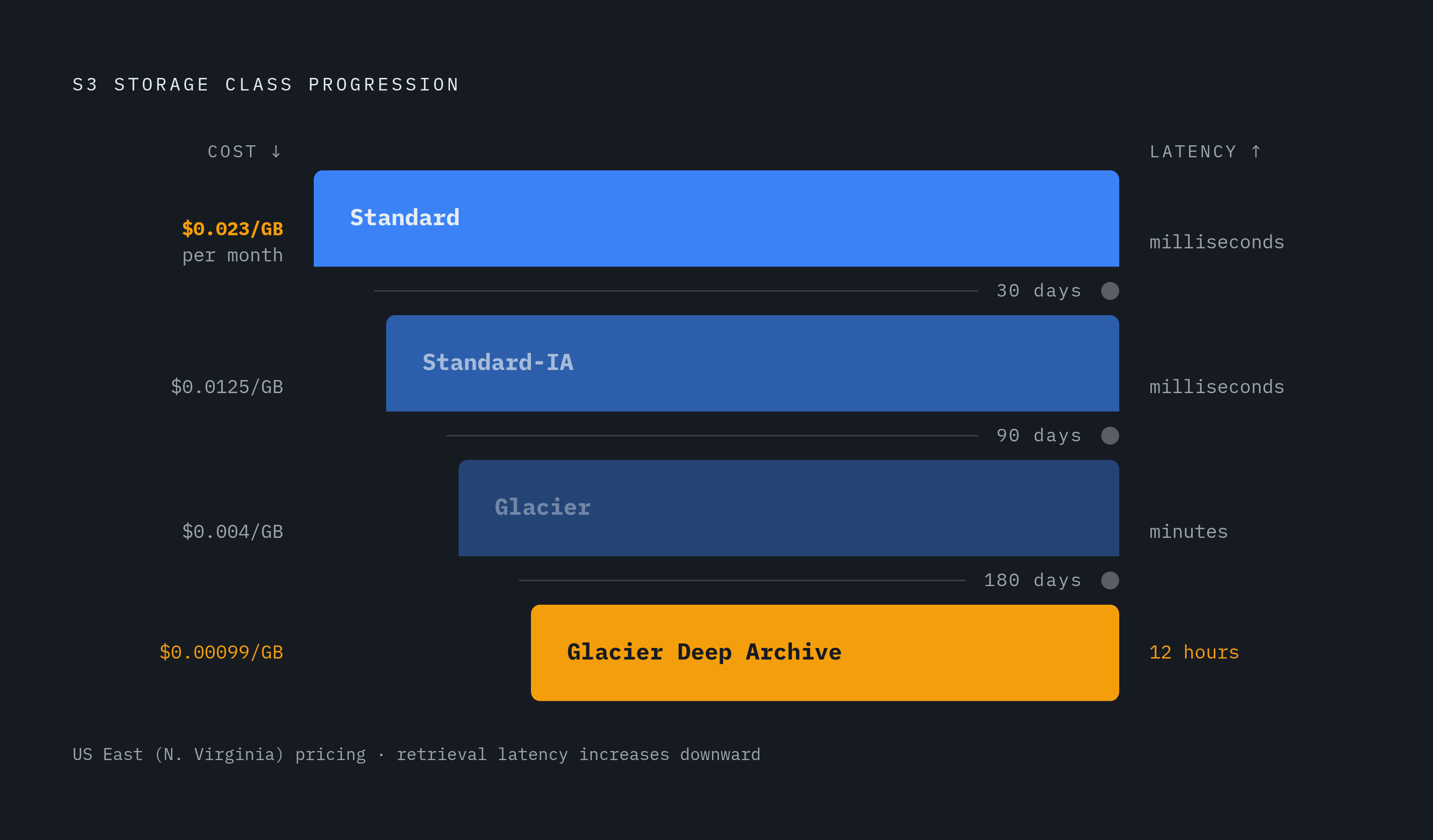
The canonical progression is Standard → Standard-IA → Glacier → Glacier Deep Archive. Each step trades access latency for lower storage cost. The further down you go, the cheaper the storage and the longer it takes to get your data back.
A reasonable default transition schedule for general-purpose workloads looks like this:
- 30 days: Standard-IA
- 90 days: Glacier
- 180 days: Glacier Deep Archive
S3 Intelligent-Tiering sits in a different category. Lifecycle can move objects into it, but once they're there, AWS manages tier placement automatically based on access patterns. It's useful when you genuinely don't know how frequently something will be accessed.
The cost math is real. S3 Standard in US East (N. Virginia) runs around $0.023 per GB per month. At terabyte scale, that becomes a meaningful line item. And in any mature bucket, most of the data sitting in Standard no longer needs millisecond access times.
Organizations that actively manage storage classes with clear rules often see significant cost reduction. That range varies a lot depending on workload and how much cold data has accumulated in Standard. The potential is real, but the exact number depends entirely on your situation.
Here's the thing people skip over: transition costs exist. Moving objects between classes incurs per-request charges. Standard-IA and Glacier tiers also have minimum storage duration requirements. Standard-IA has a 30-day minimum, which means if you transition an object and then access or delete it before that window closes, you've paid more than if you'd left it in Standard.
The ladder only saves money if your access pattern assumptions are accurate. Miscategorize hot data as cold, and the retrieval costs will find you.
How Filters, Prefixes, Tags, and Size Constraints Determine Which Objects a Rule Touches
The filter block is the targeting mechanism. Without an explicit filter, a rule applies to the entire bucket. That's a fine choice when it's intentional. It's a catastrophic choice when it isn't.
Three filter dimensions are available:
- Prefix: targets objects by key prefix, like
logs/orraw-data/2023/ - Object tag: targets by key-value tag pair, useful for categories that don't map neatly to a path structure
- Object size:
objectsizegreaterthanandobjectsizelessthanfilter by byte count. These are only available in the current lifecycle configuration format, not the legacy one.
Filters can be combined with AND logic. A rule can require both a prefix match and a tag match before it fires.
The silent miss risk is real. A rule scoped to logs/ will never touch objects stored under Logs/ or logs without the trailing slash. Prefix matching is exact and case-sensitive. This is one of those things you discover the hard way, usually when you're wondering why your cost isn't dropping.
The opposite problem is equally dangerous. Overly broad filters (or no filter) on expiration rules that delete more than intended. Especially risky when a bucket holds mixed object types.
Treat each rule's filter as a contract. Document what it's supposed to cover, then verify it against actual key patterns in the bucket before enabling the rule.
Versioning-Aware Rules: Noncurrent Version Transitions and Expirations
When versioning is enabled, every overwrite or delete creates a noncurrent version. Those versions accumulate indefinitely unless lifecycle rules address them explicitly. Most people set up versioning, never write a noncurrent version rule, and then wonder why their storage costs keep climbing.
Two distinct blocks are needed for versioned buckets:
noncurrentversiontransition: moves older versions to cheaper storage after N days of being noncurrentnoncurrentversionexpiration: deletes noncurrent versions after a specified number of days
There's also newernoncurrentversions, which lets you retain only the N most recent noncurrent versions regardless of age. That one is only available in the current configuration format.
Delete markers are worth understanding. When all versions of an object are expired, S3 leaves a delete marker behind. If you don't write a separate rule to clean those up, they accumulate and inflate your object counts in listings. It's not a storage cost problem exactly, but it creates noise and can cause confusion during incident reviews.
Here's the operational trap: a bucket with versioning enabled but no noncurrent version rules can appear cost-stable while quietly accumulating months of version history. It often goes unnoticed until a cost spike triggers an investigation.
For any versioned bucket, write at least one noncurrentversionexpiration rule alongside your current-version rules. The two halves are not interchangeable.
Multipart Upload Cleanup: The Lifecycle Rule Most Teams Forget to Write
When a multipart upload is abandoned or fails, the uploaded parts stay in the bucket and keep accruing storage charges. They don't show up as complete objects. They're easy to overlook. And they add up.
The fix is one block:
abort_incomplete_multipart_upload {
  days_after_initiation = 7
}
Seven days is a reasonable default. If a multipart upload hasn't completed within a week, something went wrong. Clean it up.
This rule belongs on every bucket, not just buckets where you're explicitly doing multipart uploads. Many AWS SDK operations use multipart upload automatically above a certain object size threshold. You are generating these without realizing it.
In multi-region setups with replication, incomplete uploads can accumulate on both source and destination buckets independently. The rule needs to be applied to both.
Before adding the rule to an existing bucket, run ListMultipartUploads to see what's already there. On active buckets, the first cleanup can reclaim meaningful storage. Know what you're about to remove.
Structuring Lifecycle Configuration in Terraform Across Multiple Environments
AWS allows only one lifecycle configuration resource per bucket. Multiple rules for the same bucket must live inside a single awss3bucketlifecycleconfiguration resource. Not separate resources. If you try to split them, the second one will overwrite the first.
The legacy format vs. the current format matters here. New implementations should use lifecycleconfigurationrules. The legacy format lacks support for objectsizegreaterthan, newernoncurrent_versions, and other filtering capabilities added to the current API. There's no good reason to use the legacy format in new infrastructure.
Environment-differentiated retention is a real pattern worth building explicitly. Dev buckets can use aggressive 90-day deletion. Production buckets require seven-year compliance retention. These should be separate Terraform modules or variable-driven configurations, not the same rule applied everywhere with a comment that says "adjust as needed."
Storing lifecycle configuration in version control gives you an audit trail. Who changed what policy and when. That matters during compliance reviews. It matters more during incident postmortems when you're trying to figure out why objects disappeared.
A few integration points worth knowing:
- Lambda: lifecycle expiration events can trigger Lambda functions. Transitions do not generate event notifications and cannot directly trigger Lambda. Expirations can. Useful for alerting, downstream cleanup, or logging policy activity to a separate audit system.
- Object Lock: S3 Object Lock (WORM mode) and lifecycle policies can coexist. Lock prevents deletion, but lifecycle can still transition objects to cheaper storage classes. Teams building compliance-retention workflows need to configure both explicitly rather than assuming one handles the other.
A well-parameterized Terraform module lets teams apply consistent baseline rules across dozens of buckets with environment-specific overrides. The goal is making sure no new bucket gets deployed without a lifecycle configuration at all. That's the real win at scale.
How AI Training Data Maps to the Storage Tier Model and Where Lifecycle Rules Fit
AI training data has a natural access lifecycle that maps cleanly to S3 tiers:
- Active training datasets: S3 Standard. Maximum throughput, no retrieval latency.
- Completed experiment checkpoints and older model versions: Standard-IA or Intelligent-Tiering.
- Archived training runs and legacy datasets: Glacier or Glacier Deep Archive.
The transition schedule matters more here than in general workloads. A checkpoint that's actively referenced during a training run must not be in Glacier. Retrieval latency would stall the pipeline. Rules scoped to checkpoint prefixes need careful minimum-age settings, because the cost of getting this wrong isn't just money. It's a broken pipeline at 2am.
There's a small-file problem that lifecycle policies don't solve but are still relevant to. AI training datasets often consist of millions of small files: Parquet shards, tokenized text chunks, image crops. S3's per-object API call overhead becomes a bottleneck at that scale. Lifecycle policies won't fix that architecture problem, but they control where those files live and can remove them automatically when training runs complete.
Per MinIO's reporting from May 2026, more than 50% of organizations report data and storage bottlenecks that limit AI performance. Lifecycle policy gaps, specifically cold data sitting in Standard and accumulating noncurrent versions, contribute to cost pressure that competes directly with compute budgets. Storage waste is not a separate problem from AI infrastructure cost. They're the same budget.
The research project pattern is worth encoding in your rules. Move active data to IA when work slows. Archive when the project ends. Lifecycle rules can make this happen automatically instead of requiring a team member to remember to act.
Tools like MLflow and similar artifact tracking systems store datasets, intermediate files, logs, and model binaries through pluggable artifact stores, including S3-compatible APIs. Lifecycle rules on the artifact bucket should distinguish between active experiment artifacts (retain in Standard) and completed run artifacts (eligible for transition). Tags or prefixes written by the ML framework are the mechanism for making that distinction.
Testing a Lifecycle Configuration Before It Runs on Production Data
Lifecycle rules are not immediately active. AWS evaluates rules once daily, and transitions or expirations will not execute until the next evaluation cycle after a rule is added. That's important context for testing. You won't see results in five minutes.
A reasonable testing approach:
- Apply the rule to a non-production bucket or a prefix-scoped subset of objects first.
- Use
ListObjectVersionsandListMultipartUploadsto establish a baseline before the rule runs. - After the evaluation window, verify that expected objects transitioned or were deleted and that no unintended objects were affected.
S3 Inventory and S3 Storage Lens are both useful here. They can surface object counts, storage class distribution, and noncurrent version accumulation over time. Not just immediately after deployment, but on an ongoing basis to confirm that rules are actually reaching the objects you expect.
Filter validation is worth doing before you enable anything. Run a ListObjectsV2 with the same prefix or tag filter you plan to use and inspect the result set. This confirms the filter matches your intent and surfaces case-sensitivity or trailing-slash mismatches before they become silent misses.
Expiration rules deserve extra caution. A misconfigured transition can be corrected by moving objects back. A misconfigured expiration that deletes production data cannot. Treating expiration rule changes as requiring a second reviewer is a reasonable operational policy. Not bureaucracy — the kind of thing you implement after you've deleted something you should have kept.
Ongoing monitoring closes the loop. Review S3 cost allocation by storage class monthly. A stable or growing Standard cost in a bucket with an active lifecycle configuration is a signal that the rules are not reaching the objects you expect. Either the filter is wrong, the age threshold hasn't been crossed yet, or something else is off. Either way, it's worth investigating before you assume everything is working.