S3 Object Lock and WORM Compliance
Object Lock in governance mode leaves a compliance gap that audit will catch.

If you work in a regulated industry and store records in S3, you have probably heard someone say "we have Object Lock enabled" as if that settles the compliance conversation. It does not. Object Lock is a specific, narrow API-level enforcement mechanism — like a deadbolt on a door that has no walls around it. It prevents object versions from being deleted or overwritten for a defined period, or until a legal hold is removed. That is it. Unauthorized reads, intrusion detection, and data that existed before you turned it on are all outside its scope. Getting the compliance posture right means understanding exactly how the mechanics work, because a misconfigured Object Lock setup and a correctly configured one look nearly identical in the AWS console. The difference shows up under audit.
A few foundational constraints are worth stating upfront before anything else. Object Lock operates on a WORM model: write-once, read-many. Enabling it automatically enables versioning on the bucket, and neither can be reversed afterward. This is a one-way door. Locking also applies to specific object versions, not the bucket as a whole. Most importantly, you cannot lock an object retroactively. The lock must be applied at upload time. Existing objects that predate your Object Lock configuration are not protected. They must be re-uploaded to gain immutability. Object Lock is not a retroactive safety net.
How Retention Periods and Legal Holds Work, and How They Interact
There are two distinct mechanisms, and an object version can carry one, the other, or both at the same time.
Retention periods are time-bound. You set a retention-until date, and during that window the object version cannot be deleted or modified by anyone. When the period expires, the lock lifts. The object becomes eligible for deletion or modification under normal permissions. Expiration does not trigger automatic deletion. It just removes the lock.
One asymmetry matters here: retention periods can be extended but never shortened. Once you set a retention-until date, you can push it further out. You cannot pull it back. That is intentional, and it matters for compliance posture.
Legal holds are indefinite. There is no expiration date. Protection remains until the hold is explicitly removed, and the retention timestamp is completely ignored while a hold is active. Legal holds are typically used for investigations, audits, and litigation situations where you do not know the preservation window in advance.
The interaction edge case that catches teams off guard: if both a retention period and a legal hold are set on the same object version, both conditions must be cleared before the object can be modified or deleted. They do not override each other.
Here is what that means in practice. Say you have an object with a retention period expiring next Tuesday, and someone places a legal hold on it today. Tuesday comes and goes. The retention lock expires, but the object is still protected because the legal hold is still active. Teams that assume expiration ends all restrictions get a surprise. A legal hold in play means protection continues beyond expiration.
Governance Mode vs. Compliance Mode: The Choice That Determines How Absolute the Protection Is
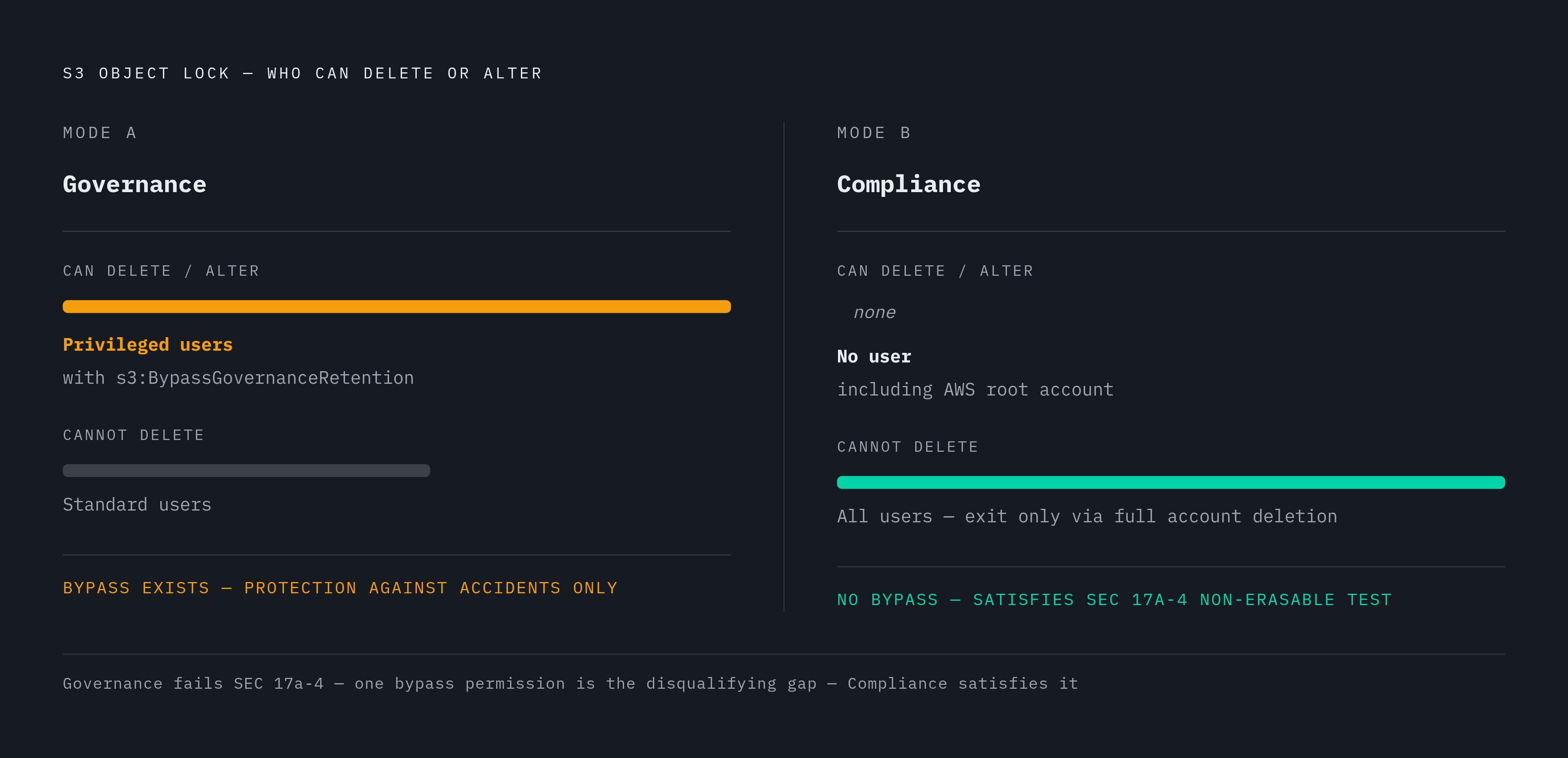
Both modes prevent ordinary users from deleting or overwriting locked objects. The difference is what privileged users can still do.
Governance mode is flexible. Users who have been granted the s3:BypassGovernanceRetention permission can alter retention settings or delete the object. This is intentional. Governance mode is designed for testing retention-period settings before you commit to something permanent, and for situations where administrative override is a legitimate business need.
Compliance mode is absolute. No user can overwrite, delete, or shorten the retention period once it is set. That includes the AWS root account. The only path to early deletion under compliance mode is deleting the associated AWS account entirely. The retention mode itself cannot be changed after it is set.
The framing that matters: governance mode protects against accidents. Compliance mode protects against everyone, including administrators acting in bad faith.
The common mistake is treating these two modes as equivalent for regulatory purposes. They are not. If a regulation requires that records be non-erasable, governance mode does not satisfy that requirement. The bypass permission exists, which means the record is technically erasable by a sufficiently privileged user. That is the whole test.
The Regulatory Frameworks That Mandate WORM Storage, and the 2023 Rule Change That Introduced an Alternative
S3 Object Lock has been assessed by Cohasset Associates for use in environments subject to SEC Rule 17a-4, CFTC, and FINRA regulations. That assessment matters because these frameworks have specific, technical language about what "non-erasable" means.
SEC Rule 17a-4 was adopted in 1997 and originally required broker-dealers to preserve books and records exclusively in non-rewriteable, non-erasable format. WORM was the only compliant path for decades.
In May 2023, the SEC amended that rule for the first time. Broker-dealers now have two options:
- WORM storage: Records remain locked in unalterable format for the full retention period. S3 Object Lock in compliance mode satisfies this path.
- Audit-trail alternative: Records are editable as long as every change is tracked and original content can be reconstructed.
The amendment does not make WORM obsolete. It makes the choice explicit. And that choice now carries its own compliance burden to document and defend. Picking the audit-trail path is a different kind of work, with its own demands.
On retention periods: different record categories under 17a-4 require between three and six years. Some records, including ledgers of securities transactions, must be kept for the life of the firm. Setting a blanket three-year default and calling it done does not cover all categories.
Other frameworks that reference WORM or immutable storage include HIPAA, FERPA, CJIS, and FINRA. The retention windows and scope differ, but the underlying requirement for tamper-evident records is consistent across all of them.
The enforcement context is not hypothetical. The SEC imposed over $600 million in penalties across more than 70 financial institutions in fiscal year 2024 alone for recordkeeping violations. The stakes are concrete and documented.
Where Governance Mode Creates a Gap in Strictly Regulated Environments
The critical gap is straightforward. Governance mode's bypass permission means a sufficiently privileged administrator can alter or delete a protected object. That breaks the "non-erasable" requirement in frameworks like SEC 17a-4, which requires that records cannot be altered or deleted by anyone, including the record-keeper.
Compliance mode is the only S3 Object Lock configuration that satisfies that requirement literally.
Governance mode has a legitimate role. It is useful for testing, for internal policy retention where regulatory non-erasability is not required, and for backup retention where administrative recovery is a genuine operational need. Using it for those purposes is fine. Using it for financial recordkeeping under 17a-4 is not.
The audit question teams should ask themselves: does s3:BypassGovernanceRetention appear anywhere in IAM policies or Service Control Policies on buckets you believe are "locked" for compliance purposes? It may have been granted for a legitimate reason at some point and then forgotten. The permission does not announce itself.
A compliance posture built on governance mode looks correct in internal documentation while failing the non-erasable test under external audit. That is a bad place to be.
Ransomware Protection and What Object Lock Actually Prevents
Ransomware attacks work in stages. The damaging second stage is encryption, where the attacker overwrites your data with encrypted versions. Object Lock neutralizes that stage by preventing overwrite of existing object versions. Even if a threat actor gains access to the bucket, locked object versions cannot be encrypted or replaced before the retention period expires — Object Lock is the immune system that stops the infection from rewriting your history, even after the pathogen is already inside.
What Object Lock does not do: it does not prevent access, and it cannot detect intrusion or stop an attacker from reading the data. It only prevents destruction or alteration. That is a meaningful protection, but it is narrow.
Object Lock also replaces some traditional approaches. Logical immutability at the API layer makes physical air-gap methods like LTO tape redundant for the non-erasability goal, though not for offline or offsite goals.
Because Object Lock is one layer, these additional controls address the access and audit dimensions it does not cover:
- Deny
s3:BypassGovernanceRetentionin Service Control Policies across your AWS Organization - Enable MFA Delete on the bucket
- Use bucket policies to deny
s3:DeleteObjectands3:DeleteObjectVersion - Enable CloudTrail data events for a full audit trail of all access and attempted deletions
Object Lock stops the overwrite. These controls handle everything around it.
Bucket-Level Defaults vs. Per-Object Locks, and How Default Retention Settings Behave
Bucket-level default retention is a convenience feature. When configured, every new object uploaded to the bucket automatically receives a retention period matching the default settings, without requiring per-object configuration at upload time. That is genuinely useful for teams managing high volumes of uploads.
Per-object settings override bucket defaults. A retention period or legal hold specified at the object level takes precedence. This is where teams can get into trouble. If a specific upload includes per-object lock parameters that are weaker than the bucket default, or omits them in a way that clears the default, that object is less protected than the team assumes.
A few rules to internalize:
- Objects uploaded before Object Lock was enabled on the bucket are not retroactively protected. They must be re-uploaded.
- Bucket-level Object Lock enablement is irreversible. Once on, it cannot be disabled and versioning cannot be suspended.
- Default retention at the bucket level is configured separately after bucket creation, via
PutObjectLockConfiguration.
In multi-team environments, bucket defaults provide a safety net. But they do not substitute for upload-time discipline when compliance mode is required on specific record categories. The default catches what falls through the cracks. It is not designed to replace intentional configuration.
Object Lock for AI Training Datasets and Model Artifacts
This section is newer territory, but the underlying logic is the same.
When AI agents write to storage autonomously, logging decisions, updating datasets, modifying knowledge bases, the risk profile of mutable storage changes. A compromised or malfunctioning agent can corrupt data at scale, fast. Object Lock at the storage layer ensures that data written by agents cannot be retroactively altered, whether by agent malfunction, prompt injection, or unauthorized access exploiting agent permissions.
For training datasets specifically, locking ensures reproducibility. The model was trained on exactly this data, and that fact can be audited. That matters more than most teams initially realize.
For ML artifacts including checkpoints, model weights, and training logs, locking at write time supports supply-chain traceability and audit requirements in regulated industries. Reproducibility obligations often extend well beyond the operational life of the model. Regulatory retention, research provenance, and litigation hold requirements mean locked artifacts need to survive longer than anyone initially plans for.
The framing: in agentic AI environments, immutability is not just a compliance feature. It is a safety control that limits the blast radius of a bad agent write. Those are two different motivations that lead to the same configuration decision.
Configuration Steps for Enabling Object Lock and Setting Retention on a Bucket
Object Lock must be enabled at bucket creation time. It cannot be added to an existing bucket after the fact. Start there.
The step sequence for a new bucket:
- Enable Object Lock during bucket creation in the AWS Console, CLI, or API. This simultaneously enables versioning.
- Optionally configure a default retention period at the bucket level, specifying both the mode (governance or compliance) and the duration.
- At upload time, specify retention mode and retention-until date per object if you are overriding the default. Apply a legal hold if needed.
A few practical notes on configuration:
- AWS accepts duration in both days and years. Use years for long-term regulatory requirements. Manual recalculation from days to years introduces errors, especially when you are dealing with six-year or life-of-firm requirements.
- The relevant CLI flags at upload are
--object-lock-mode,--object-lock-retain-until-date, and--object-lock-legal-hold-status. - For compliance mode specifically: verify the retention-until date before upload. It cannot be shortened after the fact.
- For existing objects that need protection: a COPY operation to the same bucket with lock parameters applied at copy time is the typical pattern. A new PUT also works. Either way, the object must be written again with the lock applied at write time.
Default retention at the bucket level is configured separately after bucket creation via PutObjectLockConfiguration. Enabling Object Lock at creation and configuring the default retention policy are two distinct steps.
Mistakes That Create a False Sense of WORM Compliance
These are the mistakes that look correct on the surface and fail under audit. Each one is worth naming explicitly.
Using governance mode for regulatory mandates that require non-erasability. The bypass permission means the record is not legally non-erasable, even if it looks locked in the console. A regulator testing this will test for the permission, not just for the lock.
Assuming the bucket is protected because Object Lock is "enabled." Enablement without a default retention policy means objects uploaded without explicit lock parameters are unprotected. Turning on Object Lock does not lock anything by itself.
Forgetting that pre-existing objects are not covered. Teams that enable Object Lock on a new bucket but migrate existing objects without re-uploading them leave historical data completely unprotected. The lock was not there at write time.
Setting retention periods that are too short for the applicable regulation. SEC Rule 17a-4 requires up to six years for some record categories and life-of-firm for others. A three-year default misses that.
Not auditing IAM for s3:BypassGovernanceRetention. The permission may have been granted for a legitimate operational reason and then forgotten. It silently invalidates the governance-mode protection and does not announce itself.
Treating legal hold removal as routine. Legal holds should have a documented workflow for removal. Ad-hoc removal without an audit trail undermines the hold's evidentiary value. If you have to explain to a regulator why a hold was removed, "someone removed it" is not an answer.
No CloudTrail coverage. Object Lock prevents deletion but does not itself log access or attempted deletions. Without CloudTrail data events enabled, there is no audit trail to present to a regulator. You have immutability but no visibility.
The underlying pattern across all of these: each mistake looks correct at the surface. Object Lock is on, the bucket is versioned, the objects appear locked. The failure lives in a specific technical condition that a regulator or auditor will test for directly. Surface appearance is not the test. Behavior under scrutiny is.