S3 Bucket Naming and Region Selection
Bucket names and regions are permanent decisions that ripple through your entire architecture.
Sponsored by Archil

Getting an S3 bucket name or region wrong is not a configuration issue you can patch with a hotfix. It is a structural decision baked into your architecture from day one, and you are living with it until you do a full migration. I have seen teams spend weeks untangling a naming choice made in fifteen minutes because someone spun up a bucket in a Friday afternoon proof-of-concept and it ended up in production. This piece is about making sure that does not happen to you.
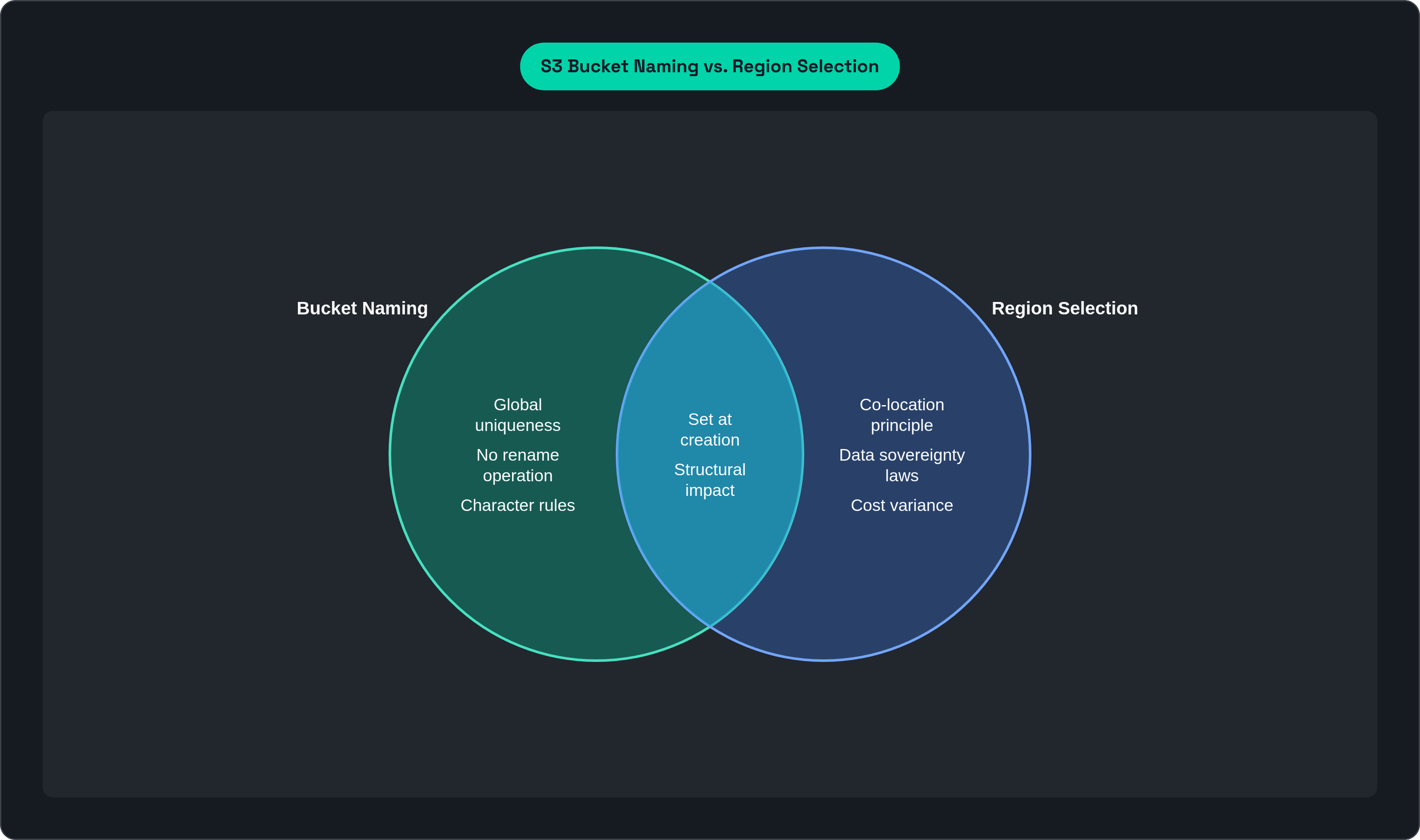
S3 bucket names must be globally unique across all AWS accounts, between 3 and 63 characters long, and composed only of lowercase letters, numbers, and hyphens. A name cannot begin or end with a hyphen, cannot be formatted as an IP address, and cannot contain uppercase letters or underscores. Once a bucket is created, the name is permanent: S3 has no rename operation. The region is equally fixed at creation time, and data does not move after creation unless you explicitly replicate it to another bucket in a different region, which requires creating a new bucket and updating every reference in your code, IAM policies, CloudFront distributions, DNS records, and CI/CD pipelines.
Why Can't You Rename an S3 Bucket or Move It to a Different Region?
Here is the thing most teams do not fully appreciate until it is too late: both decisions. bucket name and region. happen at creation time, before anyone has really thought through access patterns, compliance requirements, or what the bill is going to look like six months from now.
The bucket name is permanent. There is no rename operation in S3. The region is equally fixed. Your data does not move after creation unless you explicitly replicate it.
And the consequences compound fast. A bad name or wrong region cannot be patched. To fix it, you create a new bucket, migrate all your data, and then update every single reference in your code, your IAM policies, your CloudFront distributions, your DNS records, your CI/CD pipelines. All of it. For what originally felt like a minor oversight.
Before going further, a quick scope note: this piece covers general purpose buckets across standard AWS partitions (aws, aws-cn, aws-us-gov, and aws-eusc). Where S3 Express One Zone and directory buckets play by different rules, that is called out explicitly.
The Hard Rules: What AWS Actually Enforces on Bucket Names
AWS enforces these. They are not suggestions.
The global namespace. Every bucket name must be unique across all AWS accounts in all regions within a partition. Not just your account. All of them. Pick a name like "data" or "uploads" and you will find it is already taken, probably by someone in 2014.
The character rules.
Lowercase letters, numbers, hyphens, and dots only
3 to 63 characters
Must start and end with a letter or number
Cannot be formatted as an IP address (so 192.168.1.1 is out)
Reserved suffixes. This is where teams get quietly burned. AWS reserves certain suffixes for internal features. Use one of these and your bucket creation will fail, or you will create future conflicts you cannot resolve:
-s3alias— reserved for access point alias names--ol-s3— reserved for Object Lambda Access Point alias names.mrap— reserved for Multi-Region Access Point names--x-s3— reserved for directory buckets (S3 Express One Zone)--table-s3— reserved for S3 Tables buckets
Dots: technically allowed, practically a trap. Here is the deal with dots. HTTPS with virtual-hosted-style addressing looks like bucket.s3.amazonaws.com. AWS's wildcard certificate is *.s3.amazonaws.com. That wildcard does not cover multi-label names, which is exactly what you get when your bucket name contains a dot. So HTTPS breaks. Certificate validation fails. And Transfer Acceleration explicitly forbids dots in bucket names entirely, which means a bucket with a dot can never use Transfer Acceleration. Full stop.
The practical takeaway: avoid dots completely. Use hyphens instead. You will thank yourself later.
The Name You Choose Becomes Permanent: Operational Consequences of Immutability
Let me spell out exactly what "no rename operation" means in practice.
If you need to change a bucket name, you are doing all of this:
Create a new bucket
Migrate every object
Update every reference in application code, IAM policies, CloudFront distributions, DNS records, and pipeline configs
Redeploy anything that had the old name hardcoded
That last one is the worst. Hardcoded bucket names in application code turn a naming change into a full code deployment. The fix is simple: use environment variables or configuration files so the bucket name can change without touching source code. Do it from the start.
Name deletion does not immediately free the name. You have to wait at least 48 to 72 hours before the name becomes available again, and even then it is not guaranteed. You cannot just delete and recreate with a cleaner name on a tight deadline.
Guessable names are a cost vector. AWS charges for all API requests, including 403 responses. A publicly guessable bucket name generates unauthorized access attempts that produce real charges without any data being read. Nobody wants a line item for failed requests from bots.
Bucket names appear in DNS. They are globally resolvable. Putting sensitive information in a bucket name (environment details, customer names, internal project codes) creates an information disclosure risk before a single object is accessed. Keep names functional, not descriptive of things you would rather keep private.
One newer option worth knowing. AWS introduced optional account-regional namespaces (rolling out through 2025 and 2026). You can create buckets in your account's regional namespace using a name structure that combines a prefix with your 12-digit account ID and region code. These names cannot be re-created by another account after deletion, which mitigates the risk of a deleted name being squatted by a third party.
Naming Conventions That Scale: Structure Before You Need It
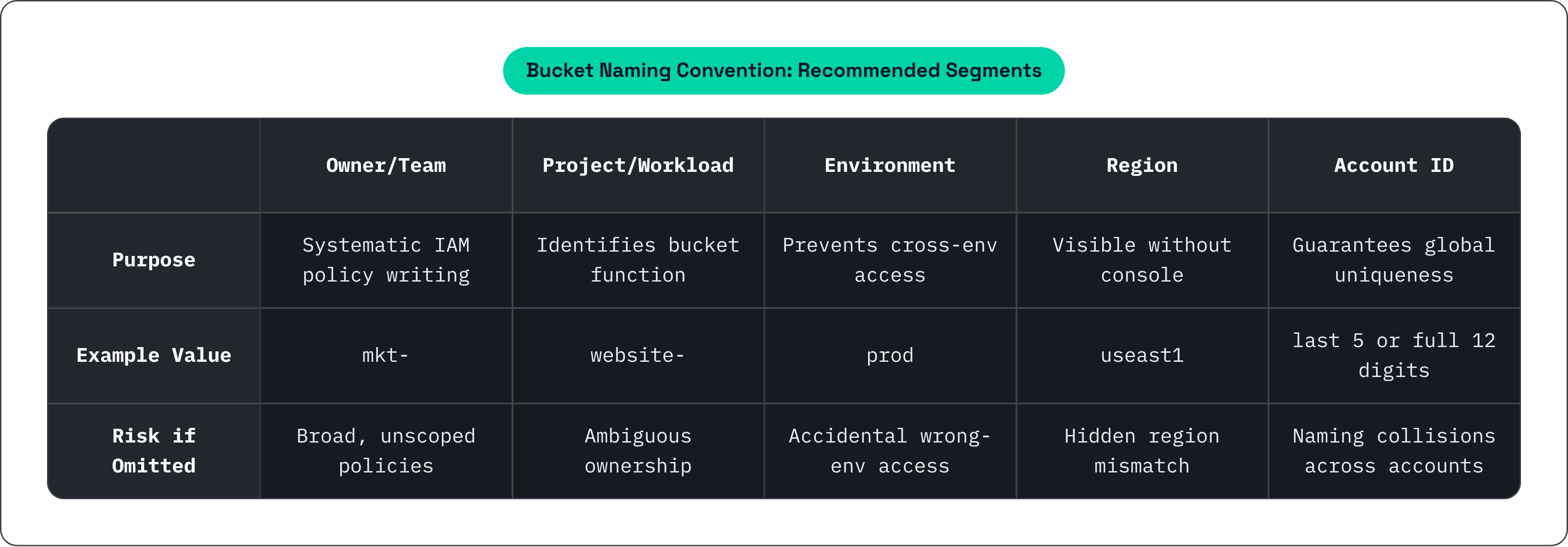
A naming convention is most valuable before you have many buckets. Retrofitting one later costs exactly as much as a rename migration. Build the structure before you need it.
The core hierarchy to encode in the name:
Owner or team prefix (e.g.,
mkt-,eng-,fin-): makes IAM policy writing systematic and makes bucket discovery searchableProject or workload identifier (e.g.,
mkt-website-,eng-ml-training-): tells you what the bucket is for without opening the consoleEnvironment (
prod,staging,dev): prevents accidental cross-environment access, which is a very bad dayRegion (e.g.,
useast1): makes the region visible without clicking aroundAccount ID (last 5 digits or full 12): guarantees global uniqueness even when naming conventions collide across accounts
AWS's prescriptive guidance example format looks like this: examplecompany-raw-useast1-12345-dev. That format is not glamorous, but it is readable, systematic, and unambiguous.
For data lake environments, use separate buckets per data layer. Archiving, versioning, access controls, and encryption requirements differ across layers, so mixing them creates policy nightmares.
Raw layer: ingested data in its original format (JSON, CSV), organized by source and ingest date
Stage/processed layer: transformed data in consumption-ready format (Parquet, ORC) after Glue or EMR jobs
Name the layer explicitly in the bucket name (-raw-, -stage-, -curated-). It prevents lifecycle rules and IAM policies from being applied to the wrong layer, which is the kind of mistake that quietly deletes data or keeps it forever when it should have been archived.
Version or date stamps (-v1, -v2, 2024-01) work well for projects that need parallel environments or blue/green deployments at the bucket level.
One rule above all: avoid abbreviations that are not universally understood within your organization. A naming convention only works if it is readable without a lookup table. Document it in a shared standard before the first bucket is created, and enforce it through IaC (Terraform, CDK) bucket name validation at apply time. If it is not automated, it will drift.
Object Key Prefixes: Where Naming Meets Throughput
This is where bucket design gets into performance territory, and it is where a lot of teams hit a wall without understanding why.
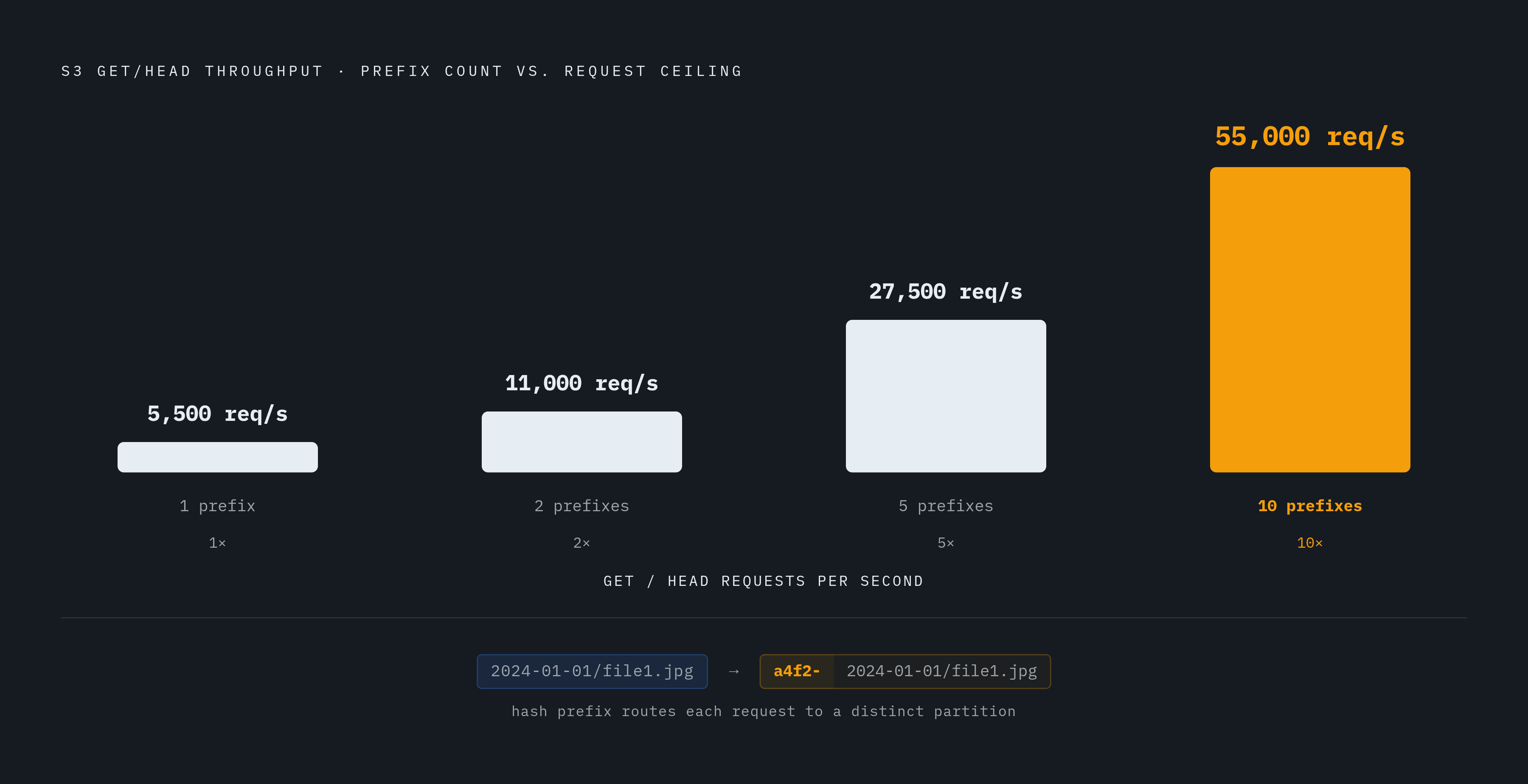
S3 partitions request capacity by key prefix. All requests to keys that share a prefix route to the same internal partition. The per-prefix throughput limits are:
3,500 PUT/COPY/POST/DELETE requests per second
5,500 GET/HEAD requests per second
There is no limit on the number of prefixes in a bucket. So if you parallelize across 10 prefixes, you scale read throughput to 55,000 GET/HEAD requests per second. The math is straightforward.
The hot-spot problem. Sequential or timestamp-leading key names (like 2024-01-01/file1.jpg) concentrate requests on a single partition. Above roughly 100 requests per second on a single prefix, this becomes a real bottleneck.
The fix. Prepend a hex or alphanumeric hash to the key name. So 2024-01-01/file1.jpg becomes a4f2-2024-01-01/file1.jpg. Requests distribute across partitions, and throughput shifts from hundreds to thousands of requests per second per prefix. It is a small naming decision with a large performance impact.
For AI and ML training workloads that read large numbers of small files (checkpoints, shards, tokenized datasets), prefix design directly determines whether S3 is a throughput bottleneck or not. This is not an edge case. It comes up constantly in high-velocity training pipelines.
S3 Express One Zone directory buckets eliminate this problem entirely. The system automatically distributes objects for even load distribution. No prefix randomization required. That is a meaningful operational simplification for high-throughput pipelines, and it is one of the clearest arguments for Express One Zone in the right context.
Region Selection: Latency, Cost, and the Co-location Principle
A bucket's region is set at creation and cannot be changed. Objects stay in that region unless you explicitly replicate them. This is worth repeating because it is easy to forget when you are just trying to get something running.
The co-location principle is simple. Put your S3 bucket in the same region as the EC2, EKS, or ECS compute that accesses it. Same-region traffic avoids data transfer charges and reduces round-trip latency. Violating this principle is one of the most common sources of surprise bills.
Latency differences are real and significant. Some benchmark numbers:
Ohio (us-east-2) and N. Virginia (us-east-1) have the lowest inter-region latency pair at roughly 23ms. Ohio is the best failover target for N. Virginia workloads.
Ohio has the best intraregion EC2-to-S3 transfer time across all tested regions, around 81ms for 1MB files.
Sydney averages around 434ms inter-region. São Paulo around 415ms. Singapore around 388ms.
For latency-sensitive workloads like inference or interactive queries, region choice alone produces a 5× latency difference. That is not a tuning problem. That is an architecture problem.
Cost variance is equally real. There can be up to a 52% price difference in a typical architecture between regions. One concrete example: 1TB of EC2 data transfer out to the internet costs roughly $90 in N. Virginia, $150 in São Paulo, and $154 in Cape Town. For AI training specifically, data transfer costs between S3 and GPU compute are paid per GB. Selecting the wrong region for a training bucket when GPUs are in a different region turns into a recurring charge on every training run.
For workloads that need global reach without replicating the bucket, two options:
S3 Transfer Acceleration: routes uploads through CloudFront edge locations over an optimized path to the bucket's home region. Ideal for clients uploading across continents to a centralized bucket. Cannot be used with buckets that have dots in their names (see the naming section).
S3 Multi-Region Access Points: a global endpoint spanning buckets in multiple regions, built on AWS Global Accelerator. Dynamically routes to the lowest-latency copy. Can improve upload and download performance by up to 60%. Costs $0.0033/GB for intra-AWS routing, plus internet acceleration fees if accessed over the public internet.
For S3 Express One Zone, region selection goes one level deeper: you are selecting an Availability Zone. Compute and storage must be co-located in the same AZ to realize single-digit millisecond latency. Getting the AZ wrong defeats the entire point.
Region Selection as a Legal Decision: Compliance and Data Sovereignty
Here is where naming and region selection stop being technical decisions and start being legal ones.
Where a bucket lives determines which data protection and privacy laws apply. Choosing a region for convenience without checking regulatory obligations constitutes non-compliance before any data is processed. This is not hypothetical. It happens.
GDPR. Personal data of data subjects protected under GDPR that is transferred outside the European Economic Area requires adequate safeguards. That means Standard Contractual Clauses (SCCs) or an adequacy decision. The bucket region determines whether the transfer occurs at all. Put EU personal data in us-east-1 without the right contracts in place, and you have a problem.
The CLOUD Act / GDPR tension is real and uncomfortable. The US CLOUD Act allows US authorities to compel American companies to produce data regardless of where the data physically resides. Data residency in an EU data center does not by itself resolve CLOUD Act exposure if the provider is a US-headquartered company. Provider origin, not just data location, is now a core selection criterion. Over 45% of IT leaders cite it as a primary factor when evaluating cloud storage. That number is only going up.
The EU Data Act (effective September 2025) mandates data portability and interoperability by design. Providers must demonstrate a real exit path, including metadata and versions, without lock-in. This affects how organizations evaluate any cloud storage commitment, including which regions and services they use.
AWS European Sovereign Cloud reached general availability in Brandenburg on January 15, 2026. It is designed for workloads with strict EU sovereignty requirements. That said, most EU SaaS workloads fit standard EU regions (eu-west-1, eu-central-1) combined with a solid DPA and SCCs. The Sovereign Cloud carries a pricing premium and a narrower service roadmap, so it is not the default answer. It is the answer when the regulatory requirement explicitly demands it.
Sector-specific rules in healthcare, finance, and government may further restrict which regions are permissible. A bucket in the wrong region can disqualify a product from regulated markets entirely. And backup and DR buckets are not exempt. The backup storage location you chose for operational convenience might violate data residency laws if it crosses a jurisdictional boundary.
Data residency should be the customer's choice, enforced by architecture. No cross-region movement should happen without explicit configuration.
S3 Express One Zone and Directory Buckets: When the Rules Change
S3 Express One Zone is not a feature you add to an existing bucket. It is a separate storage class with a separate bucket type called a directory bucket. The naming rules, the performance characteristics, and the design constraints are all different.
The performance profile is genuinely impressive. Up to 10× faster data access than S3 Standard, consistent single-digit millisecond latency, up to 2 million requests per second per bucket, and request costs up to 80% lower than S3 Standard. For the right workloads, this is a meaningful step change.
Directory bucket names are prescriptive. The format is [name]--[az-id]--x-s3. The --x-s3 suffix is the reserved suffix covered earlier, so you cannot accidentally apply it to a general purpose bucket. And the AZ ID is embedded directly in the bucket name, which means the Availability Zone is visible in the bucket identifier itself. That is intentional. It reinforces the co-location constraint so you do not forget where your storage actually lives.
AZ co-location is the core design constraint. AWS explicitly recommends creating the directory bucket in the same AZ as your compute. This is not a best practice suggestion. It is the only way to get the latency profile you are paying for. If your EC2 instance and your directory bucket are in different AZs, you are not getting single-digit milliseconds. You are getting standard S3 latency at Express One Zone prices.
The prefix randomization complexity that general purpose buckets require simply does not apply here. The system handles load distribution automatically. For high-throughput pipelines, AI training jobs, and latency-sensitive inference workloads, that simplification is one of the strongest arguments for directory buckets when the workload fits.
The bottom line on all of this: every decision in this piece, bucket name, region, prefix structure, storage class, happens once and compounds from there. Get the structure right before the first byte lands.
This article is sponsored by Archil.