Amazon EBS vs EFS: Where Does an S3-Compatible Option Fit In?
Each storage service excels in different scenarios: know which one fits your architecture.

Every software architecture decision sends ripples through product performance, developer experience, and long-term business costs. Among all those decisions, storage is especially consequential.
Choose block storage when object storage would do the job just as well, and you are probably overpaying. Rely on shared file systems where scale-out object storage would be the better fit, and you invite bottlenecks along with unnecessary engineering overhead.
The real challenge is balancing performance, scale, and cost without painting yourself into a corner. Tilt too far toward performance, and you burn through budget. Focus too narrowly on cutting costs, and your system may buckle under pressure. Scale without a plan, and storage management becomes a distraction instead of an enabler for product growth.
That is why knowing when to use EBS, EFS, or an S3-compatible option is not merely technical trivia; it is a core architectural strategy.
Amazon EBS Explained: Elastic Block Store for High-Performance Storage
What is cloud-based block storage?
Block storage is a foundational concept in cloud-hosted data persistence. It works by emulating a physical hard drive, exposing raw storage volumes directly to the operating system. A **block** is simply a fixed-size chunk of data: a sequence of bytes representing the smallest unit of storage the system can read or write.
This foundational data model underpins Amazon EBS, where AWS manages the underlying infrastructure and handles replication, durability, and performance optimization. Combined with your operating system, which manages the file system layer, this abstraction lets cloud block storage behave like a local disk drive, delivering fast, low-latency access.
How to use Amazon EBS?
Amazon EBS provides scalable, high-performance block storage that attaches directly to Amazon Elastic Compute Cloud(EC2) instances. Several volume types are available, each optimized for general-purpose workloads, high IOPS, or throughput-heavy operations.
Once an EBS volume is attached to a compute instance, it behaves just like a local disk; you can format it, mount it, and manage it directly through your operating system.
Cool, now, when would I use EBS?
EBS volumes are persistent, so your data stays intact when compute instances stop or reboot. They are ideal for workloads that need reliable storage attached to a single compute instance, meaning only one virtual machine can read from or write to the disk at any given time; there is no file sharing or network-based access across multiple machines.
Typically, Amazon EBS is used when:
Running a **relational or NoSQL database** on a single EC2 instance.
Hosting a monolithic application that stores files or state locally.
Running an application server that writes, logs, caches, or stores session data to disk.
Needing a boot volume (operating system disk) for an EC2 instance.
Performing batch processing or machine learning training where each job runs on one node.
EBS Strengths and Weaknesses
Amazon EBS Strengths:
The primary advantage of Amazon EBS is data persistence: your data remains intact even when an EC2 instance is stopped or restarted, which makes it well suited for stateful workloads.
It also provides tunable performance through various volume types, letting you adjust IOPS and throughput independently.
Beyond that, you can create snapshots for backup or replication to other Availability Zones, and all volumes support encryption at rest and in transit. Most configurations, including resizing and changing volume types, can be completed without downtime, giving you flexibility as your storage requirements grow.
Amazon EBS Weaknesses:
The most significant constraint of EBS is that volumes can generally be attached to only one compute instance at a time; multi-attach is available only in limited situations for specific volume types and use cases.
EBS is also confined to a single Availability Zone, so moving data between AZs requires manual snapshot creation and restoration.
Native shared storage is not supported, making EBS unsuitable for workloads that require multiple instances or user-file access.
While performance tuning is powerful, it demands manual monitoring and ongoing adjustments, and high-performance configurations can drive costs up considerably.
Amazon EFS Explained: Elastic File System for Shared Storage
What is a cloud-based file system?
Unlike block storage, cloud-based file systems provide networked, shared access to files. Multiple virtual machines, containers, or services can interact simultaneously with the same directory structure, which benefits distributed applications that need to read from and write to a common file hierarchy in parallel.
Why does this matter so much? Teams can share data across compute resources without building complex synchronization mechanisms.
Amazon Elastic File System (EFS) is AWS's fully managed network file system, delivering scalable, elastic file storage. Paired with EC2, it is ideal when multiple compute instances need concurrent access to the same files.
It supports the standard **NFSv4** protocol, which essentially means applications can interact with the service as they would a traditional file system, with no code changes or SDKs required, while AWS handles scaling, durability, and availability.
How to use Amazon EFS?
Once you create a file system and mount it on an EC2 instance, it behaves just like a shared directory. Applications can create, modify, or delete files using standard system calls.
Okay, so when would I use Amazon EFS over EBS?
If you are managing workloads where multiple compute instances need simultaneous file access, EFS is a natural fit. From containerized applications to horizontally scaled web servers and distributed systems that rely on shared state or configuration, EFS delivers seamless file-sharing capabilities.
Its regional availability and cross-AZ mounting make EFS particularly strong in high-availability environments. Organizations that need consistent, low-maintenance shared file access across distributed infrastructure will find it especially valuable for mission-critical deployments.
Common use cases include:
Multiple EC2 instances are accessing the same files concurrently.
Running containerized workloads in ECS or EKS that need shared storage.
Hosting web applications with shared assets.
Maintaining centralized configuration, logs, or user home directories.
EFS Strengths and Weaknesses
Amazon EFS Strengths:
EFS's greatest advantage is its **shared access model**, which offers full support for POSIX-compliant file operations. Coordinating workloads that must read and write from common directories or access temporary files becomes remarkably straightforward as a result.
Its fully elastic nature is another differentiator; no upfront storage provisioning is needed. As your data requirements shift, the system automatically scales to keep pace.
AWS manages all aspects of scaling, replication, and availability behind the scenes, eliminating server management concerns. EFS also integrates across multiple AZs, providing built-in high availability and fault tolerance from the start.
Amazon EFS Weaknesses:
EFS offers real convenience, but it comes with tradeoffs worth considering. Performance typically lags behind EBS for small, random I/O workloads because of its network-access pattern. The cost per GB also exceeds both S3 and basic EBS volumes, making it a premium choice.
Regional scope is another limitation. Although EFS can be accessed across Availability Zones, sharing across AWS regions requires complex replication setups. Standard file access patterns are well supported, but EFS falls short when workloads demand high-throughput or parallel analytics optimization.
S3-Compatible Storage: A Third Category Beyond EFS and EBS
Amazon S3 has firmly established itself as the gold standard for scalable cloud storage. Rather than offering basic file storage functionality, S3 gives developers an extensive API ecosystem for sophisticated data control and manipulation, which sets it apart from traditional file systems.
While EBS and EFS function like traditional disk drives and network shares, S3 represents a fundamentally different approach called object storage.
S3 is:
Stateless - no persistent connections needed
Infinitely scalable - no capacity planning required
Highly durable - built for 99.999999999% reliability
Optimized for throughput - great for large data transfers
This architecture makes S3 ideal for backups, static assets, data lakes, and archives; it is less suitable, however, for applications that need direct disk access with file locking, random writes, or immediate consistency.
Turning Buckets Into Volumes: The S3-Compatible Storage That Bridges the Gap
Developers love S3's scalability, durability, and broad ecosystem integration. Even so, many applications still require a POSIX-compliant file system rather than object APIs. Retrofitting those applications to work with S3 often demands refactors, new tooling, and a rethink of basic I/O behavior.
Rather than redefining storage paradigms entirely, a simpler architectural approach has taken hold: combining the advantages of object storage with the convenience of local disk behavior.
These systems place a file system layer on top of S3-compatible storage, letting applications perform standard read/write operations exactly as they would against a local drive; no special API calls or code changes are required.
By bridging these two paradigms, this model opens up use cases where S3's scalability and cost-efficiency shine, while still providing the familiar interface of a mounted file system. Streaming large datasets, training ML models, and running stateful batch jobs all become possible without requiring developers to change how their applications interact with storage.
This emerging class of storage is not replacing EBS or EFS; S3-compatible file systems augment them. It is a complementary layer particularly well suited for workloads that need both massive scalability and high performance, without forcing developers to trade convenience for cost.
S3 Made Seamless: How Archil Delivers Local-Disk Speed on Cloud Object Storage
What is Archil?
Archil builds a bridge between S3 object storage and traditional file systems. It transforms S3 buckets into storage volumes that applications can access just like local disks, so you do not need to rewrite your code to use S3's API; existing applications can read and write files naturally.
Built specifically for high-performance workloads, Archil lets you take advantage of S3's unlimited scaling while keeping the simplicity of standard file operations. Your applications interact with files as though they were stored locally, while Archil handles all the complexity of S3 API coordination in the background.
How does Archil work?
Let's keep it simple. Here's how Archil works:
Simple connection: Your EC2 instances connect to Archil via encrypted NFSv3 protocol.
**Seamless translation:** Archil converts your standard file operations into S3 API calls behind the scenes.
From there, Archil delivers two major advantages: **Fast reading:** When reading files, Archil streams data directly from S3 while preserving the responsiveness of local storage.
**Efficient writing:** When writing files, Archil makes them instantly available locally while asynchronously syncing to S3 in the background.
The result? You get local disk-like performance combined with S3's unlimited scalability, without touching your application code.
Okay, when would I use S3 + Archil?
Unlike EBS, which is tightly bound to a single EC2 instance and constrained by Availability Zone boundaries, or EFS, which can suffer latency and throughput limitations at scale, Archil takes a different approach.
It provides a globally mountable, high-speed file interface that blends the familiar feel of local storage with all the benefits of S3, including scalability, durability, and cost-effectiveness.
Strong use cases for Archil include AI/ML training at scale, cross-region or multi-zone access, analytics and query engines, and applications that need access to data lakes containing millions of objects.
💡TL;DR - Use Archil when:
Your data lives in S3, but your app expects a disk.
EFS is too slow or costly at scale.
EBS is too rigid or instance-bound.
You want performance, simplicity, and scale (all at once).
Choosing Between AWS EBS, EFS, and S3 Storage Solutions
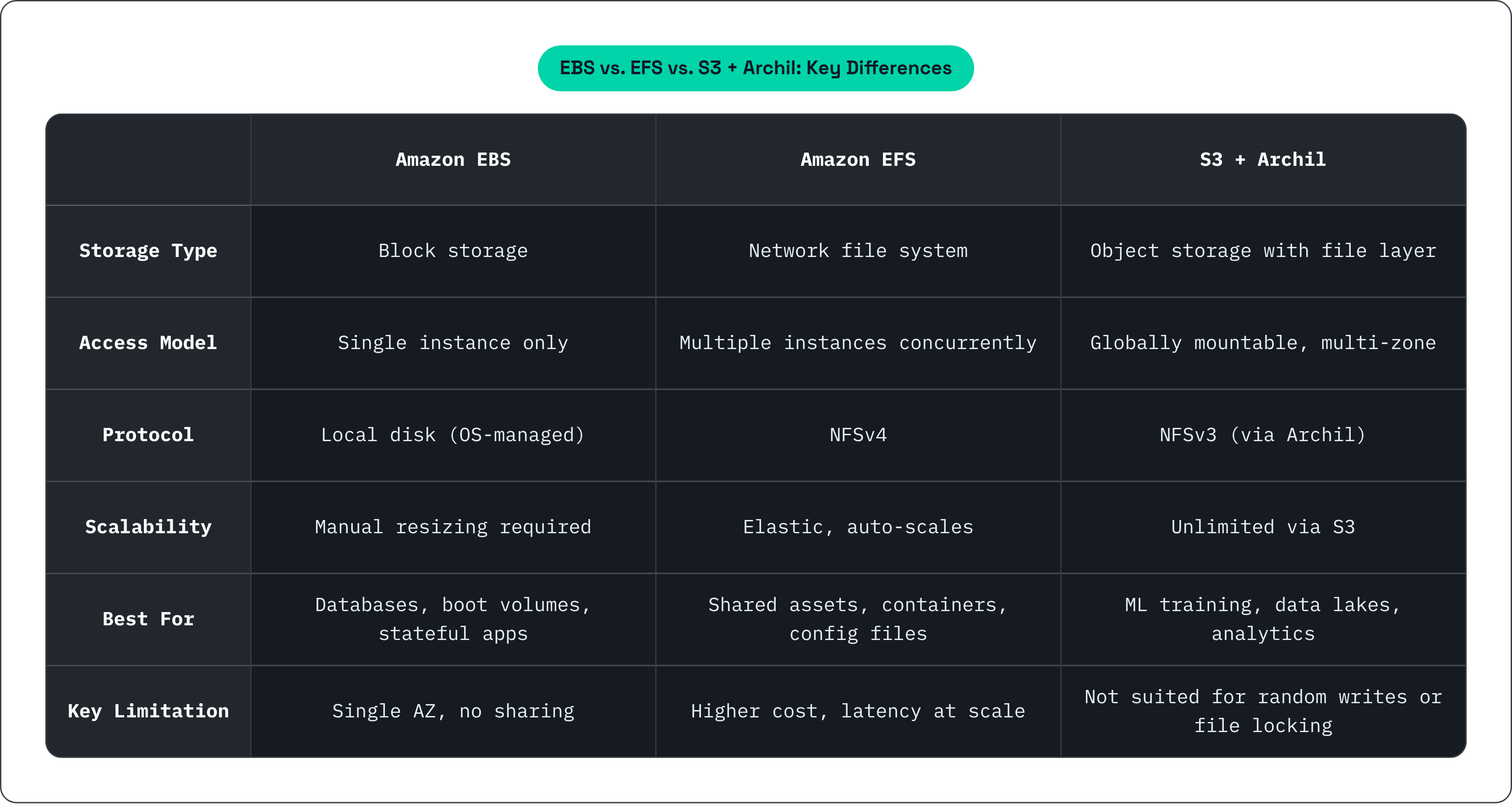
Amazon Web Services (AWS) offers a broad range of storage options, each designed and optimized for specific use cases and workload requirements.
When building out your cloud infrastructure, understanding the nuanced differences between these storage solutions is essential for striking the right balance among performance, cost efficiency, and scalability.
EBS for high-performance, single-instance workloads.
EFS for shared file access across multiple EC2 instances.
S3-compatible solutions like Archil when you want scalable object storage with the speed and simplicity of a local disk.
Your choice should align with your workload's performance, sharing, and scaling requirements. For modern, data-heavy applications that need fast file access, Archil bridges the gap between traditional storage and cloud-native scalability.