How Byte-Range GETs Speed Up Large S3 Downloads
Splitting large S3 downloads into parallel byte ranges cuts latency and improves resilience.
Sponsored by Archil

What the Range Header Actually Does Inside a GET Request
It's simpler than it sounds. You add one line to your HTTP GET request:
Range: bytes=0-8388607That tells S3: "Give me only bytes 0 through 8,388,607 of this object." Nothing else changes. S3 sends back those bytes with an HTTP 206 Partial Content response. That status code is your confirmation the range was honored.
Think of it like asking a librarian for pages 1 through 50 of a book — the book stays on the shelf, whole and untouched, and you only carry home the pages you asked for.
A few things worth knowing before you go further:
The object in the bucket is untouched. You're not splitting anything. The Range header is a read instruction, not surgery on the file itself.
Each range is its own separate GET request. S3 doesn't support fetching multiple ranges in a single call. That constraint is exactly why concurrency becomes the only real lever.
It works on any S3 object, regardless of how it was uploaded. No special prep required on the write side.
Objects uploaded via multipart also support a
partNumberquery parameter, so you can address individual parts directly if you know the structure.Single GET requests cap at 5 TB. Anything bigger returns
405 Method Not Allowed. At that scale, byte-range GETs stop being optional.
Simple mechanism. Big consequences downstream.
Why S3's Latency Profile Makes Parallelism Non-Optional
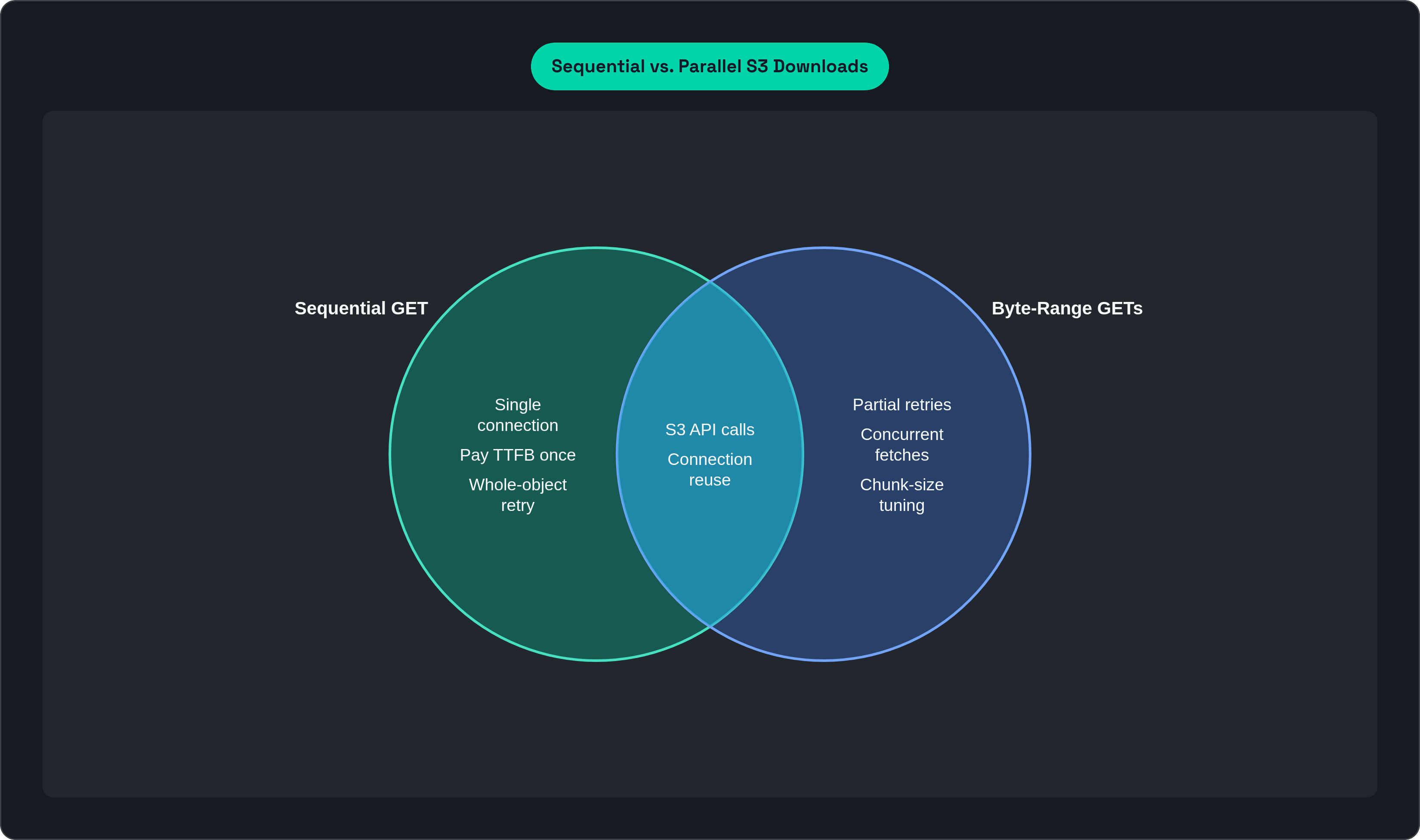
S3 latency is mostly fixed, and you pay it per request.
Before the first byte of your actual data arrives, S3 collects its toll. TCP connection setup, TLS handshake, network round-trip, S3's internal locate-and-access work, client response handling. For most operations you're looking at 100–200 ms TTFB (time to first byte), sometimes lower under ideal conditions.
On a small file, you barely notice. On a multi-gigabyte sequential download, you pay the tax once and the data flows. Tolerable enough, until something downstream is waiting on you. A training job that needs data. A checkpoint restore under time pressure. That's when sequential downloading starts actively working against you.
Here's the thing that changed how I think about this: TTFB is per-request, not per byte. So if you issue 15 concurrent range requests instead of one sequential GET, you're paying that 100–200 ms overhead 15 times simultaneously, not 15 times in a row. Latency stops being a serializing bottleneck and becomes an amortized constant across all those parallel fetches. Sequential downloading is like paying a $5 toll every mile on an empty highway — parallel fetching lets fifteen cars share the same stretch of road at once.
S3's own architecture signals this is the intended approach. The request rate ceiling sits at 5,500 GET/HEAD requests per second per prefix, with no connection count limit. That's not an accident. The service was built with massively parallel workloads as the expected case.
Concurrency Arithmetic: Turning Parallel Slices Into Aggregate Throughput
Let's put numbers to this, because the math is actually pretty satisfying once you see it laid out.
AWS recommends 8–16 MB per range request for intra-region EC2-to-S3 downloads. The concurrency rule of thumb works out to roughly one concurrent request per 85–90 MB/s of desired throughput.
Do the math on a 10 Gb/s NIC:
10 Gb/s is approximately 1.25 GB/s
1,250 MB/s divided by ~85 MB/s per request = roughly 15 concurrent requests
Faster NIC, scale proportionally. It's linear, and in practice it really does stay that clean.
A few things that bite teams once they're past the basic math:
Smaller chunks mean more API calls. More API calls mean higher costs beyond data transfer. Granularity has a price tag that sneaks up on people.
Align GET ranges to multipart part boundaries when possible. If an object was uploaded via multipart, misaligned reads can cause internal S3 read amplification. Small detail, compounds quietly at scale.
Connection pooling is not optional. Every time you open a fresh TCP connection, you restart TCP slow-start and pay the TLS handshake again. AWS explicitly recommends pooling HTTP connections and reusing each one across multiple requests. The gains from parallelism evaporate if you're renegotiating a connection for every range.
The good news: AWS SDKs handle most of this automatically. The S3 Transfer Manager manages concurrent connections, multipart coordination, and retry logic without manual thread management. The AWS Common Runtime (CRT) goes further and dynamically scales individual GET sizes based on observed throughput conditions. If you're writing custom range code from scratch, you're doing more work than you need to, and probably introducing bugs that won't surface until your workload actually scales.
Partial Retries: How Range Requests Contain Failure Cost
Think about what happens when a network hiccup hits a traditional single-stream download of a 20 GB file. You're at byte 18 billion. The connection resets. You start over from byte zero. All that progress, gone. It's like finishing a 500-piece puzzle, knocking it off the table, and being told you have to start from an empty box.
With byte-range GETs, the failure cost is bounded by chunk size, not object size. A failed 16 MB range gets retried as a 16 MB range. The other 19+ GB you already received stays intact. You re-fetch the one slice that dropped, and everything else keeps moving.
That changes the retry math significantly:
Transient errors (TCP reset, S3 503 Slow Down) can be retried immediately on just the affected range, while sibling requests keep running.
Long-running downloads benefit most. Checkpoint files, model weights, large dataset shards: the bigger the object and the flakier the network path, the more partial retry saves you.
Chunk size is a unified tuning knob. Smaller chunks reduce your maximum retry cost but increase request count and API cost. You're adjusting both throughput and retry resilience with the same setting.
AWS specifically recommends 16 MB part sizes for checkpoint multipart uploads to reduce API overhead. The same logic applies on the read side. For large model checkpoints, partial retry is the difference between a minor hiccup and a full pipeline restart.
AI Training Pipelines: Where These Gains Actually Show Up
This is where byte-range GETs go from clever networking trick to genuine operational concern.
AI training reads data randomly. Each training step pulls samples from completely different positions inside a large shard file. How you structure that shard file determines almost everything about your I/O performance.
Small-file datasets (one file per training sample) mean each sample requires its own GET request. Dataloader threads spend most of their time waiting on TTFB. The workload is latency-bound, not bandwidth-bound, and you're paying the S3 toll on every single sample.
Large-shard datasets (roughly 100 MB shards) let dataloaders read multiple samples per GET, distributing TTFB across many samples at once. The workload shifts to bandwidth-bound. Byte-range GETs on large shards then enable concurrent sub-shard fetching: multiple samples from a single object, in parallel, without waiting for the whole shard to finish transferring.
The performance gap between these two approaches is not subtle. High-resolution image training pipelines can demand around 4 GBps per GPU in read performance. Only parallel range fetching can approach those numbers over object storage, and only if the data is structured to support it.
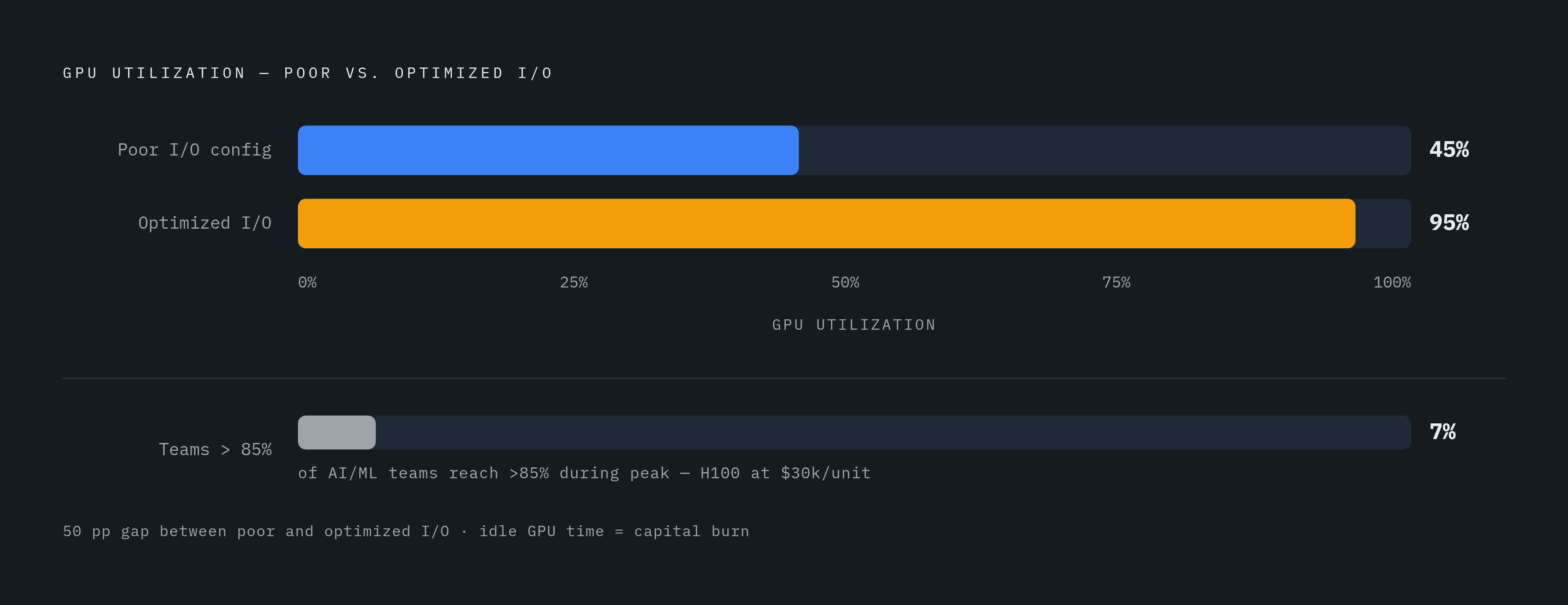
The GPU utilization numbers tell the real story:
GPU utilization averages around 45% with poor I/O configuration
Optimized I/O pushes that to roughly 95%
Only 7% of AI/ML teams achieve over 85% GPU utilization during peak periods
Data loading can consume over 60% of total training time in poorly configured pipelines
An NVIDIA H100 runs around $30,000. Every idle minute is capital burning with nothing to show for it.
Modern compute advances like mixed-precision training and FlashAttention have made GPUs faster at consuming data. That makes the storage gap more visible, not less. The teams still running sequential GETs on large training workloads are essentially subsidizing everyone else's GPU utilization numbers.
Tools worth knowing about: Amazon S3 Connector for PyTorch and Mountpoint for Amazon S3 handle native S3 integration without requiring teams to write REST API calls directly.
Tooling That Automates What Manual Range Code Gets Wrong
Manual byte-range implementations have a consistent list of failure modes. Connection pooling done wrong. Retry logic that fires at the wrong scope. Concurrency limits set too high or too low. Thread management that looks fine locally and falls apart under real load. I've watched teams spend weeks debugging production issues that the standard tooling simply doesn't have.
The tools that exist now exist specifically to remove these failure modes.
AWS Transfer Manager is built into the AWS SDKs. It automatically uses byte-range requests, manages concurrent connections, handles retries, and coordinates everything. The AWS SDK for.NET Transfer Manager v4 delivers faster downloads through automatic multipart coordination. It's the default recommendation for a reason.
AWS CRT (Common Runtime) goes a level deeper. It dynamically scales individual GET sizes based on observed throughput conditions and is available across SDKs. AWS recommends always using the latest CRT version for best resource utilization. Treat it as the baseline, not an optional performance tweak.
Mountpoint for Amazon S3 mounts S3 as a local filesystem. Some tools take a similar approach, mounting existing buckets as a POSIX filesystem with an NVMe cache absorbing the per-request latency, such as Archil, a serverless filesystem layer that mounts S3 and GCS buckets as a native POSIX filesystem so AI workloads can read data zero-copy without migrating anything. Byte-range GETs happen under the hood, invisible to application code. Your app reads through a POSIX-like interface and gets the parallelism benefits without knowing they exist.
For teams not on AWS: direct REST API users must implement connection pooling manually. Pool your HTTP connections. Reuse each one for multiple requests. Opening a fresh connection per range request destroys the gains from parallelism, and it's a mistake that works fine at small scale and then quietly destroys performance once traffic picks up.
A few other approaches worth knowing about:
S3 Transfer Acceleration uses CloudFront edge locations to speed up transfers for geographically distant clients. Separate from byte-range optimization, but can be layered on top.
NVIDIA RDMA-based approaches bypass TCP entirely, moving data directly between storage and GPU memory without CPU involvement. Dell and HPE are integrating this into their object storage platforms.
Google Cloud Storage FUSE with a caching layer reports up to 2.9x higher training throughput versus direct reads, applying the same caching principle to GCS.
The S3 API as Universal Interface — and What That Means for Range Requests Everywhere
S3 isn't just an AWS product anymore. It's an interface standard, and that matters more than most teams realize.
MinIO, Ceph, Cloudflare R2, OVHcloud Object Storage: they all implement S3-compatible APIs because that's what every tool and library expects. OVHcloud supports byte-range fetch with the same chunked-GET pattern, same 8–16 MB typical sizes, same parallelization rationale. The major cloud platforms (AWS S3, Google Cloud Storage, Azure Blob Storage) all support range requests and integrate with their respective ML platforms: SageMaker, Vertex AI, Azure ML.
The practical implication teams consistently underestimate is that knowledge is portable. A team that understands Range header mechanics, concurrency sizing, and retry strategies on AWS S3 carries that knowledge to any S3-compatible system without relearning the fundamentals. Ceph RGW, SeaweedFS, hardware appliances: it all behaves the same way at the request level. That's a real advantage when you're evaluating infrastructure options or migrating between providers.
Metadata layers like Delta Lake and Apache Iceberg provide consistent semantics across stores.
The teams moving fastest are the ones that stopped building custom data-movement pipelines. They let the storage layer handle parallelism, caching, and range management through SDKs, connectors, or filesystem abstractions. Application code stays clean. Performance comes from the layer below.
Where Byte-Range GETs Hit Their Limits
Byte-range GETs are powerful, but they're not the right tool for every situation. Knowing when to skip them is part of using them well.
API cost per request. Every range GET is a billable S3 API call. Split a 10 GB object into 1 MB chunks and you're making 10,000 requests. At scale, with cost-sensitive workloads, fine-grained chunking can become economically counterproductive.
Small objects. If the object is smaller than your chunk size, you gain nothing and add overhead. TTFB is paid once either way. Use a whole-object GET with connection reuse and move on.
Connection management overhead. More concurrent connections means more state to manage. Without proper concurrency limits and connection pooling, naive implementations exhaust local file descriptors or blow up client-side memory. The tooling exists specifically to prevent this.
S3 Object Lambda. Arbitrary byte-range access on dynamically transformed objects is genuinely painful. A naive implementation transforms the entire object up to the requested byte position before returning the slice. It's not a viable pattern for dynamic transformation pipelines. Design for sequential access or pre-transform instead.
Prefix-level request rate ceiling. 5,500 GET/HEAD requests per second per prefix sounds like a lot until you're running a large multi-client workload. At very high concurrency, your key naming strategy can become the bottleneck. Design your prefix structure intentionally from the start.
When whole-object streaming wins. For continuous sequential reads of moderate-size objects where the application can start processing the stream immediately, a single connection at full bandwidth can outperform the coordination overhead of many small concurrent ranges.
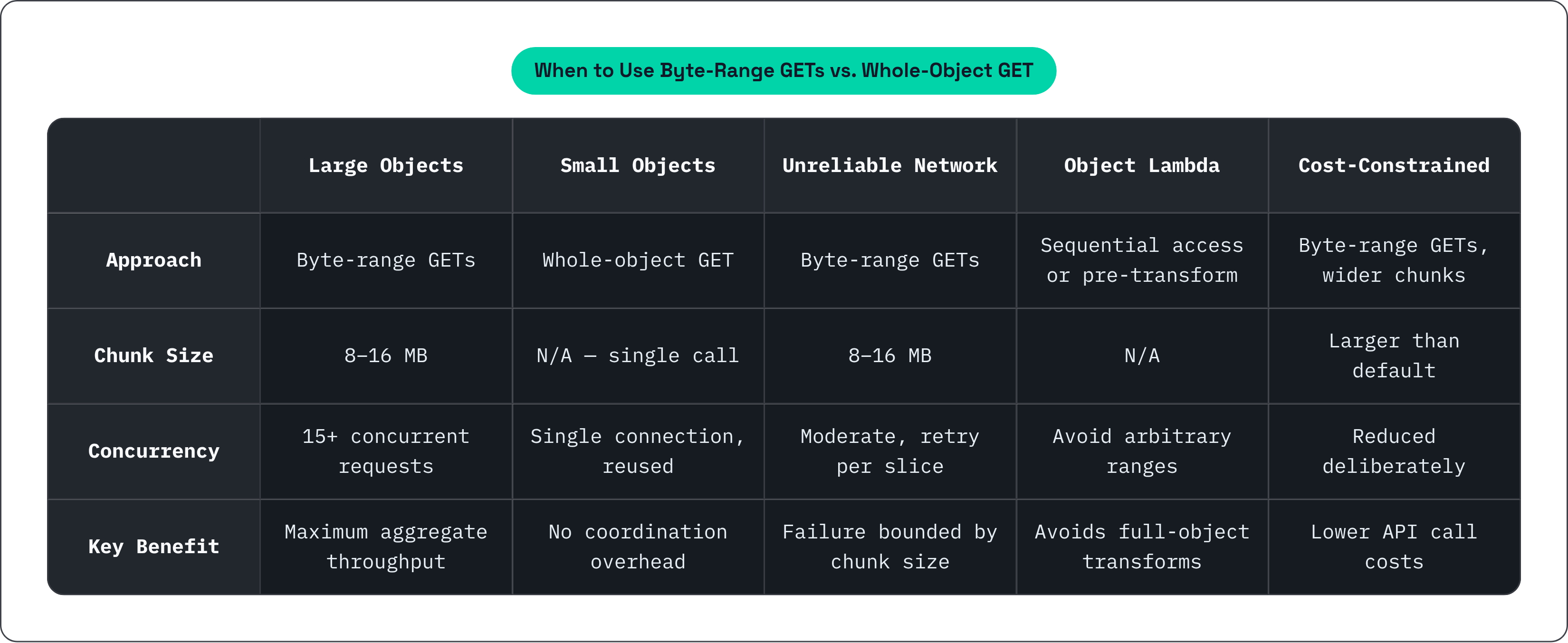
A rough decision guide:
| Scenario | Recommendation | |---|---| | Large object (hundreds of MB+), latency matters | Byte-range GETs, 8–16 MB chunks, 15+ concurrent requests | | Small object (under ~50 MB) | Whole-object GET, connection reuse | | Unreliable network or long-running transfer | Byte-range GETs regardless of size, for partial retry | | Dynamic transformation via Object Lambda | Avoid arbitrary range patterns; design for sequential access | | API cost is primary constraint | Widen chunk size, reduce concurrency, accept lower peak throughput |
The technique is powerful. It's also specific. Knowing when not to reach for it is part of the skill.
This article is sponsored by Archil.