Comparing S3, GCS, Azure Blob, and R2
The real differences hide in your monthly invoice and minimum retention penalties.

Object storage is one of those technologies where the surface-level differences look small and the real differences are hiding in your monthly invoice. All four of the major platforms (Amazon S3, Google Cloud Storage, Azure Blob, and Cloudflare R2) will store your data reliably. The question worth asking isn't "which one works?" It's "which one fits the way I actually use data, and what is that choice going to cost me two years from now?" Those are very different questions, and most teams only ask the second one after they've already signed up for the first.
What Object Storage Actually Does. Why These Four Platforms Dominate
Before we get into the comparisons, let's get on the same page about what object storage actually is.
Object storage works on a flat key-value model. There are no folders, no file system hierarchy, no block device to mount. You have a key (think: a filename or a path string), and you have an object (your data). You talk to it over HTTP. That's it. Compare that to block storage, which behaves like a hard drive, or file storage, which gives you a traditional folder tree. Object storage trades those familiar structures for massive scalability, global accessibility, and very simple programmatic access.
The durability story across all four platforms is effectively identical. S3, GCS, Azure Blob, and R2 all advertise 99.999999999% durability. That's eleven nines. In practical terms, losing data to a storage failure on any of these platforms is not something you need to lose sleep over. Durability is a solved problem. The interesting differences live elsewhere.
So why these four specifically? A few reasons:
Amazon S3 launched in 2006. Nearly twenty years of feature accumulation and ecosystem entrenchment gives it roughly 33% global object storage market share.
AWS and Azure combined exceed 50% of the market. These are not niche products.
R2 is the newest entrant and the most deliberately positioned as a disruptor. Cloudflare isn't trying to out-feature S3. They're attacking the pricing model.
GCS rounds out the hyperscaler trio with deep integration into Google's analytics and AI stack.
One thing worth naming early: the S3 API has become the de facto standard for object storage. R2, MinIO, Backblaze B2, DigitalOcean Spaces, and dozens of others are all "S3-compatible." That phrase means you can point an S3 SDK at a completely different provider just by swapping the endpoint URL. No code rewrite. That detail matters a lot when we get to the lock-in conversation.
What this article covers: performance characteristics, pricing structure (including the costs that don't show up in the headline rate), storage tiers and lifecycle management, egress economics, and ecosystem fit. This is not an exhaustive feature spec. It's the stuff that actually determines which platform belongs in a given architecture.
Performance: Where the Four Platforms Actually Differ
Here's the honest baseline: for most developer use cases, all four platforms serve small objects in 50 to 200 milliseconds from the nearest region. At typical scale, the performance differences are often negligible. If you're building a standard web app that reads and writes objects occasionally, you probably won't notice.
But "typical scale" isn't the whole story.
First-Byte Latency
For cold reads (objects not already cached), S3 and GCS are slightly faster than R2 in the same region. R2 adds roughly 10 to 30 milliseconds compared to S3 on cold reads. That sounds like a meaningful gap, but R2 operates across 330+ points of presence globally, and its edge cache changes the picture dramatically for repeated reads. If your users are spread across the globe and hitting the same objects repeatedly, R2's edge distribution wins on perceived latency even if its cold-read baseline is a touch slower.
Azure Blob is competitive on in-region latency, and it backs that up with a 99.99% availability SLA. That's actually higher than the others and is worth noting for workloads where uptime guarantees matter more than raw speed.
Throughput
This is where the numbers start to separate:
S3: up to 5,500 GET/HEAD requests per second; roughly 100 MB/s single-stream throughput
Azure Blob: up to 2,000 requests per second per blob; roughly 60 MB/s throughput
GCS: nearly matches AWS on downloads, outperforms Azure by about 3x on downloads. Upload speed runs roughly 2.5x slower than AWS
AWS vs. Azure on downloads: AWS is roughly 2x faster; AWS vs. GCP on downloads is closer, with some benchmarks showing GCP nearly matching AWS
For large-file handling and multipart uploads at 100GB+, S3 and GCS have the most optimized paths. Better parallelization, better retry logic. For bucket listing with millions of objects (something data pipelines hit constantly), S3's list-objects-v2 is the most mature implementation. Listing is slow everywhere, but S3 is the least slow.
High-Performance Tiers for AI Workloads
This deserves its own call-out because the gap between standard performance and these specialized tiers is not subtle.
S3 Express One Zone co-locates storage with compute in a single availability zone and delivers single-digit millisecond latency. Amazon reports it can cut ML training epoch times by up to 35% without any changes to model code. That's a meaningful number if you're running serious training workloads.
Google Cloud Storage Rapid (announced May 2026) is built on Colossus, the same distributed storage infrastructure powering Gemini and YouTube. It delivers 15+ TB/s aggregate read throughput, up to 20 million queries per second, and sub-millisecond latency. This tier is clearly aimed at AI and ML data prep, training, and checkpointing at scale.
Azure Premium Block Blobs targets low-latency transaction processing and includes a unique confidential-computing integration for sensitive workloads. If your data is regulated and your latency requirements are tight, this combination is worth a serious look.
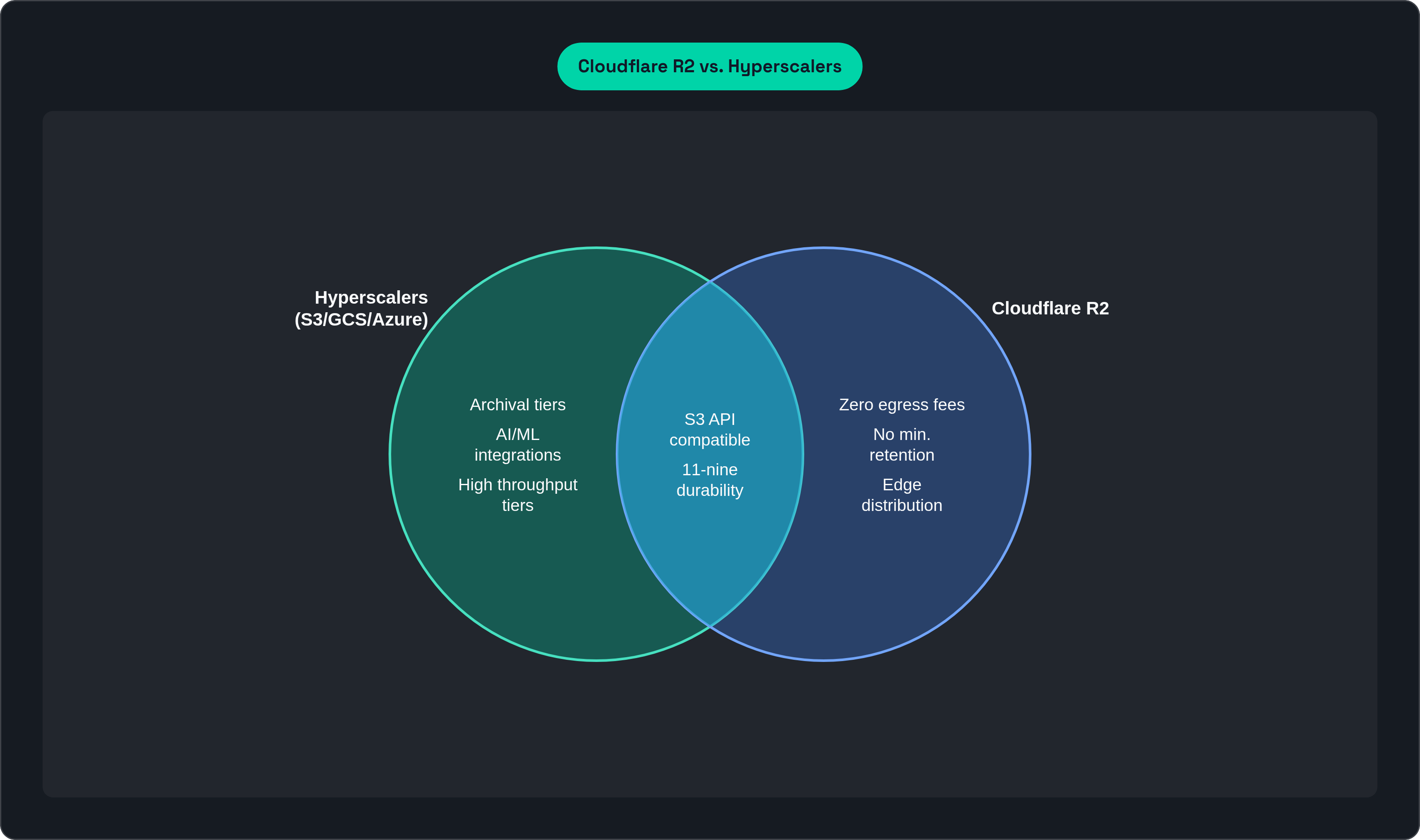
R2 has no dedicated high-performance tier. That's a deliberate trade. R2 is optimized for global edge distribution and zero egress, not for single-region, low-millisecond storage performance.
The summary: S3 leads on raw throughput and list operations. GCS competes on large sequential reads and is making a serious AI-infrastructure play with Rapid. Azure trades peak throughput for strong availability guarantees. R2 trades cold-read latency for zero-egress global distribution.
Storage Tiers and Lifecycle Management: Depth vs. Simplicity
The number of storage tiers a platform offers is basically a proxy for how much complexity you're signing up to manage. More tiers means more savings potential, and more footguns.
Tier Count by Platform
S3: seven classes. Express One Zone, Standard, Intelligent-Tiering, Standard-IA, One Zone-IA, Glacier Instant, Glacier Flexible, and Glacier Deep Archive.
Azure: five tiers plus Premium. Hot, Cool, Cold, Archive, and Premium Block Blobs.
GCS: four classes plus Autoclass. Standard, Nearline, Coldline, and Archive.
R2: two classes. Standard and Infrequent Access. No archival tier.
Minimum Retention Penalties
Archive tiers almost all come with minimum billing periods. If you move data to archive and then need it sooner than expected, you pay for the full minimum period anyway.
S3 Glacier Deep Archive and Azure Archive: 180-day minimum
GCS Archive: 365 days. Double the others.
That GCS Archive penalty is significant. If there's any chance you'll need archived data sooner than a year out, this tier will cost more than you expected. R2 has no archival tier at all, which means no minimum-duration billing traps. But it also means no path to deep cold storage pricing.
Intelligent Auto-Tiering
This is one of the genuinely useful innovations in the space, and it matters more than people give it credit for.
The classic problem: data sits in Standard tier long after it's gone cold because nobody wrote the lifecycle policy. You overpay for months before anyone notices.
GCS Autoclass monitors actual access patterns and moves objects to the optimal tier automatically. No guessing about access patterns upfront. No lifecycle policies to maintain. It just watches what gets touched and acts accordingly.
S3 Intelligent-Tiering works on the same principle. Amazon reports it has saved customers over $4 billion since launch. That's not a small number.
Azure and R2 both have lifecycle policy tools, but neither offers the same level of automatic access-pattern-based tiering.
Practical Guidance by Data Pattern
| Use Case | Best Fit | |---|---| | Latency-sensitive, frequently accessed | S3 Express One Zone, GCS Rapid, Azure Premium Block Blobs | | Mixed access, set-and-forget | GCS Autoclass or S3 Intelligent-Tiering | | True long-term archival (years) | S3 Glacier Deep Archive at $0.00099/GB | | High-egress workloads, moderate access | R2 Standard |
R2 is not a cold storage play. At $0.015/GB, it's the cheapest for hot storage, but S3 Glacier Deep Archive at $0.00099/GB is roughly 15x cheaper for data you're not going to touch for years.
Pricing Structure: The Headline Rate Is Only a Fraction of the Bill
Let's talk about the number that most people compare first and that matters least in isolation: per-GB storage cost.
Standard Storage Rates (Approximate, US, 2026)
R2: $0.015/GB/month
Azure Blob Hot: $0.018/GB/month
GCS Standard: $0.020/GB/month
S3 Standard: $0.023/GB/month
That spread looks meaningful. It isn't, on its own. Retrieval fees, egress charges, API operation costs, and replication overhead routinely push real spend two to five times higher than the raw storage rate. Per-GB storage is often not the dominant line item on your bill.
Egress Rates
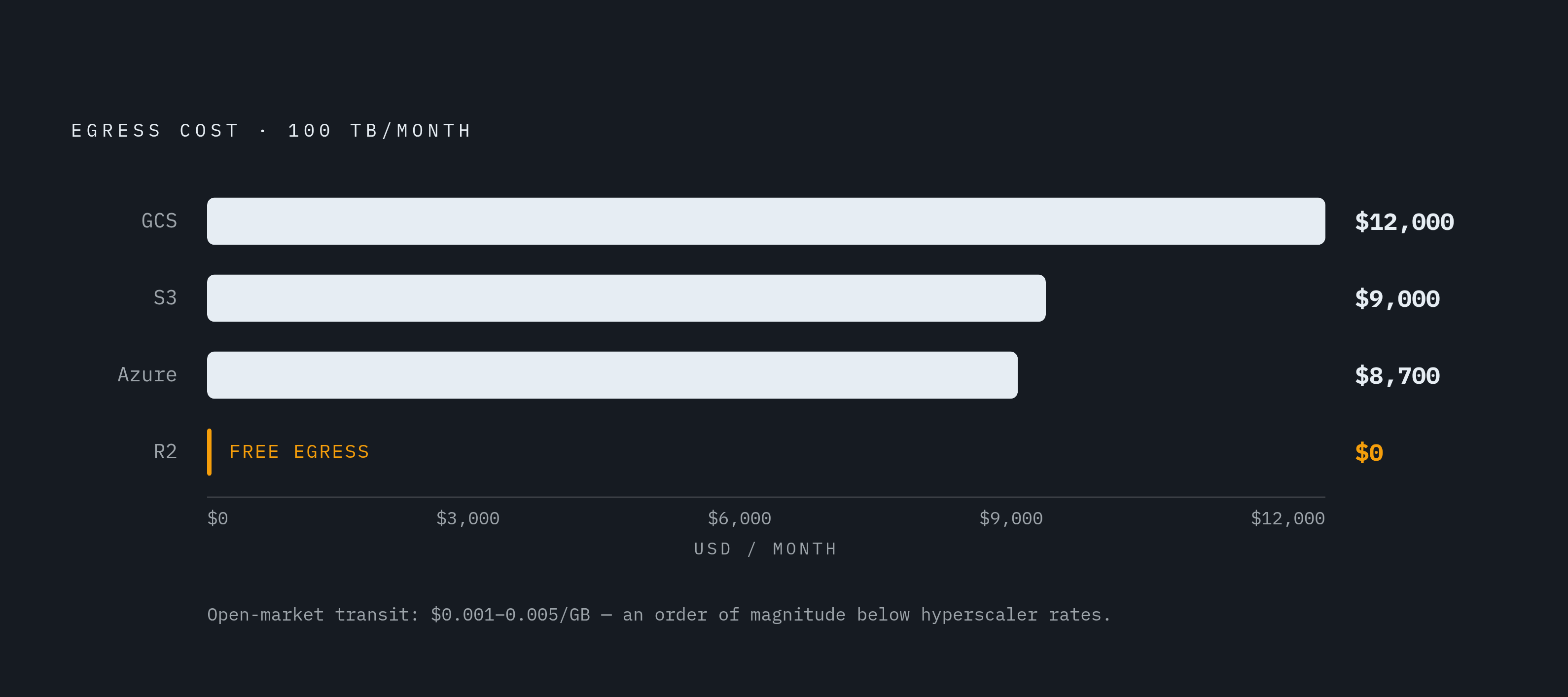
This is where things get dramatic.
S3: $0.09/GB for the first 10TB/month
Azure: $0.087/GB for the first 10TB/month
GCS: $0.12/GB for the first 1TB, $0.11/GB for 1 to 10TB
R2: $0.00/GB. Zero. Always.
Put those numbers against real workload volumes:
At 100TB/month egress from a hyperscaler, you're spending $8,500 to $10,000 per month on egress alone. That often exceeds your storage cost entirely.
For a 10TB/month egress workload, GCS runs roughly $1,200/month in egress. R2 runs $0.
At 100TB stored with heavy egress, R2 at roughly $18,488/year compares to AWS S3 at several times that number once egress is factored in.
For high-egress applications, R2 delivers 50 to 80% total cost reduction compared to the hyperscalers. That is not a rounding error.
Cloudflare's argument on egress pricing is worth repeating plainly: transit pricing on the open market runs roughly $0.001 to $0.005/GB at scale. Hyperscaler egress rates are an order of magnitude higher than that. This is a business model decision, not a reflection of what bandwidth actually costs.
API Operation Costs
All four platforms charge per-request fees for PUT, GET, LIST, and DELETE operations. Rates vary. This cost is easy to overlook and adds up fast at scale. If your workload involves millions of small-object operations, you need to benchmark this specifically rather than assume it's negligible.
Archival Pricing
For true long-term cold storage, the hyperscalers win. S3 Glacier Deep Archive at $0.00099/GB is about 15x cheaper than R2 Standard. R2 is not competing for the archival market and doesn't pretend to be.
Egress Fees as Architectural Lock-In. What S3 Compatibility Changes
Here's the part that doesn't show up in comparison blog posts, but probably should.
How Egress Shapes Where You Put Compute
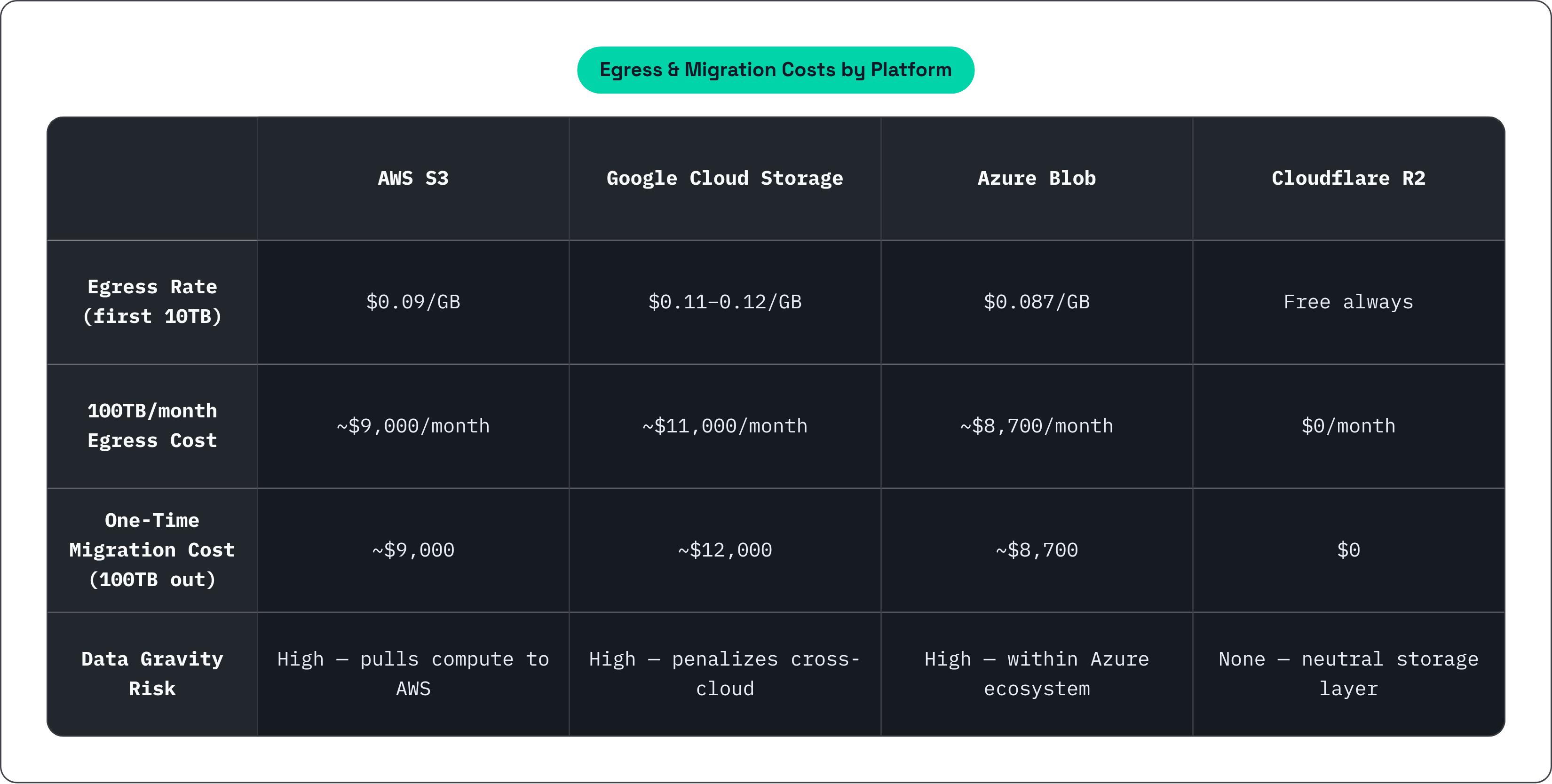
If your data lives on S3 at $0.09/GB egress, moving it to a cheaper or better-suited compute provider costs real money every time. The economic incentive is to keep your compute on AWS even when that's not the right technical decision. Egress fees create data gravity. Your data pulls your compute toward it because moving data is expensive.
True multi-cloud architectures (running across providers for resilience or cost optimization) require moving data between clouds. Copying 10TB/month from S3 to GCS costs roughly $900 to AWS in egress alone, just for the transfer. That's before you do anything useful with the data on the other side.
The Escape Cost
Nobody compares this number when signing up for object storage. They should.
The one-time cost of migrating 100TB off each platform:
AWS S3: roughly $9,000
GCS: roughly $12,000
Azure: roughly $8,700
Cloudflare R2: $0
That's a one-time number. But it acts as a permanent constraint on your architecture decisions while you're locked in, because you're always aware that leaving costs real money.
S3 API Compatibility as a Partial Solution
The S3 API is the industry standard. R2, MinIO, Backblaze B2, DigitalOcean Spaces. All S3-compatible. In practice, switching between S3-compatible providers often requires only changing the endpoint URL in the S3 SDK. R2 is fully S3-compatible, so migrating from S3 to R2 is low-friction on the integration side. The barrier is data movement, not API translation.
But S3 compatibility doesn't solve the underlying problem. API portability is not data portability. You still pay egress to move the actual bytes from a hyperscaler to any other provider. And ecosystem integrations like SageMaker, Vertex AI, and Azure ML assume the native platform's storage. Those are not portable via S3 API.
Ecosystem Fit: Where Each Platform Has Home-Field Advantage
The co-location principle is simple: for AI and ML training, the best storage is usually the same provider as your compute. Same-region placement eliminates egress entirely and minimizes latency. A slightly higher per-GB rate gets offset quickly when you're not paying to move massive training datasets across providers.
AWS S3
S3's ecosystem is two decades deep. Virtually every data tool has an S3 connector as a first-class feature. That's not marketing. It's just the reality of being the first major platform and holding a third of the market.
A few specific things worth calling out:
SageMaker integration: native automated data preprocessing, feature engineering, and model artifact management triggered by data arrival events in S3.
S3 Vectors (GA December 2025, live in 17+ regions): purpose-built for vector embeddings used in RAG pipelines and semantic search. Supports up to 2 billion vectors per index, sub-100ms latency, and claims 90% cost reduction versus dedicated vector databases. This is a significant move if accurate.
Best fit: teams already running on AWS, or teams that need the broadest possible ecosystem compatibility.
Google Cloud Storage
GCS's strongest advantage is its integration with BigQuery. Federated queries run directly against GCS objects, with zero egress between GCS and BigQuery. If you're training on large datasets that also live in BigQuery or are processed through Vertex AI, GCS is almost certainly the right answer on economics alone.
GCS Rapid is built on Colossus, the same distributed storage system that powers Gemini and YouTube. That's not just a marketing data point. It's a signal about where Google is placing their infrastructure bets for AI-native workloads.
Best fit: analytics-heavy workloads, BigQuery users, teams on Vertex AI.
Azure Blob Storage
Azure's home-field advantage is the Microsoft ecosystem, which is a very large field. Seamless integration with Microsoft 365, Power Platform, Synapse Analytics, Databricks, and Microsoft Fabric means that if your organization already runs heavily on Microsoft infrastructure, Azure Blob is often the path of least resistance.
ADLS Gen2 with Hierarchical Namespace (HNS) is worth a specific mention. It enables file-system-style operations on top of object storage, which matters significantly for big data and analytics workloads that expect directory semantics. It's a meaningful capability that GCS and S3 don't match in the same way.
Best fit: enterprise teams in the Microsoft ecosystem, organizations with existing Azure commitments, analytics workloads that benefit from HNS.
Cloudflare R2
R2's home-field advantage is anywhere egress fees are a primary cost driver. Media delivery, user-generated content platforms, data distribution, backups where you need to restore frequently. Any workload where data regularly leaves the storage layer and goes somewhere else.
R2 is also the right answer for multi-cloud strategies where you want storage that doesn't penalize you for moving data. Because it's S3-compatible and charges zero egress, it sits cleanly as a neutral storage layer that compute on any other platform can access without generating a surprise line item. Tools such as Archil, a serverless filesystem that mounts S3 and GCS buckets directly as a native filesystem so AI workloads can read data zero-copy without migration, take advantage of exactly this kind of storage-agnostic arrangement.
The tradeoff is honest: R2 lacks deep integrations with managed AI/ML services, has no archival tier, and isn't trying to be your primary compute platform's native storage. It's not trying to win every workload. It's trying to win the workloads where pricing structure is the deciding factor. And for those workloads, it does.