How do I do EFS on Other Clouds?
Compare AWS EFS with managed file storage alternatives on Google Cloud, Azure, and Oracle Cloud.

The Search for the Right Network File System
In 2016, AWS Elastic File System (EFS) became generally available, marking the arrival of the first fully managed, elastically scalable NFS file storage service in the cloud. Because storage scaled automatically with usage and users paid only for what they consumed, EFS eliminated the need for capacity planning and manual provisioning. This was a meaningful departure from traditional approaches, which required either pre-provisioning fixed-capacity cloud volumes or managing physical storage infrastructure.
EFS's success prompted the other major cloud providers to release their own managed NFS offerings. Google launched GCP Filestore in 2017, Azure extended NFS protocol support to Azure Files in 2020, and specialized high-performance options such as AWS FSx for Lustre and Azure Managed Lustre appeared to serve HPC and data-intensive workloads. Fully managed, elastically scalable file storage has since become a standard offering across every major cloud platform.
Core Features
Fully managed file stores serve a wide range of workloads: lift-and-shift migrations moving on-premises applications to the cloud, big data and analytics pipelines that need shared access to datasets, content management systems serving media files, containerized applications requiring persistent shared storage, and machine learning workflows processing large training datasets. Cloud providers each compete for this space, yet they differ considerably in performance characteristics, pricing models, protocol support, and how deeply they integrate within their own ecosystems.
For a service to genuinely match AWS EFS's capabilities, it must deliver four core features:
Fully managed NFS service – eliminates server provisioning, patching, and maintenance overhead
Automatic elastic scaling – storage capacity adjusts dynamically without manual intervention or downtime
Concurrent multi-instance access – supports thousands of simultaneous connections from compute instances
High availability and durability – data replicated across multiple availability zones with built-in redundancy
Intelligent lifecycle management – automated tiering between performance and cost-optimized storage classes
This guide examines the leading alternatives to AWS EFS, comparing how each solution addresses these requirements. We'll evaluate options across major cloud platforms (Google Cloud, Azure, Oracle Cloud), analyze their performance profiles and pricing structures, and identify which scenarios favor each alternative. Whether you're planning a cloud migration, building a multi-cloud architecture, or optimizing costs for existing workloads, understanding these trade-offs will help you select the right file storage solution.
Other Cloud Providers
Every major cloud provider now offers managed file storage services that support concurrent access from multiple servers. Below is a feature comparison of AWS EFS alternatives across different cloud platforms.
We've also included Archil, a cloud-agnostic solution that works across any provider with S3-compatible object storage. Rather than functioning as a traditional file system, Archil operates as a cache layer over object storage, offering a distinct hybrid approach to file storage.
Provider Protocol Support Auto Scaling Storage Tiers Key Integrations Availability & Durability Additional Features AWS EFS NFS (NFSv4) Yes Standard, Infrequent Access (IA) EC2, ECS, EKS, Lambda, AWS Backup Multi-AZ replication, 99.999999999% durability Lifecycle management, encryption, throughput modes Azure Files SMB and NFS No Premium (SSD), Standard (HDD) Azure AD, Azure Backup, Azure VMs Geo-redundant and zone-redundant options Built-in snapshots, soft delete, file sync GCP Filestore NFS (NFSv3) No Basic, High Scale, Enterprise GKE, Compute Engine, Cloud Console Regional replication, automatic failover Configurable IOPS, automatic backups, point-in-time recovery Oracle File Storage Service NFS (NFSv3) Yes Standard tier OCI Compute, OCI Database, IAM Automatic replication across fault domains Snapshots, cloning, encryption at rest and in transit Cache-over-S3 Solution NFS (NFSv3) Yes Standard tier EC2 Multi-AZ replication, 99.999999999% durability Storage cost is the same as S3, operates as a cache
Although there is considerable feature overlap among the various cloud service providers, several important differences stand out:
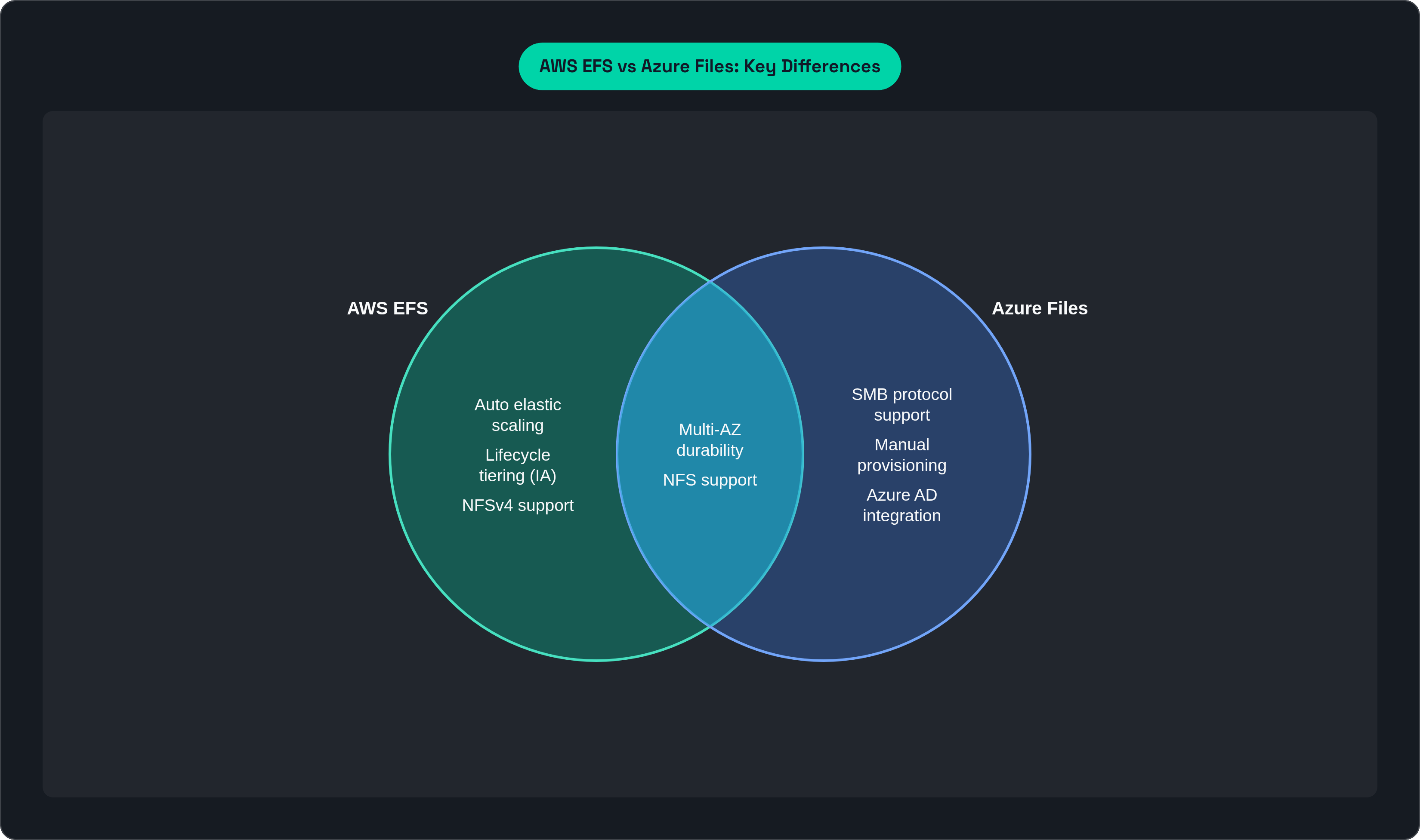
Auto Scaling: AWS EFS and the cache-over-object-storage solution automatically grow and shrink without pre-provisioning, while Azure Files and GCP Filestore require manual capacity allocation upfront.
Protocol Support: Azure Files uniquely supports both SMB (Windows-native) and NFS, making it versatile for mixed environments.
Storage Architecture: The cache-over-object-storage solution differs fundamentally as a caching layer over object storage rather than a native file system, which affects performance patterns and use case suitability.
Storage Tiers: AWS EFS offers the most granular lifecycle management with automatic tiering to Infrequent Access storage, while Oracle and the cache-over-object-storage solution currently offer single-tier options.
AWS EFS and Oracle File Storage Service remove the need to forecast capacity, provision additional storage, or monitor utilization thresholds. Storage automatically expands and contracts with your actual usage, and you pay only for what you consume.
For multi-cloud or hybrid environments, Azure Files holds distinct advantages thanks to its dual SMB/NFS protocol support, which enables seamless integration across Windows and Linux systems. Organizations running mixed workloads or gradually migrating from on-premises infrastructure will find this especially valuable. That said, the flexibility comes with trade-offs: Azure Files requires manual capacity planning and provisioning, so you'll need to monitor usage and adjust allocations as your needs evolve.
If you operate across multiple cloud providers or want to sidestep vendor lock-in, some tools provide a cloud-agnostic alternative compatible with any S3-compatible object storage. A caching architecture can reduce storage costs significantly while preserving NFS compatibility, though performance characteristics differ from those of native file systems.
GCP Filestore suits workloads that demand predictable, high-performance file storage with strong integration into the Google Cloud ecosystem, particularly for Kubernetes-based applications on GKE, though it similarly requires upfront capacity provisioning.
Performance and Cost Considerations
Selecting among file storage solutions requires a clear understanding of both performance characteristics and pricing models. Capabilities vary from provider to provider, and costs scale differently depending on usage patterns, so the best choice is highly specific to your workload requirements.
Performance Metrics
Each service offers performance characteristics tuned for particular workload types. The table below compares key metrics, though it's worth noting that these figures represent theoretical maximums achievable only under specific conditions.
Provider Max Read Throughput (per file system)* IOPS* Latency* Performance Modes AWS EFS 10+ GB/s (Elastic) 500,000 Single-digit milliseconds General Purpose, Max I/O, Bursting, Provisioned Azure Files Up to 10 GB/s (Premium) 100,000+ Sub-millisecond (Premium SSD) Premium (SSD-backed), Standard (HDD-backed) GCP Filestore Up to 26 GB/s 600,000+ (High Scale SSD) Sub-millisecond to low millisecond Basic HDD, Basic SSD, High Scale SSD, Enterprise Oracle File Storage Service Scales with capacity Scales with capacity Low millisecond Single standard tier with configurable capacity Cache-over-S3 Solution 10 GB/s 10,000 Sub-millisecond Single Tier
** Performance metrics depend on total storage size, file system configuration, network conditions, and workload patterns. Actual performance varies significantly based on implementation.*
Performance varies considerably across providers, and the variation grows even larger depending on your specific use case. Reaching maximum throughput, for instance, typically requires that a large proportion of your storage reside in the highest tiers. With some providers this happens only when you are close to capacity, which can mean nearly 64 TBs of data, far more than most use cases ever require.
When reviewing the theoretical performance limits of any service, be sure to weigh your access patterns and workloads alongside those numbers.
Cost Considerations
Pricing structures differ substantially across providers, with fundamentally distinct models for storage capacity, throughput, and data access. A solid grasp of these differences is essential for accurate budgeting and cost optimization.
Provider Storage Pricing (per GB/month) Throughput Pricing Request Pricing Data Transfer AWS EFS $0.30 (Standard), $0.016 (IA) Included in Elastic mode, $6/MB/s in Provisioned Included Standard AWS data transfer rates Azure Files $0.10 (SSD), $0.007 (Standard HDD) Based on provisioned share size Transaction-based for Standard tier Standard Azure egress rates GCP Filestore $0.30 (SSD)
$0.16 (HDD) Included in capacity pricing Included Standard GCP egress rates Oracle File Storage Service $0.30 per GB/month Included Included Standard OCI egress rates Cache-over-S3 Solution $0.23 (Same as underlying S3 storage)
Cache storage is $0.20 Included Same as S3 Standard AWS data transfer rates
Pay-per-use vs. Provisioned Capacity:
AWS EFS, Oracle, and pay-per-use solutions charge only for actual storage consumed, making them cost-effective for variable workloads or development environments where capacity needs fluctuate.
Azure Files and GCP Filestore require provisioned capacity with minimum commitments (Azure Premium: 100 GB minimum; GCP Basic: 1 TB minimum). You pay for provisioned space regardless of actual usage, which can produce significant waste if you over-provision for peak capacity.
When evaluating costs, look beyond storage pricing to consider your anticipated throughput needs, access patterns, and data transfer requirements. It's also worth accounting for the latencies and costs involved when storage and compute span different cloud providers, so keeping them together is generally a sound approach.
Choosing the Right Solution
Each major cloud provider has built capable file storage solutions tuned for their own ecosystems. AWS EFS excels within AWS, Azure Files integrates seamlessly with Microsoft services, and GCP Filestore pairs naturally with Google Cloud workloads. These are powerful, production-ready options.
However, if you're managing large volumes of cold data, or simply want to avoid paying premium prices for straightforward file storage needs, solutions like Archil offer compelling economics without sacrificing the familiar NFS interface your applications expect and reducing the operational burden on your engineers.
The right choice isn't about maximum theoretical performance; it's about matching your actual requirements to the most cost-effective solution that satisfies them.