12 AWS Products for Slashing Costs
Cut AWS spend by 70% with a practical stack of 12 cost-cutting tools.
Runway measured in months makes cloud spend one of the fastest levers available to you. Consider the math: at early stage, trimming even 10% from infrastructure can translate into meaningful extra months of life without hiring freezes or product slowdowns. If efficiency comes first, prioritize safe, reversible changes that pay back immediately. Below are 10 AWS tools that consistently cut costs, assembled into a cohesive stack you can deploy in weeks.
First, what is Archil?
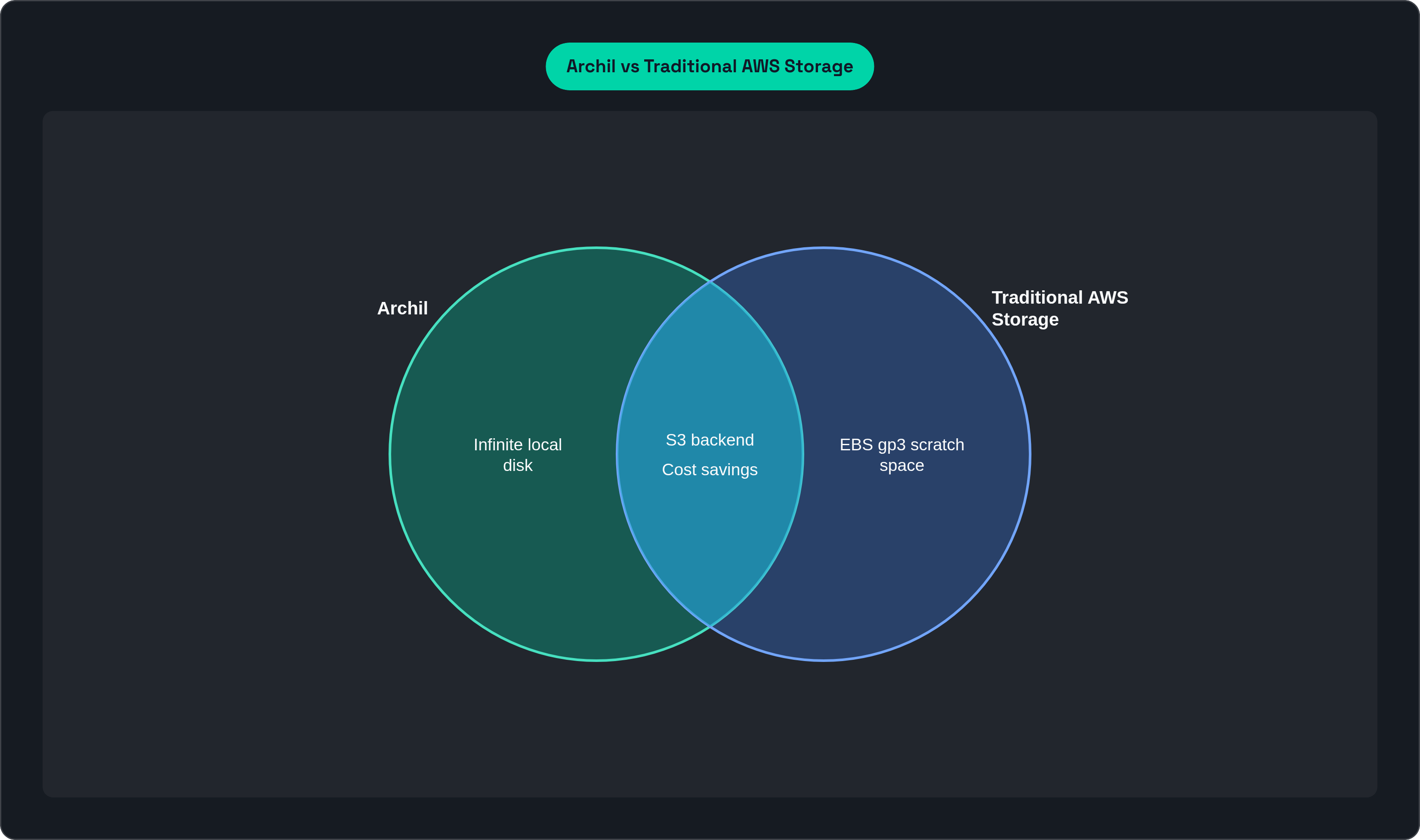
Archil is a POSIX-compliant, S3-backed volume that turns S3 and other S3-compatible stores into infinite, local disks with instant access to large datasets. It behaves like block storage to your apps while scaling like object storage, and Archil volumes are shareable, auto-growing, and pay-for-what-you-touch.
1. Compute Savings Plan
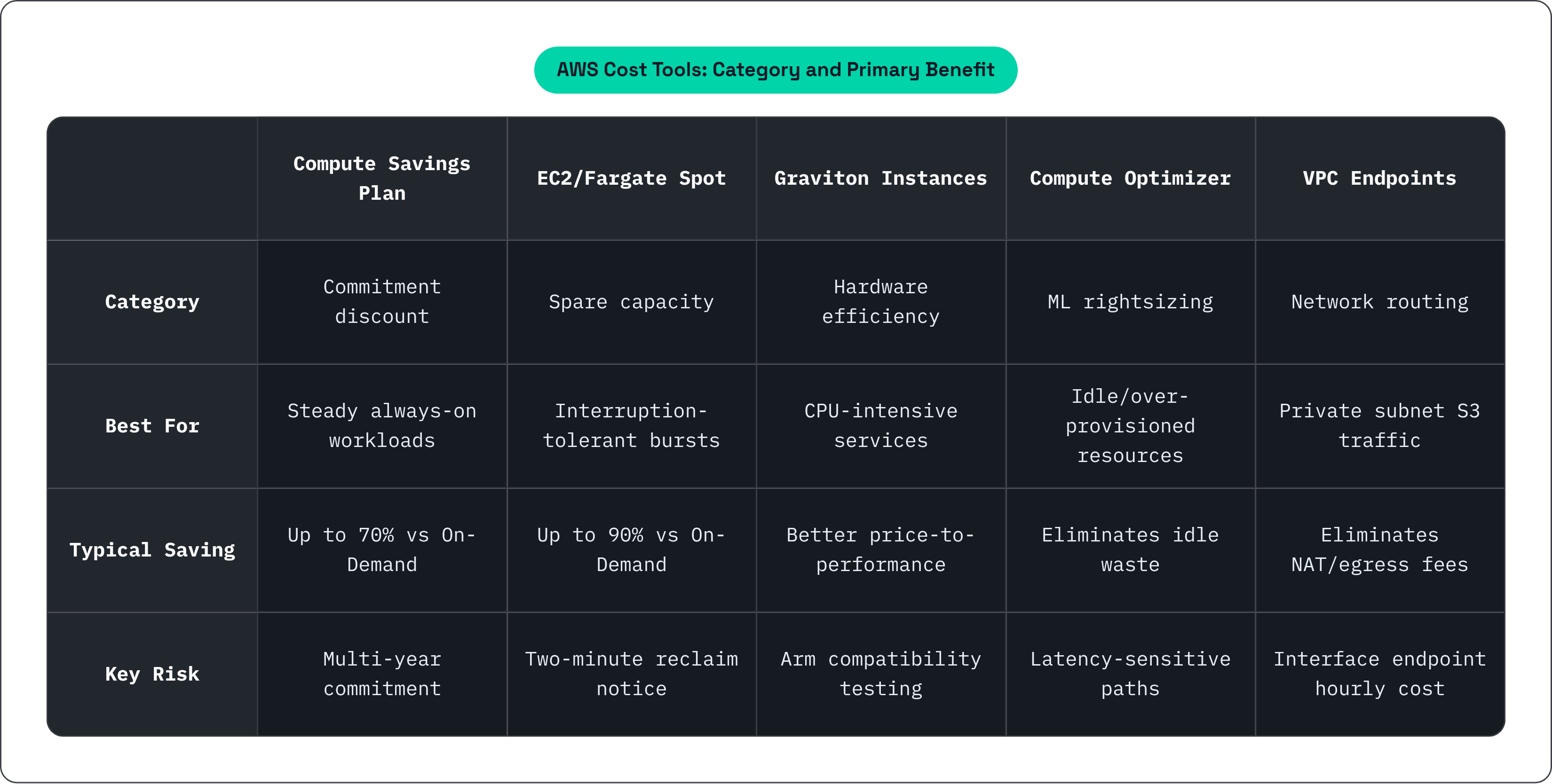
Compute Savings Plans are 1 to 3 year commits that discount EC2, Fargate, and Lambda without locking you to a specific instance family or region. Steady compute workloads like APIs and workers mounting S3-backed data convert to a cheaper baseline, typically saving up to 70% compared to On-Demand. These plans are best suited for predictable services that regularly access datasets via S3 volumes.
2. EC2 Spot (and Fargate Spot)
EC2 Spot taps spare capacity with a two-minute reclaim notice at deep discounts, often up to 90% off. Interruption-tolerant jobs like ETL, feature extraction, training, CI, and batch analytics that stream data from S3 volumes are natural fits. Use multi-AZ, multi-size Spot fleets and add graceful interruption handlers to keep throughput high.
3. Graviton (ARM) Instances
Graviton Instances are AWS's ARM CPUs (e.g., C7g/M7g/R7g) that deliver better price-to-performance than comparable x86 options. Services that marshal or transform data near S3 volumes get more work per dollar. Start with multi-arch containers, migrate stateless tiers first, then evaluate caches and databases where Graviton is supported.
4. AWS Compute Optimizer
AWS Compute Optimizer applies ML-driven rightsizing to EC2, EBS, Lambda, RDS/Aurora, and ECS. Idle and over-provisioned resources get flagged and eliminated. Enable it org-wide, address "idle" and "over-provisioned" findings first, then tune latency-sensitive paths.
5. S3 Intelligent-Tiering and Lifecycle (Glacier tiers)
S3 automatically shifts objects between access tiers, while lifecycle rules age colder data into Glacier. Storage costs fall as datasets cool, and no code changes are required. Apply these settings to your buckets so hot bytes stay fast while historical artifacts, checkpoints, and logs drift to cheaper tiers.
6. EBS gp3
EBS gp3 is the next-gen general-purpose SSD with IOPS and throughput decoupled from size. It runs up to 20% cheaper and lets you purchase only the performance you actually need for scratch space or local caches. Apply gp3 to most EC2 workloads that do not require io2, and migrate gp2 volumes during maintenance windows.
7. EFS Infrequent Access
EFS Infrequent Access provides lower-cost storage classes for EFS with automatic lifecycle moves. On rarely accessed files in shared POSIX trees, savings can reach up to 90%. Use it when shared directories hold build artifacts but most content is cold, and monitor retrievals to avoid surprise rehydration charges.
8. VPC Endpoints (Gateway & Interface)
VPC Endpoints create private links from your VPC to AWS services, with Gateway endpoints serving S3 and DynamoDB and Interface endpoints covering others. By cutting out NAT Gateway processing and public egress, they eliminate hidden taxes that hit data-heavy stacks hard. Enable them whenever private subnets talk to S3, ECR, CloudWatch, or similar services.
9. CloudFront (with Origin Shield)
AWS's CDN caches content globally, and Origin Shield adds a centralized caching layer to reduce origin fetches. S3 and compute egress drop, origin load decreases, and delivery of models, datasets, and artifacts speeds up. Apply it to static assets, downloads, and cacheable API responses.
10. Aurora Serverless v2
Aurora Serverless v2 is an Aurora instance that auto-scales capacity up and down, including scaling to zero when idle. In environments adjacent to large S3 datasets, it stops you from paying for 24/7 database compute. Use it for dev and preview environments and spiky microservices, keeping an eye on cold starts and storage growth.
11. DynamoDB Capacity Modes
DynamoDB Capacity Modes offer both On-Demand (pay per request) and Provisioned with autoscaling. Spend aligns with actual request volume for metadata and catalog tables that reference S3 objects. Use On-Demand for unknown or spiky access patterns, then switch steady, hot tables to Provisioned with sensible autoscaling limits.
12. AWS Budgets & Cost Anomaly Detection
AWS Budgets and Cost Anomaly Detection pair budget alerts with ML monitors that flag unusual spend. They catch regressions early, covering egress, NAT, and unintended transfers, which matters especially as datasets and access patterns evolve. Enable them immediately across the full account and route alerts to email, SNS, or Slack with a simple triage playbook.
The Gameplan Summary
Begin by making S3 your source of truth and let prices fall as data cools. Turn on S3 Intelligent-Tiering and add lifecycle rules to push older objects into Glacier without any application changes.
On the compute side, cover your steady always-on footprint with Compute Savings Plans and run on Graviton to extract more throughput per dollar. For bursts, lean on EC2 or Fargate Spot so spiky loads never hit On-Demand rates. Once instances no longer need oversized CPU to "babysit" data, use AWS Compute Optimizer to rightsize them down. For any scratch space you still require, standardize on EBS gp3 so you are not overpaying for gp2 and can dial throughput independently. Finally, wire up Budgets and Cost Anomaly Detection so any regression, whether egress spikes, NAT leaks, or mis-tagged resources, reaches you before it becomes an invoice.
Instances shrink, Spot becomes practical, databases idle safely, and the network stops charging you for every hop. Same workloads, fewer copies, smarter pricing, and guardrails that lock savings in.
You do not need all ten switches flipped on day one to see real savings. Think of them as a toolbox: some trim steady-state costs (Savings Plans, Graviton), some crush spikes (Spot), some make storage smarter (S3 tiers, gp3, EFS-IA), and others plug leaks you cannot see (VPC Endpoints, CloudFront, Anomaly Detection). The question is how they work together, so you are not saving in one line item while overspending in another. Here is the opinionated setup that stitches those tools into a coherent, cost-efficient stack you can roll out quickly.
Metrics to Watch
Tracking what actually changes behavior rather than vanity graphs is critical to cost optimization. This includes:
Spend
Unit costs force honest decisions:
$/request tells you if a new feature is efficient or just popular
$/tenant shows which plan types are underwater
$/ACU ties DB spend to actual capacity
egress/GB surfaces hidden taxes (NAT, CDN, S3) so you fix routing or caching instead of buying more compute
Efficiency
These reveal waste you can reclaim:
CPU/Memory headroom (at P95+) shows rightsize potential without risking latency
Cache hit ratio when rising means fewer origin fetches and lower egress
Spot coverage quantifies how much burst you have moved off On-Demand
Savings Plans coverage and utilization confirms your commitments are the right size (high utilization) and growing with baseline.
Ops
Speed protects savings:
Short time-to-detect anomalies catches egress/NAT leaks before the invoice does
Short time-to-rollback keeps experiments cheap and reversibility real.
Closing Thoughts
Cutting your AWS bill comes down to a handful of sensible defaults you enable and monitor consistently. The ten tools above carry the heavy lifting: buy flexibility with Savings Plans, run on Graviton, use Spot for bursts, let S3 auto-tier, stick to gp3 for scratch space, skip the NAT tax with VPC Endpoints, cache at the edge with CloudFront, and pay for database capacity only when you are actually using it.
This is also where Archil earns its keep. By making S3 feel like an infinite, shareable local disk, you move fewer bytes, keep cold data cheap, and let smaller or Spot instances do more work. The same workload runs with fewer copies and fewer detours.
Flip the switches, watch the metrics, and turn waste back into runway.