Stop Syncing and Start Mounting: A Smarter Alternative to aws s3 sync
Mounting S3 buckets skips costly data copies before jobs begin.
Sponsored by Archil

aws s3 sync copies data from one place to another before you can touch it. Mounting skips that step: your job reads straight from the bucket like it's a folder on your laptop. That's the whole difference, and it matters more than it sounds like it should.
The command itself is solid engineering, to be clear. It walks a source and a destination, checks file size and ETag, and only moves what changed. That's why people still reach for it: staging a dataset before a batch job, pulling checkpoints back after a training run, a nightly backup, copying between buckets for disaster recovery. All of that works fine with sync, still.
But there's an assumption baked into the tool since the day someone wrote it: data has to land on local disk before any work starts. That made sense when compute and storage sat in the same rack, and the only way to get bytes to a CPU was to physically move them there. Cloud compute left that world behind a while ago. GPU instances spin up and disappear in minutes, datasets keep growing past the terabyte mark, and now the "quick copy step" is the thing everyone sits around waiting on.
The hidden costs that accumulate inside a sync-first workflow
Nobody puts this on a slide deck: every sync job is a waiting room. Training doesn't start, inference doesn't start, your agent doesn't touch its first task, until the copy finishes. And idle GPUs sitting in that waiting room cost real money. StarWind's 2026 analysis put the wasted capital and power at roughly $30,000 per node, per year, just from GPUs fed nothing to chew on.
The mismatch is almost funny once you notice it. GPUs get faster every year. Data pipelines mostly just sit there. A Blackwell-class cluster can chew through a naive sync pipeline's entire output in seconds, then twiddle its silicon thumbs waiting for more.
Network bandwidth caps all of this no matter how much compute you're paying for. A 10 Gb/s link is a 10 Gb/s link, full stop. AWS's own SageMaker Debugger documentation does the math: at 100 MB per training sample, that link tops out around 100 samples a second. Doesn't matter if the GPU could technically handle a thousand. The network doesn't care what you paid for.
Then there's energy. NVIDIA's own numbers put data movement at up to 70% of total energy draw in a typical GPU workload. Sync-heavy pipelines don't just tolerate that number, they push it higher, since every run means shuffling the same bytes across the wire again.
Small files make it worse. ML datasets are often millions of tiny images or samples, and each one needs its own S3 GET request. AWS caps per-prefix throughput at 3,500 PUT/POST/DELETE operations and 5,500 GET/HEAD operations per second, and a serious training job funneled through one prefix hits that wall fast. The usual fix, hashed or time-based key prefixes to spread the load, is real engineering work that exists purely to patch around a copy-first design. Nobody should have to babysit key names just so a training run can breathe.
Checkpoints add their own tax. Large model checkpoints run hundreds of gigabytes, and writing them synchronously to object storage means real latency, sometimes real throttling, and every GPU on the job frozen mid-write. Multiply that by however many checkpoints a long run saves, and you've built a second waiting room on top of the first one.
Sync taxes you twice: once before the work starts, once after it ends.
What mounting actually means at the filesystem level
Mounting flips the model. Instead of copying S3 objects down before the job runs, it exposes the bucket as a regular POSIX path, live, at runtime. The application opens a file. It has no idea, and no reason to care, that the bytes actually live in a bucket a few hundred miles away.
Mechanically, a FUSE driver (or something at the kernel level) intercepts the usual filesystem calls, open, read, write, stat, rename, and turns them into S3 API calls behind the scenes. A local cache, often NVMe, sits in front of that translation layer, so a given object makes the round trip to S3 exactly once. After that it's served locally.
That's a lazy-fetch model: data shows up only when something actually asks for it, instead of getting copied wholesale up front on the hope some of it gets used. POSIX semantics matter more here than people give them credit for. Atomic rename lets a checkpoint commit safely, no copy-and-delete dance. File locking lets parallel workers coordinate without stepping on each other. mmap lets code map model weights straight into memory. Hard links, symlinks, sparse files, all of it just works, so training code written for a normal filesystem runs unmodified.
The rename problem deserves a beat, because it's a real headache anyone coming from Hadoop or Spark already knows. S3 has no native rename. Writing output means copying the whole object under a new key and deleting the old one, so job commit time scales with dataset size, which is an awkward thing to explain to someone asking why a job "finished" twenty minutes before it actually finished. A real POSIX mount with atomic rename makes that problem disappear.
None of this shows up from the application's side. It sees an ordinary directory, no SDK calls, no client library, no code rewritten to fetch objects some special way. The job starts the second it's submitted, reads what it needs when it needs it, and the bucket stays the one source of truth the whole time.
How Mountpoint for Amazon S3 implements this in practice
AWS built its own answer here: Mountpoint for Amazon S3, an open-source file client that mounts a bucket as a local path on EC2 instances. It uses the AWS Common Runtime library to turn filesystem calls into S3 REST calls, and it's a real step up from the older s3fs-fuse, roughly 6 to 8 times the throughput on sequential read and write, per FIO benchmarks published by Seqera.
For training jobs running multiple epochs over the same data, Mountpoint can cache to EC2 instance storage, instance memory, or an EBS volume, so the same sample doesn't trigger a fresh S3 request every epoch. AWS reports training jobs finishing up to twice as fast with local caching on, versus reading straight from S3.
Since November 2024, there's a shared option too. S3 Express One Zone can act as a high-performance cache visible across multiple compute instances at once, with reads running up to 7 times faster than pulling from S3 Standard. That's built for things like computer vision training, where millions of small images get read over and over from several nodes at once.
Mountpoint doesn't implement the full POSIX interface, and AWS says so. Most everyday file operations work fine, edge cases exist, and the tool is built and tuned specifically for Amazon S3. Other S3-compatible stores might happen to work with it, but that's outside what AWS actually supports, and a future release could break that compatibility without warning anyone. For a team whose data doesn't live entirely on AWS, that's not a footnote. That's the whole ballgame.
Where Mountpoint's boundaries leave multi-cloud teams exposed
Most large teams aren't parked on one cloud. Data lives in S3, in GCS, in Azure Blob, in R2, sometimes all four at once, sometimes shifting between them as contracts change or a team migrates a workload. Mountpoint's own GitHub docs say it plainly: S3-compatible stores outside AWS are unsupported and may break without warning. Fair enough, that's an honest disclosure, but it means Mountpoint solves the AWS half of a problem that, for a lot of teams, is bigger than AWS.
What a multi-cloud setup actually needs is a mounting layer that presents the same POSIX interface no matter what's storing the bytes underneath, no migration step, no ETL pipeline in the middle, no extra copy piling up every time the provider changes. Portability isn't a bonus feature here, it's closer to a survival requirement: lock your storage to one vendor and you've locked your entire data layer to that vendor's roadmap, pricing, and outages.
Pointing infrastructure at a different bucket or a different provider without rewriting a line of application code, that's the actual bar. Data residency matters too. Cache nodes need to sit physically close to compute, and nothing should cross a region boundary unless someone explicitly told it to. And any mounting layer that quietly keeps its own persistent copy of your data, off in some vendor's shadow storage outside your account, has just handed you a new dependency and a new risk to manage. The bucket stays the actual source of truth. Full stop.
Cloud-agnostic mounting options worth evaluating
A few things to check before picking a mounting layer: how complete its POSIX support really is (atomic rename, flock, mmap, hard links, sparse files), whether it works across S3, GCS, Azure Blob, and R2 or just one, how the cache is built and what latency it adds, what happens on writes and who owns the source of truth, whether you run it yourself or someone runs it for you, and whether it plays nicely with agents or serverless jobs hitting the filesystem directly.
Mountpoint for Amazon S3, covered above, is the strongest pick if your whole footprint sits inside AWS: 6 to 8 times faster than s3fs-fuse on sequential I/O, with a shared cache option through S3 Express One Zone that speeds up multi-node reads by up to 7 times. Its limit is right there in the name, though. It's for S3, and its POSIX coverage has known gaps.
s3fs-fuse is older and more battle-tested, and it works broadly across providers. It doesn't scale gracefully, though. Solidigm's analysis found that handling 100 million objects needs roughly 128 GB of DRAM just to keep metadata cached, a rough number to sit with when your dataset runs into billions of objects, not millions. Throughput lags well behind Mountpoint on sequential workloads too.
Archil comes at this from the storage-agnostic angle. It puts an NVMe cache in front of reads, sub-millisecond latency on a hit, and on a miss it fetches from the source and caches it for next time. Writes get replicated before the call returns, then flushed to the bucket asynchronously, so the bucket stays the source of truth and no separate copy of your data sits outside your own account. It handles full POSIX semantics: atomic rename, flock and fcntl, mmap, fsync, hard links, symlinks, sparse files, so code built for a normal filesystem doesn't have to change. Capacity gets metered by actual cache use instead of pre-provisioned block storage you size and pay for up front, and it includes a serverless layer that lets agents and scripts run commands straight against the filesystem without spinning up a separate sandbox, useful if you're running parallel agent sessions that need to hold context between runs.
Whatever mounting layer you land on, AWS's own data loading guidance still holds: consolidate data into shards between 100 MB and 1 GB, favor sequential access patterns. And if the pipeline is pure PyTorch, the Amazon S3 Connector for PyTorch beats other S3 clients in AWS's own benchmarks, worth adding regardless of which mount you're running.
When syncing is still the right answer
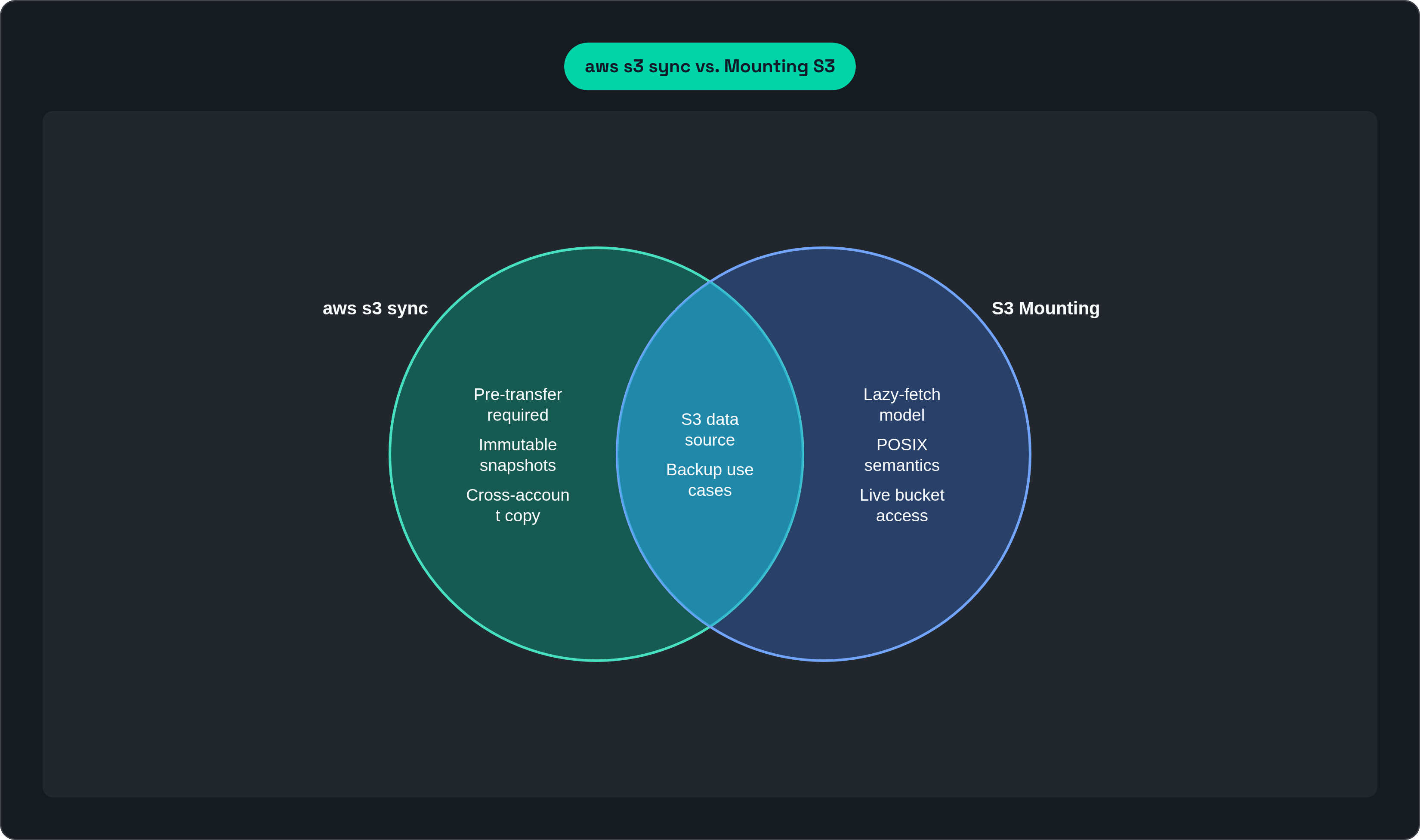
None of this makes aws s3 sync obsolete. It's still the right call for one-directional transfers where latency doesn't matter: a nightly sync of finished outputs to a backup bucket in another region, cross-account replication where nobody's waiting on the copy, shipping a finished model or dataset out to a partner or public bucket. If the dataset's small enough that the copy takes a few seconds against a job running for hours, sync is simpler. Simpler is good, when it's actually simpler.
It also holds up better for compliance and audit work, where you want an immutable, versioned snapshot frozen at a point in time. That's a real strength, in the right context.
Here's a decent gut check: if the first question before a job kicks off is "has the sync finished yet," that's your answer. Swap in a mount. And the two aren't mutually exclusive, you can mount the bucket for live access while training runs, then still sync finished artifacts off for archive once the work's done.
What teams actually gain when they drop the sync step
Jobs start the moment they're submitted. No pre-transfer stage, no idle GPU burning cash while a copy job crawls along somewhere in the background.
A whole pipeline disappears too. No sync script to write, schedule, monitor, or get paged about at 2 a.m. because it failed silently. No back-and-forth between teams asking whether the data landed yet.
Multi-epoch training gets meaningfully cheaper. A cache layer reads each object out of S3 exactly once, and every epoch after that gets served locally, so the old penalty of re-fetching the same data over and over quietly goes away. And because a real mount gives you full POSIX behavior, flock, atomic rename, multiple workers can read from and write to the same mounted path safely, coordinating in a way sync-based workflows have always struggled to pull off cleanly.
This article is sponsored by Archil.