S3 Bucket Terraform Configuration Patterns
Terraform patterns that prevent S3 misconfiguration, cost overruns, and audit failures at scale.
Sponsored by Archil
If you've ever managed more than a handful of S3 buckets by hand, you already know where this is going. The AWS console works fine when you have three buckets and one person making changes. It falls apart fast when you have thirty buckets, three environments, and a team of five who all have console access. Nobody knows who changed what, settings drift between dev and production, and the one time you need to prove a bucket was encrypted before an incident, there's no record. Terraform fixes this. You get version-controlled config, a plan-review-apply workflow, and the same bucket settings reproduced exactly across every environment. The AWS Terraform provider crossed 4 billion downloads as of May 2025, which tells you this isn't a niche workflow anymore. It's how AWS infrastructure gets managed at scale. This article walks through the patterns that matter most: secure baseline, versioning, lifecycle rules, remote state, multi-environment structure, and ML pipeline topology. Apply these consistently and your S3 configuration becomes something you can actually audit, review, and trust.
How the AWS provider and bucket resource have changed, and what that means for existing configs
Before you write a single resource block, pin your provider. The minimum recommended version is hashicorp/aws ~> 5.0. If you're inheriting an older codebase, this is the first thing to check.
April 2023 brought a breaking change that still catches teams off guard. Amazon now enables Block Public Access and disables ACLs by default on all new buckets. Object Ownership defaults to BucketOwnerEnforced. That sounds fine until you run terraform apply on a config that sets an acl parameter and get back The bucket does not allow ACLs. No warning before apply. It just fails. Any access pattern built around ACLs needs to be replaced with bucket policies. This is not optional.
Two more things to update if you're working from old examples:
awss3bucketobjectis deprecated. The current resource isawss3_object. New features and bug fixes go there, not to the old one.- Keep the
awss3bucketresource itself minimal. Manage versioning, encryption, ownership, and public access as separate linked resources.
That last point is worth slowing down on. The old pattern was one giant bucket resource block with everything nested inside it. It worked, but it was hard to read, hard to review in a pull request, and nearly impossible to override for a specific environment without duplicating the whole block. The modern pattern is cleaner: a small awss3bucket resource, then separate resources that each reference bucket = awss3bucket.this.id. Each piece is its own thing. Easy to swap, easy to review, easy to understand.
One more thing: S3 bucket names are globally unique across all AWS accounts in the same partition. Use a deterministic, DNS-safe naming convention like org-env-app-purpose, and consider appending the account ID or a random suffix to guarantee uniqueness at plan time. Nothing is more frustrating than a terraform apply that fails because someone in another account already took your bucket name.
The secure baseline: the four resources every production bucket needs
Think of this as a checklist. These are not optional extras. These are the four resources every production bucket requires, and they all reference the same bucket via bucket = awss3bucket.this.id.
1. awss3bucketpublicaccess_block
Enable all four options:
blockpublicacls = trueignorepublicacls = trueblockpublicpolicy = truerestrictpublicbuckets = true
73% of cloud data breaches in 2024 involved misconfigured object storage. Public access block is the single highest-leverage control you have. It takes ten lines of Terraform. There is no good reason to skip it.
2. awss3bucketownershipcontrols
Set object_ownership = "BucketOwnerEnforced". This aligns with the April 2023 default and makes the ownership model explicit in code rather than implied by AWS behavior.
3. awss3bucketserversideencryptionconfiguration
Use SSE-KMS with a dedicated awskmskey resource. And set bucketkeyenabled = true. That one flag reduces per-request KMS API call costs significantly at high object counts. It's easy to miss in the docs and easy to add once you know it exists.
4. awss3bucket_versioning
Covered in depth in the next section, but it belongs in this list. Versioning is part of the baseline for any bucket holding state, logs, or data you'd want to recover.
On tagging: always include environment, team, and cost-center tags on awss3bucket. These enable cost allocation reports and audit filtering later. When you're trying to figure out which team owns a bucket that's racking up unexpected charges, tags are the only thing that saves you.
Versioning done right, and the cost trap it creates without a lifecycle rule
Versioning is simple to understand. Every overwrite or delete creates a new version. Objects are never truly gone until you explicitly expire them. That's the feature. It's also the problem if you're not careful.
Versioning belongs on any bucket holding Terraform state, logs, or backup files. Basically anything where recovery matters. You enable it with awss3bucket_versioning and status = "Enabled". There's also "Suspended", which pauses versioning without deleting existing versions. Useful if you're migrating or troubleshooting.
Here's the cost trap. A team enabled versioning on a backup bucket. No lifecycle policy. They were running daily backups. After 90 days, every file had 90 versions, all sitting in Standard storage, all getting billed. Their monthly S3 cost went from $400 to $2,100 in three months. Nobody noticed until the AWS bill arrived.
The fix is simple. Versioning and a lifecycle expiration rule on noncurrent versions are a pair. Never configure one without the other. Full stop.
What that looks like in practice:
- Expire noncurrent versions after 30 days
- Use
newernoncurrentversionsto keep the most recent N versions if you want a safety buffer - Add a rule to expire expired object delete markers
That last one catches people. Delete markers accumulate silently and add listing overhead. They're easy to clean up with a lifecycle rule once you know they exist.
Lifecycle rules for cost control across storage classes
Since AWS provider v4, lifecycle rules live in awss3bucketlifecycleconfiguration, separate from the bucket resource. One important constraint: S3 only supports one lifecycle configuration resource per bucket. If you try to apply a second awss3bucketlifecycleconfiguration targeting the same bucket, you'll get an apply-time error. All your rules go in one resource block.
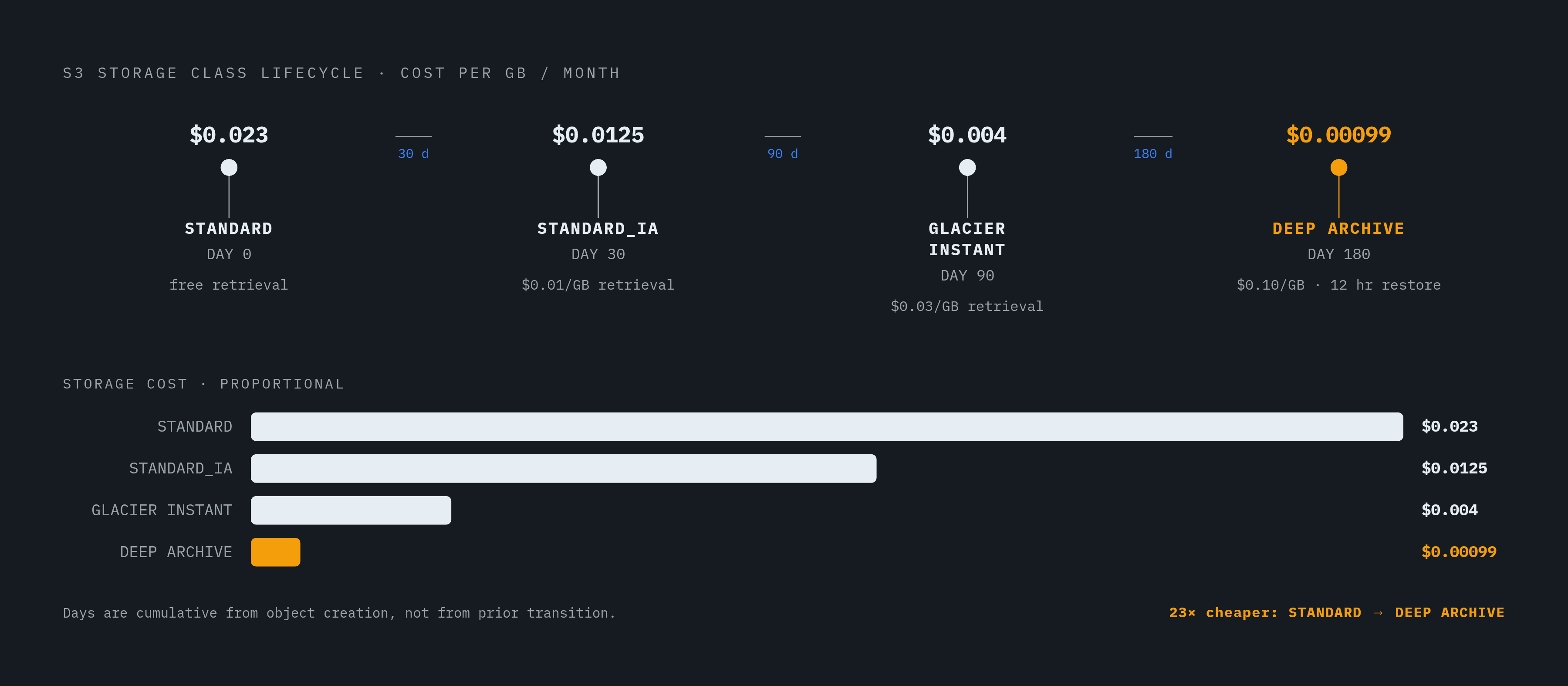
The standard transition ladder looks like this, based on US East 2025 per-GB per-month storage rates:
| Days | Storage Class | Cost/GB/month | Retrieval Cost | |---|---|---|---| | 0–30 | STANDARD | $0.023 | Free | | 30 | STANDARD\IA | $0.0125 | $0.01/GB | | 90 | GLACIER\INSTANT\RETRIEVAL | $0.004 | $0.03/GB | | 180 | DEEP\ARCHIVE | $0.00099 | $0.10/GB, 12-hour restore |
One thing to be explicit about: transition days are cumulative from object creation, not from the previous transition. If you set IA at 30 days and Glacier at 90 days, the object spends 60 days in IA before moving. Not 30. Get the arithmetic wrong and your objects end up sitting in the wrong tier longer than intended, which means you're paying more than you should be.
Two gotchas that quietly negate your savings:
- Objects smaller than 128 KB are excluded from transitions by default. Forcing them into IA or Glacier can actually cost more than leaving them in Standard. Don't transition small objects.
- STANDARD\_IA and One-Zone IA carry a minimum 30-day storage charge. Delete an object after 10 days and you still pay for 30. Know this before you design aggressive deletion rules.
For environment-specific retention, parameterize via variables. Don't write separate lifecycle resource blocks for dev and production. A dev bucket might use aggressive 90-day deletion. A production compliance bucket might need 7-year retention. The same module handles both if you wire the retention windows through variables.
When to skip the manual transition ladder entirely: if your access patterns are unpredictable or variable, use Intelligent-Tiering. No retrieval fees, no manual tuning required. More than 40% of organizations still cite workload optimization and waste reduction as their primary cloud cost focus in 2025 (per ProsperOps State of FinOps). Lifecycle rules are where that work starts for S3.
Using an S3 bucket as a Terraform remote state backend
Local state has three problems. It breaks collaboration. It has no locking. And if the machine disappears, so does your state file. Remote state solves all three.
The S3 backend configuration needs at minimum: bucket, key, region, and encrypt = true. That's your floor.
State locking:
The old approach used a DynamoDB table for locking. It worked, but it's now deprecated and will be removed in a future version. Don't start new projects with it.
The current approach, available in Terraform v1.10 and above, is native S3 state locking via conditional writes. Enable it with use_lockfile = true in the backend block. No DynamoDB table needed. If you're building something new on provider v5+, use this. If you have existing DynamoDB-based setups, put migration on the roadmap.
Credentials:
HashiCorp explicitly warns against hardcoding credentials in the backend block or passing them via -backend-config. Both approaches store credentials in .terraform and in plan files. Use IAM roles or environment variables instead. This is not a "best practice" suggestion. It's a security requirement.
The state bucket itself:
Apply the full secure baseline from the earlier section. Versioning especially. When a bad apply corrupts state, versioning is how you get it back. Public access blocked, encrypted, ownership enforced.
Workspace key layout:
The default workspace stores state at the key you configure. Other workspaces go to env:// by default. Understanding this path structure matters when you're debugging missing state and wondering why Terraform can't find what you just applied.
The bootstrap problem:
The state bucket must exist before Terraform can use it as a backend. You can't manage it with the same configuration that depends on it. Teams typically provision it with a minimal one-time apply or via AWS CLI, then import it if needed. Plan for this upfront so it doesn't catch you on day one.
Structuring multi-environment S3 configuration with variables and modules
The naive approach is copy-pasting the same bucket config three times with different names. It works for about a week. Then dev gets a new lifecycle rule that nobody adds to staging or production, and you've created configuration drift that's invisible until something breaks in production that worked fine everywhere else.
The better approach: a module that accepts environment, retentiondays, enableversioning, and kmskeyarn as inputs and wires them into the secure baseline resources. One module, all environments. Different behavior comes from different variable values, not different resource blocks.
What that looks like per environment:
- Dev: aggressive deletion, short noncurrent version expiry, no Glacier transition. Keep costs low, iterate fast.
- Staging: mirrors production structure, shorter retention. You want to catch production-like failures without paying production-like storage bills.
- Production: full transition ladder, compliance retention, versioning always on. No shortcuts.
Workspaces vs. separate state files:
This is a genuine choice with real trade-offs. Workspaces share the same module with different variable files. Separate state files give harder isolation between environments. Neither is wrong. What is wrong is letting it drift, where some environments use workspaces and others use separate state files because nobody documented the decision. Pick one, document it, enforce it.
Module outputs:
Always output the bucket ARN, ID, and domain name from the module. Downstream resources like IAM policies, Lambda configs, and SageMaker jobs should reference these outputs, not hardcoded bucket names. Hardcoded names are how you end up with IAM policies pointing at a bucket that was renamed three months ago.
Enforcing the pattern at scale:
Tag all buckets with ManagedBy = "terraform" and use AWS Config rules or OPA/Sentinel policies to flag any bucket that lacks the public access block or encryption. This keeps drift detectable even when someone skips Terraform and applies manually. And someone always eventually applies manually.
S3 configuration patterns for ML data pipelines
ML data pipelines have a specific bucket topology. Each stage of the pipeline gets its own bucket. A clean pattern uses for_each = toset(["raw", "processed", "features", "models", "artifacts"]) with DataStage and Purpose = "ml-pipeline" tags. Each bucket gets the full secure baseline. The lifecycle rules differ by stage.
The raw bucket is special. It's append-only and never overwritten. It's the source of truth. If a downstream transformation produces garbage output, you need the original input intact. Long retention here. No aggressive deletion.
Artifacts, on the other hand, can expire quickly. A model artifact from a training run six months ago is probably not what you're serving today.
SageMaker wiring:
The canonical Terraform ML pattern provisions S3 buckets for training data and model output, IAM roles, ECR repositories, and Step Functions to orchestrate the pipeline. Bucket IDs flow directly into IAM policies and Step Function definitions as Terraform references. Not hardcoded strings. This is the same discipline as the multi-environment module pattern. References, not literals.
Where standard S3 latency becomes the bottleneck:
GetObject time-to-first-byte on S3 Standard commonly lands in the 30 to 200 ms range. For batch workloads, that's fine. For GPU instances waiting on data reads between training steps, that's expensive idle time. GPU instances cost real money per minute. Idle GPU time waiting on storage reads is a cost problem.
S3 Express One Zone as the solution for hot data:
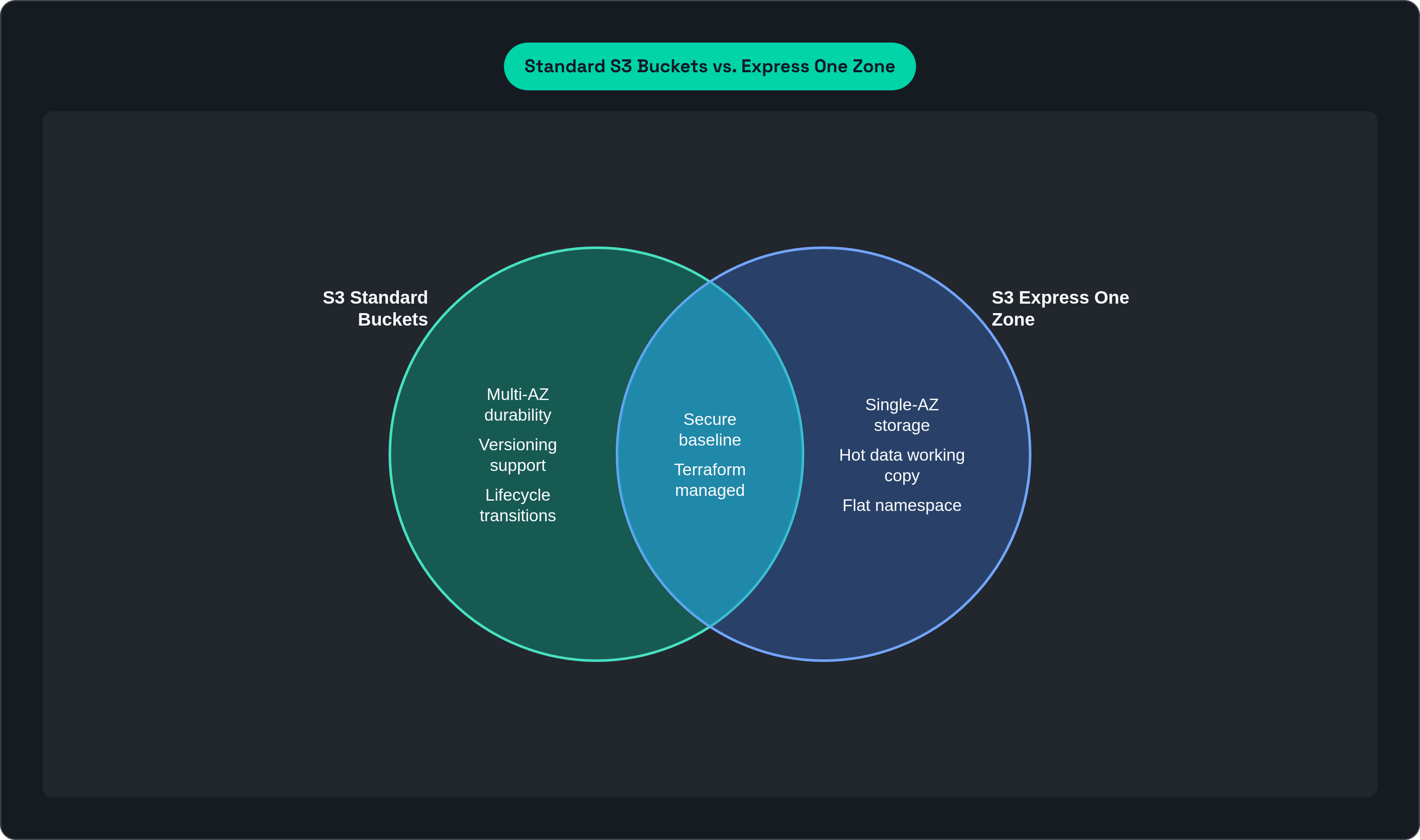
AWS built Express One Zone for exactly this use case. Single-digit millisecond access, up to 10x faster than S3 Standard, and request costs up to 50% lower (per AWS). It uses a directory bucket type with a flat namespace optimized for high request rates.
The Terraform resource is awss3directorybucket, which is separate from awss3_bucket. The trade-off is single-AZ durability. It's not resilient to a full AZ loss. That makes it appropriate for hot working copies, not for source-of-truth data.
The pattern:
- Raw and archive buckets stay in Standard or Standard-IA
- Before a training run, the active training dataset is staged into an Express One Zone bucket
- The training job reads from Express One Zone
- After the run, the hot copy can expire; the source data in Standard is still intact
Bedrock and RAG pipelines:
Same Terraform module pattern. S3 holds the knowledge base source documents, wired into OpenSearch Serverless and Lambda via Terraform outputs. The same bucket module you use everywhere else, with a different lifecycle policy tuned for document freshness. No special snowflake config. Just the same pattern applied to a different use case.
That consistency is the whole point. Once you have the patterns down, a new bucket type is just a new set of variable values. The structure is already there.
This article is sponsored by Archil.