S3 Lifecycle Rule Mechanics and Common Pitfalls
Misunderstanding day-counting and filters turns cost-saving rules into budget disasters.

S3 lifecycle rules run on internal logic that almost nobody reads closely, and that gap is exactly where the expensive mistakes live. Get the mechanics right, prefix and tag filters, day-counting, versioning interactions, and most of the pitfalls take care of themselves. Skipping that step leaves the team explaining to finance why the "cost-saving" archive migration made the bill go up.
Two action types exist, full stop: Transition, which moves an object to a different storage class, and Expiration, which deletes it. That's the whole universe of what a lifecycle rule can do. A lifecycle configuration attaches to a bucket, not to individual objects, and it applies to everything already sitting there plus anything added afterward. Write a new rule on a bucket that's been collecting objects for three years, and yesterday's upload gets evaluated right alongside a file from years earlier. Each rule needs a Filter (what it targets), an Action (what happens), a Status (Enabled or Disabled), and timing (Days or a Date, never both). Status is the only clean way to pause a rule without deleting and rebuilding it, so use it to test before anything goes live in production. Don't rely on rule order to keep you safe. It won't pause a rule either, since rule order offers no such protection, so use Status instead to test before anything goes live in production.
Filter resolution: prefix, tag, size, and the And element
A Filter accepts exactly one of five things: Prefix, Tag, ObjectSizeGreaterThan, ObjectSizeLessThan, or And. That's an API constraint, not a suggestion someone wrote in a style guide. A Filter accepts exactly one of five things: Prefix, Tag, ObjectSizeGreaterThan, ObjectSizeLessThan, or And; combining a prefix and a tag without wrapping them in the And element gets the rule rejected as malformed rather than making it stricter.
Prefix filters catch anything whose key starts with a given string, so a prefix of tax/ scoops up tax/doc1.txt and tax/doc2.txt without you naming either one. Tag filters work differently: they target objects by key-value labels regardless of where those objects sit in the folder structure, which makes them useful when the thing you want to act on is scattered across ten prefixes instead of living neatly in one. Size filters (ObjectSizeGreaterThan and ObjectSizeLessThan) solve a different problem entirely, and the section on the 128 KB trap further down explains why they matter for cost.
Leaving the prefix empty is a valid move. It just means the rule applies to every object in the bucket, no exceptions. That's fine when it's on purpose. It's a five-alarm problem when it's an accident, and that happens more than anyone wants to admit. New rules should always carry an explicit Filter element. The old top-level Prefix syntax still works, but it's a legacy pattern, so new rules should always carry an explicit Filter element rather than following that pattern.
How day-counting works and when actions execute
Days count from the object's creation date. Not the date the rule got written, the date the object itself landed in the bucket. That single fact trips up more people than anything else in this system, because it means a brand-new rule can reach back in time and immediately queue objects that have been sitting there for years.
The minimum value is 1 day. Days: 0 is not valid in most transition contexts. Check the AWS documentation for the specific storage classes and conditions where same-day transitions are permitted before using it. If a single rule stacks multiple transitions, the Days values have to climb in order. Any chained transition where a later entry has a lower Days value than an earlier one fails validation, because the Days values must climb in order. Rules can use an absolute Date instead of a Days count, but never both in the same rule. That combination isn't on the menu.
Eligibility and execution run on two different clocks. An object can become eligible for an action and then sit around for days, sometimes weeks, before S3 actually processes it, since these actions run asynchronously through an internal queue. Billing doesn't wait for execution, though. It flips the moment eligibility hits, regardless of when the physical move happens. Intelligent-Tiering is the one exception: billing there changes only once the transition physically completes. And after adding or editing a lifecycle configuration, give it a few minutes before assuming it's live everywhere. Propagation isn't instant.
Rule interaction when multiple rules target the same object on the same day
An object can become eligible for more than one action on the same day, and S3 doesn't reject that setup. It picks a winner using a fixed hierarchy. Permanent deletion outranks transition. Transition outranks the creation of delete markers. And if an object is eligible for both Glacier Flexible Retrieval and a Standard-IA or One Zone-IA transition on the same day, Glacier Flexible Retrieval wins.
None of this gets logged anywhere obvious. S3 doesn't announce which tiebreaker fired, and it doesn't flag the conflict either. Picture a broad expiration rule sitting on the same prefix as a narrower transition rule, both set to trigger on day 90. The object gets deleted, not archived, and the order someone typed the rules into the console makes zero difference to the outcome. AWS's own documentation points toward using the Status field to disable rules during testing rather than trusting rule order to sort things out. That tracks, since rule order isn't actually a variable in this equation.
Bucket policies don't override lifecycle rules, either. Not even a deny-all policy stops a scheduled transition or expiration from executing. Bucket policies sit at a layer above lifecycle rules, so lifecycle actions run on their own schedule, immune to whatever the policy says.
How versioning changes what expiration rules do
Turning on versioning changes what a standard expiration rule means. Instead of deleting the object, it drops a delete marker on top and pushes the current version into noncurrent status. The object isn't gone, it's just hidden behind a marker, and every previous version keeps sitting in storage, racking up charges forever, unless something else steps in.
That something else is NoncurrentVersionExpiration, a completely separate rule action. It does not inherit from the regular Expiration rule, no matter how closely related the two sound. Want old versions to tier down into cheaper storage instead of parking in Standard indefinitely? That takes NoncurrentVersionTransitions, also configured on its own. And even after every noncurrent version has been expired out, the delete marker itself can still sit there racking up a tiny but real storage charge, which is what ExpiredObjectDeleteMarker exists to clean up.
NoncurrentDays, the parameter NoncurrentVersionExpiration runs on, counts from the moment a version became noncurrent. That distinction produces a bill that keeps climbing every month while the lifecycle configuration looks, on paper, completely correct. Nothing's broken here. The rule is just doing something different than what most people think they configured.
The cost mechanics that make archive transitions more expensive than they look
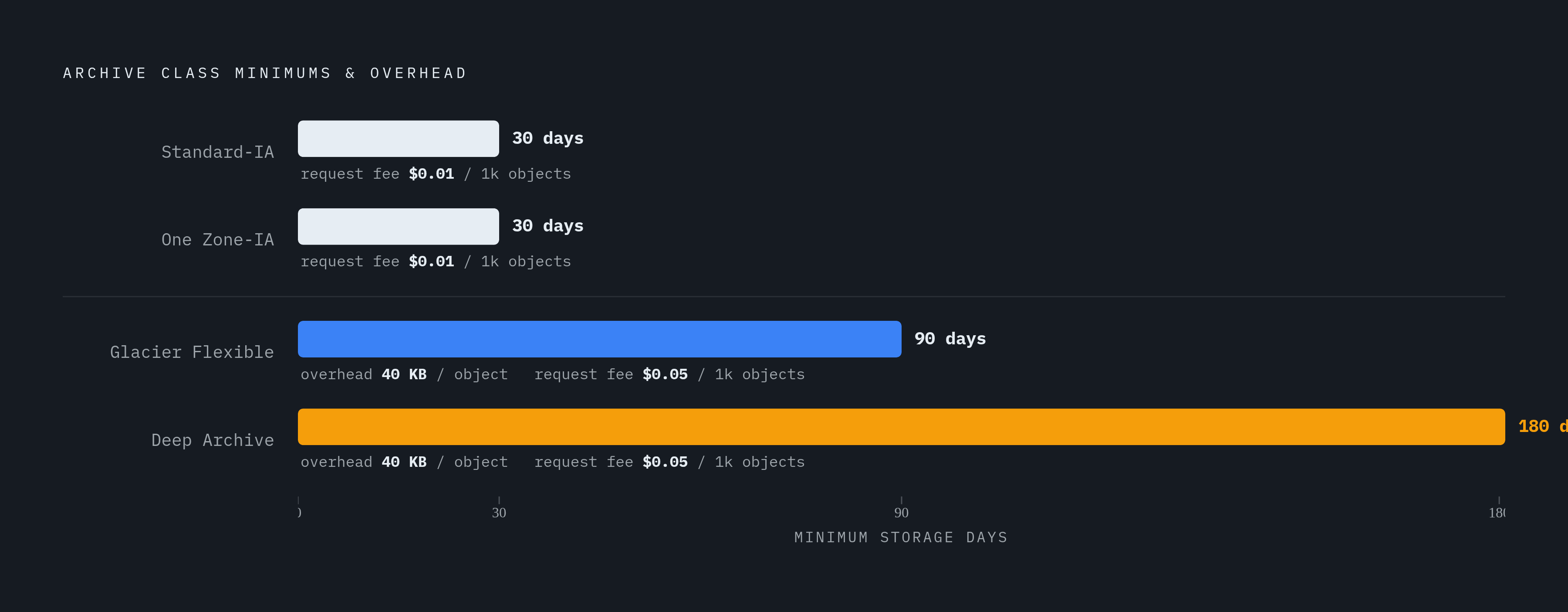
Every storage class below Standard carries a minimum duration charge, and it applies whether the object stays the full stretch or gets pulled out early. Standard-IA and One Zone-IA charge a 30-day minimum. Glacier Flexible Retrieval runs 90 days. Glacier Deep Archive runs 180. Pulling an object out early doesn't help, since S3 still bills the rest of the minimum window anyway, so leaving early saves nothing.
Glacier classes also tack on per-object overhead: 8 KB billed at Glacier rates for the object name and metadata, plus another 32 KB for index-related metadata, 40 KB total, billed at whatever rate the destination class charges. That overhead kicks in the moment the lifecycle rule's condition is satisfied, before the physical transition has even happened.
Request fees stack on top of that. Standard-IA and Glacier Instant Retrieval charge $0.01 per 1,000 objects transitioned. Glacier Flexible Retrieval and Deep Archive charge $0.05 per 1,000. Running the math on a bucket holding 100 million small objects shows that a single lifecycle sweep to Glacier Flexible Retrieval or Deep Archive generates $5,000 in transition fees alone, sometimes more than the first month of storage savings the move was supposed to deliver. Lifecycle transitions themselves don't carry data retrieval charges, but pulling anything back out of archive storage later does, and restoration isn't instant either: Glacier Flexible Retrieval takes 1 to 12 hours, Deep Archive takes 12 to 48. Fine for a compliance archive nobody touches. Considerably less fine when someone needs that file for a meeting in twenty minutes.
The 128 KB threshold and the small-object trap
Standard-IA and Glacier Instant Retrieval bill every object as if it were at least 128 KB, no matter how small it actually is. Glacier's per-object overhead, the same 40 KB from the section above, stacks right on top of that minimum. Adding it up shows that a 40 KB file moved into Glacier can end up costing more in overhead and minimum billing than it would have just sitting in Standard the entire time. Cheaper storage class, more expensive object. That's the trap in one sentence, and it's the reason blanket archive rules on buckets full of small files are a bad idea almost every time.
As of September 2024, AWS changed the default behavior here: lifecycle rules no longer automatically transition objects smaller than 128 KB into any storage class. Before that change, small objects could still get swept into Glacier Flexible Retrieval or Deep Archive by default, quietly generating the exact overhead problem described above. The default protects against it now, though the option to override that protection still exists. It just takes an explicit size filter to turn it back on.
The right pattern: gate any archive-bound rule with ObjectSizeGreaterThan, using 128 KB as a floor and pushing that up toward 1 MB specifically for Glacier destinations, to leave enough margin over the overhead and minimum-billing math. Someone builds a bound rule with ObjectSizeGreaterThan, using 128 KB as a floor and pushing that up toward 1 MB specifically for Glacier destinations, to leave enough margin over the overhead and minimum-billing math, and the failure appears in the invoice almost every time in the same shape. Someone reads that Deep Archive runs around $0.00099 per GB against Standard's roughly $0.023, writes a blanket rule transitioning everything after 30 days, and watches the next invoice climb instead of drop, because the bucket is full of millions of small objects where the per-object transition fees outrun whatever the storage savings were supposed to be.
Four rule-configuration mistakes that produce silent failures
Nothing about a bad lifecycle rule throws an error at save time. Nothing about a bad lifecycle rule throws an error at save time: it just saves, sits there, and does nothing, or does the wrong thing, and the evidence appears weeks later as a strange line item on the bill. That delay is what makes these mistakes expensive: by the time anyone notices, the rule has already been running quietly in the wrong direction for a month.
One documented failure: an empty rule added into a configuration silently blocked every other rule in that same configuration from running, with no error raised anywhere. Leaving the filter empty applies the rule bucket-wide, which is completely fine when intentional and a genuine disaster when it isn't, so production buckets should carry an explicit prefix or tag unless full coverage really is the goal. Days set to 0 is not broadly valid and will fail validation in most contexts. And transitions inside a single rule need ascending Days values. Get that order backward and the rule will not behave as intended, which is why ascending Days values must be verified carefully before saving.
Glacier Flexible Retrieval and Deep Archive have significant limitations on outbound transitions as far as lifecycle rules go. Moving objects back toward warmer storage classes is not straightforward. Getting objects back into active use from these classes involves retrieval delays, and the error messages around this limitation don't always spell that out clearly. Since S3 sends no alert when a rule fires, or fails to fire, catching any of this in real time requires active monitoring rather than waiting for the bill. Waiting for the bill to tell the story is the slow, expensive way to find out.
Two cost drains that live outside the transition rules themselves
Multipart uploads that never finish don't just vanish. If an upload gets abandoned or fails partway through, the parts that already made it to S3 stay put, billed at Standard rates, and they don't show up as objects in the console. They're invisible unless someone specifically goes looking for in-progress multipart uploads, which almost nobody does until the bill prompts the search.
The fix is AbortIncompleteMultipartUpload, its own distinct lifecycle action, separate from both Transition and Expiration, and it has to be configured on purpose. A 7-day threshold is a reasonable baseline for AbortIncompleteMultipartUpload rules.
Version sprawl is the second drain, and it's really the same versioning issue from earlier showing up in a different form. Versioning is great insurance against accidental deletes, but every noncurrent version left unmanaged keeps accruing storage charges indefinitely. NoncurrentVersionExpiration and NoncurrentVersionTransition rules have to be written explicitly. They don't inherit anything from whatever expiration logic governs the current version. Both drains share the same root cause: the console never displays the cost at the object level, so it's easy to build a bucket that looks complete on paper and isn't in practice.
When lifecycle rules are the wrong tool: retroactive application and access-pattern mismatch
Lifecycle rules look backward automatically, which is a strange thing to say about a tool that seems forward-looking, but the day-count math makes it true. A rule written today counts Days from each object's original creation date, so existing objects older than the threshold get swept up immediately. That's fine for ongoing management. It's the wrong mechanism for deliberately migrating years of historical data all at once, since lifecycle rules apply that kind of bulk change unevenly and often too slowly for anyone's patience. S3 Batch Operations, working off an S3 Inventory manifest, is built for exactly that job instead, and reaching for it over a lifecycle rule for a one-time migration is the right call almost every time.
The costlier mistake sits one level up, in the decision of whether to transition data. Glacier Flexible Retrieval at roughly $0.004 per GB per month against Standard's roughly $0.023 looks like an 80%-plus discount right up until retrieval fees and the 90-day minimum enter the picture, at which point actively accessed data can end up costing more in archive storage than it ever did in Standard. Writing a blanket transition rule without checking how often that data actually gets touched is the single most common way teams turn a savings plan into a cost increase. Pull S3 Storage Lens or S3 Inventory data on real access frequency before committing any prefix to a storage class target, so the rule encodes a conclusion already reached, rather than standing in for analysis that never happened.
How persistent, POSIX-mounted object storage changes the calculus for AI and data-intensive workloads
Lifecycle rules exist to manage a specific problem: S3's storage classes are flat and undifferentiated by default, and someone has to decide which objects deserve cheaper, slower storage and which don't. That framework assumes a certain kind of workload, one where data ages predictably and access patterns settle down over time.
AI and data-intensive pipelines don't always follow that pattern, and pretending they do is where a lot of these lifecycle rules go wrong. Training data, checkpoints, and embeddings often get touched repeatedly and unpredictably across a project's life, which makes the "age it out and archive it" logic a much harder fit. Persistent, POSIX-mounted object storage changes that equation by giving applications direct file-system-style access to data that would otherwise need constant lifecycle tuning to avoid landing in the wrong tier at the wrong moment. The lesson from every mechanic above still holds here just as much: know the access pattern before choosing where the data lives. The storage class and the access model both have to fit the workload, not just the price sheet.
Sources
- Managing the lifecycle of objects - Amazon Simple Storage Service
- S3 Lifecycle Policies: Optimizing Cloud Storage in AWS
- Examples of S3 Lifecycle configurations - Amazon Simple Storage Service
- LifecycleRule - Amazon S3
- Lifecycle configuration elements - Amazon Simple Storage Service
- Adding filters to Lifecycle rules - Amazon Simple Storage Service
- aws.amazon.com
- docs.aws.amazon.com