What Is Amazon S3 and How Does It Work
A flat-namespace storage system that scales to hundreds of trillions of objects without slowdown.
Sponsored by Archil

Before S3 clicks, you need to know what it isn't.
Engineers run into three storage paradigms regularly, and they genuinely are not interchangeable:
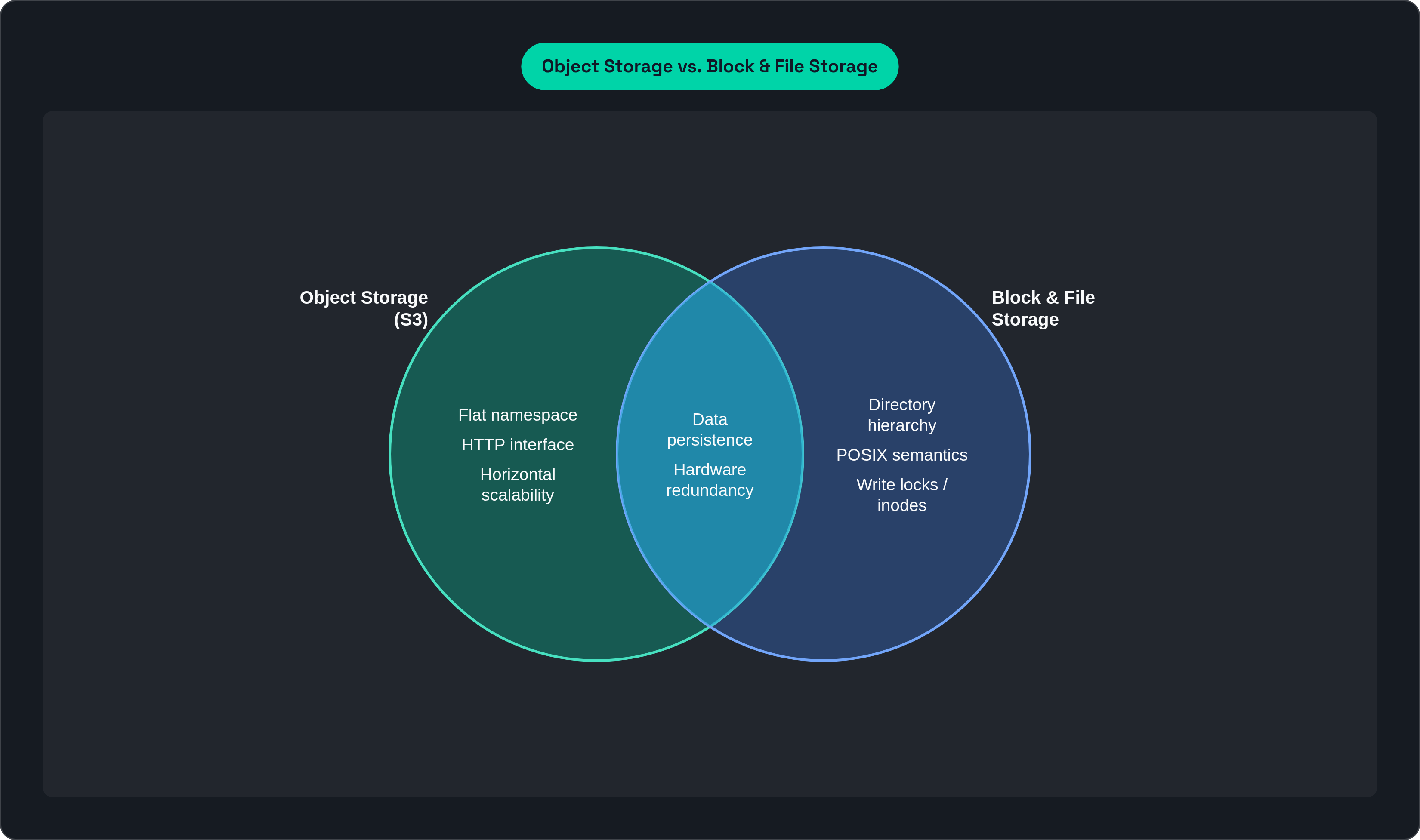
Block storage. Raw disk chunks. No built-in metadata, no file system. Your database and OS disk live here. Fast, low-level, and you manage basically everything yourself.
File storage. The classic folder-and-file hierarchy. POSIX semantics, directory traversal, write locks. Works great until you're dealing with hundreds of billions of files, at which point it starts to visibly buckle.
Object storage. A flat namespace. Every piece of data gets a unique key, a payload, and metadata. No folders. No locking. HTTP interface.
The trade-off object storage makes is deliberate: give up the familiar directory structure, get extreme horizontal scalability in return. I'll be honest, the first time someone explained this to me I thought "flat namespace" sounded like a downgrade. It isn't. It's like trading a filing cabinet with locked drawers for an infinitely wide wall of numbered cubbies — there's no parent drawer to jam on a write, no inode to update. Writes go straight to the object index, which means you can address hundreds of trillions of objects without the system slowing to a crawl.
Every S3 object has three parts:
The data itself
System metadata (content type, creation date, storage class)
Optional user-defined metadata (custom key-value pairs you attach)
The folders you see in the S3 console are a visual trick. When your key is photos/2024/dog.jpg, S3 renders the slash as a folder. Underneath, it's completely flat. That's a deliberate design choice with real performance consequences. No directory to update on a write means no lock contention, no bottleneck. Just a key going into an index.
The HTTP interface is what turned S3 into a universal standard. Any language, any runtime, any cloud can speak HTTP. That wasn't an accident.
How S3 Stores and Retrieves an Object Internally
S3 is not a monolithic storage system. It's a collection of over 350 microservices, each handling specific tasks, spread across multiple AWS regions and availability zones.
When a PUT request arrives:
The request hits the S3 front end and gets authenticated.
It gets routed to the appropriate storage nodes.
The data is written and replicated across those nodes.
Only after replication is confirmed does S3 return a 200 OK.
By the time you get a success response, your data is already in multiple places. That ordering matters more than it sounds.
Retrieval is fast because of how S3 partitions its index. S3 splits the key index by prefix, so millions of objects with different prefixes have their index entries spread across thousands of storage nodes. Reads fan out across those nodes in parallel. No single hot path. No one node fielding every request.
For large objects, S3 supports multipart upload. Objects can be up to 50 TB (announced at re:Invent 2025). Anything above 5 GB must use multipart, which lets you break an upload into chunks, push them in parallel, and have S3 reassemble them. Faster uploads, resilience to network interruptions, and simpler pipelines for large datasets.
Integrity checking is active, not passive. S3 continuously runs checksums on stored data. If it detects bit rot or corruption, it catches and repairs it automatically. You'll likely never know it happened, which is the point.
How S3 Produces 11 Nines of Durability
99.999999999% durability. Eleven nines. The system is designed so that losing one object per 100 billion per year is the target. Not an observed average. A design target.
How does S3 actually hit that number?
Every object is stored redundantly across a minimum of three Availability Zones by default. These are physically separate data centers. A single facility going dark cannot cause data loss.
The system is built to tolerate multiple simultaneous device failures. When redundancy drops, S3 detects it and repairs automatically.
Continuous checksum verification catches silent corruption before it compounds into something unfixable.
Durability is an architectural property. It's baked into how S3 stores data, not something you opt into.
Here's what eleven nines does not protect against: you. Accidental deletes, application bugs, bad overwrites. If your code tells S3 to delete something, S3 will delete it. Durably. That's where versioning and cross-region replication come in. Those are operational safeguards you layer on top, and skipping them is the kind of thing you only do once before you learn your lesson.
For regulated industries, S3 Object Lock adds WORM protection. Write Once, Read Many. Objects can't be deleted or overwritten during a defined retention period. It supports PCI DSS, HIPAA/HITECH, FedRAMP, and other compliance frameworks. Durability plus immutability is the combination regulated workloads usually need.
The Storage Class System and How S3 Prices Access Patterns
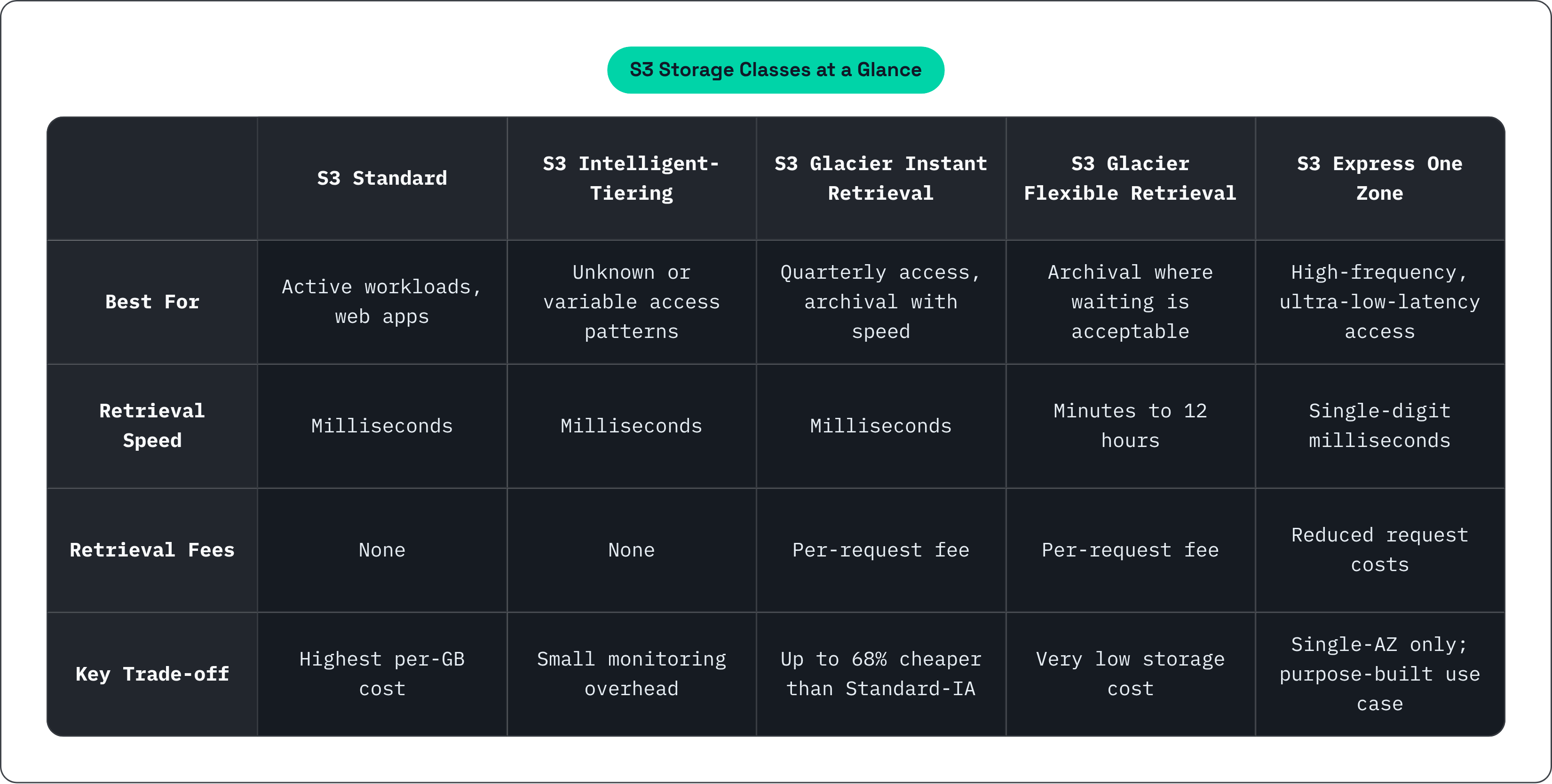
S3 doesn't offer one price. It offers a spectrum of storage classes that trade retrieval speed, availability, and cost against each other. Picking the wrong one for your workload isn't catastrophic, but you will notice it when the bill comes.
Here's the lineup:
S3 Standard. Low latency, high throughput, no retrieval fees. The default for active workloads: web apps, analytics, content distribution.
S3 Intelligent-Tiering. Automatically moves objects between access tiers based on how often they get touched. No retrieval fees, no operational overhead. A solid default when you genuinely don't know your access patterns.
S3 Glacier Instant Retrieval. Up to 68% cheaper than S3 Standard-IA, with millisecond retrieval. Good for data you access roughly once per quarter.
S3 Glacier Flexible Retrieval. Storage costs drop to $0.0036/GB. Retrieval takes anywhere from a few minutes to 12 hours depending on which tier you choose. For archival where waiting is acceptable.
S3 Express One Zone. Single-digit millisecond response times, up to 10x faster than S3 Standard, with request costs up to 80% lower before April 2025 price cuts made it even more accessible. Purpose-built for high-frequency, low-latency access.
As of 2026, S3 has four bucket types: General Purpose, Directory (low-latency), Table (Apache Iceberg for analytics), and Vector (AI embeddings). The storage class model has grown into purpose-built primitives for genuinely different use cases.
Your cost structure is determined as much by which class you pick as by how much data you store. Most S3 cost optimization is a storage class decision. Compression and deduplication help at the margins, but picking the right class is where the real money is.
What S3's Performance Envelope Actually Looks Like
S3 Standard delivers at least 3,500 PUT/COPY/POST/DELETE requests per second per prefix, and at least 5,500 GET/HEAD requests per second per prefix. Per prefix. Not globally. Not per bucket.
Ten prefixes in a bucket means up to 55,000 read requests per second. There's no cap on how many prefixes you use. Throughput scales with parallelism, and you control the parallelism through how you name your keys. This is one of those details that sounds minor until you're debugging a performance problem at 2 a.m. and someone finally asks how your keys are structured.
Latency for small objects sits consistently in the 100-200 millisecond range, with 90th-percentile time to first byte typically around 20 milliseconds regardless of object size.
At data lake scale, applications scanning billions of objects can saturate up to 100 Gb/s of network throughput on a single EC2 instance. Aggregate across multiple instances and you're looking at multi-terabit-per-second total throughput. The ceiling is not S3. It's how hard you're willing to push.
For workloads that need more headroom, S3 Express One Zone delivers single-digit millisecond access and up to 2 million transactions per second per directory bucket. After April 2025 price cuts, storage dropped 31%, PUT requests dropped 55%, and GET requests dropped 85%.
S3 Files, generally available in April 2026, adds 1-5 GiB/s aggregate write throughput, up to 50,000 write IOPS per file system, and up to 3 GiB/s per-client read throughput. It brings filesystem-style access patterns to S3-backed storage.
S3 performance is not a fixed property. It's a function of how you structure your keys, how aggressively you parallelize, and which class you pick. Engineers who treat S3 like a slow NAS are using it wrong, and the frustrating part is that S3 won't tell them that.
Why S3 Became the Dominant Data Layer for AI Training
In AWS-centric ML pipelines, S3 is the default home for training datasets. SageMaker reads training data directly from S3 buckets. This is not just convention. It's architecture.
The problem is that GPUs are hungry. They can consume data faster than naive S3 reads can supply it. The bottleneck is usually not the model or the compute. It's the data access pattern, which is a less satisfying problem to debug than a broken model but an extremely common one.
AWS published best practices in December 2025 for ML workloads on S3:
Consolidate datasets into shards of 100 MB to 1 GB
Use sequential access patterns
Cache frequently accessed data for multi-epoch training
Use the Amazon S3 Connector for PyTorch, which outperforms other common access methods
The 50 TB object size limit matters here too. Training datasets like Common Crawl run into the hundreds of terabytes. Larger object sizes mean fewer API calls, simpler pipeline architecture, and less overhead from metadata operations.
S3 Express One Zone's co-location with EC2, EKS, and ECS within a single Availability Zone is what makes low-latency training reads practical. Storage and compute in the same zone means single-digit millisecond access and no cross-zone hops.
The remaining tension: data still has to move from S3 to the compute node before training begins. Download time is dead time for GPUs, and that compounds across epochs and parallel jobs. Caching layers and filesystem abstractions over S3 exist specifically to close that gap. It's not fully closed yet.
S3's Native AI Extensions: Vectors, Tables, and What They Signal
S3 Vectors became generally available in December 2025. It's the first cloud object store with built-in vector search. No separate vector database required.
The scale at launch: 2 billion vectors per index (40 times the preview capacity), up to 20 trillion vectors per bucket. Warm query latency as low as 100 milliseconds, with infrequent queries under one second. AWS claims it reduces the cost of uploading, storing, and querying vectors by up to 90% compared to dedicated alternatives.
Adoption numbers in the first four months: over 250,000 vector indexes created, more than 40 billion vectors ingested, over a billion queries performed.
For teams building retrieval-augmented generation (RAG) pipelines, S3 Vectors plugs directly into Amazon Bedrock Knowledge Base. S3 becomes the vector store. No extra managed service to stand up and pay for, which is either exciting or suspicious depending on how you feel about AWS consolidating more of your stack.
S3 Tables, generally available in December 2024, optimizes storage for Apache Iceberg analytics workloads. Up to 3x faster query performance and 2-3x higher transactions per second compared to self-managed Iceberg tables in general purpose buckets. Over 400,000 tables created since launch.
What this signals: AWS is turning S3 from a passive byte store into an active query layer. Storage with a query engine attached. The architecture is shifting. Compute used to just fetch data from storage. Now storage is starting to answer questions directly.
The S3 API as the De Facto Standard Beyond AWS
S3's API has become the HTTP of object storage. Any storage system implementing the S3 API can be read and written by applications built for S3. Compatible systems span cloud providers, on-premises hardware vendors, and open-source projects.
The S3 API became the integration surface the ecosystem converged on largely because it was already everywhere by the time anyone thought to question it. That's not a compliment exactly, but it's how standards actually happen.
Code written against S3 bucket operations, multipart uploads, presigned URLs, and lifecycle policies transfers to any S3-compatible backend without changes. When people say "cloud-agnostic data layer," they usually mean "S3-compatible layer" in practice.
S3 compatibility is a spectrum, not a binary. Core operations (GET, PUT, DELETE, list) are universally supported. Advanced features like Object Lock, Express One Zone, S3 Vectors, and S3 Tables are AWS-specific.
Knowing where the standard ends and the AWS extensions begin is how you reason about portability before you build. Build on standard API primitives and you can move. Build on S3 Vectors and you're on AWS. Both choices can be correct. Just make them on purpose, not by accident.
The Mental Model That Makes S3 Easier to Use Well
S3 launched on March 14, 2006, as a simple bet: give developers a place to store files over HTTP, charge them by the gigabyte, and get out of the way. Nearly two decades later, it holds over 500 trillion objects, handles 200 million requests per second, and commands nearly 23% of the global enterprise data storage software market. More than the next two competitors combined.
That trajectory is worth sitting with for a second. S3 didn't win by being the flashiest thing AWS ever shipped. It won the same way a good wrench wins — it fit the job, it didn't break, and now it's in everyone's toolbox. The core design was simple enough to understand quickly and scalable enough to never really outgrow.
The things worth internalizing:
Performance is a key naming problem. Prefix structure determines partition distribution, which determines parallel throughput. Random key prefixes spread load. Sequential prefixes concentrate it. Get this right early, because reorganizing millions of keys later is not fun.
Durability is built in, but it doesn't protect you from yourself. Three-AZ replication and continuous integrity checking are baked in. They don't cover your application deleting things it shouldn't. Versioning and lifecycle policies are the operational layer you add on top.
Storage class is a cost architecture decision, not a storage decision. Getting it wrong at scale is expensive and slow to unwind. Intelligent-Tiering as a default for data with unknown access patterns is the lowest-risk starting point.
S3 is not a NAS or SAN. LIST operations are expensive. Small sequential reads are inefficient. Treating it like a network file share is how you end up with a slow, expensive pipeline and no obvious explanation for why.
For AI workloads specifically: the bottleneck is almost never S3's capacity. It's the data movement path between S3 and compute. Shard data into appropriately sized chunks. Co-locate storage and compute in the same AZ. Cache data that gets read more than once.
Because the S3 API became the standard, the mental model you build for AWS S3 travels with you to any compatible backend. Same core primitives. Same partitioning logic. Same performance characteristics. That happened because the design was simple enough to copy and useful enough that everyone did.
This article is sponsored by Archil.