SAN vs NAS for Teams Evaluating Cloud Object Storage
Object storage scales across regions where SAN and NAS hit hard limits.
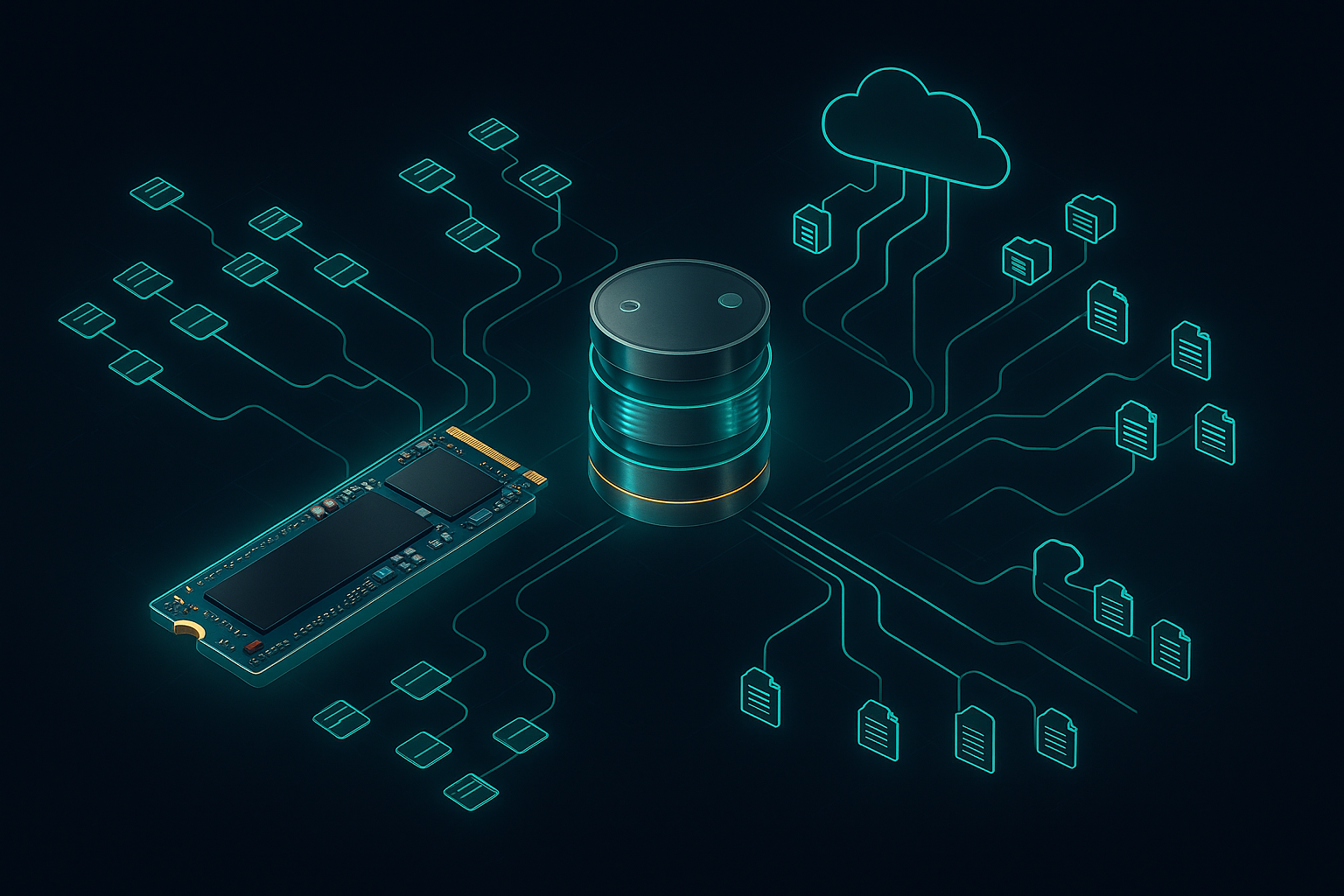
SAN and NAS were built to solve real, distinct problems, and knowing what each one does well is the only way to understand where each one breaks. NAS bundles the file system and the storage into one appliance, so clients reach it over plain Ethernet using SMB or NFS and get back whole files. That's a good match for shared file access: document storage, home directories, general file serving for a company that just needs its people to find their folders. It costs less and takes less work to manage than SAN, and it scales fine for the jobs it was made for. Complete AI Training's storage comparison points out that unstructured data tends to land on NAS specifically because it's cheaper and easier to scale than either direct-attached storage or block-access SAN.
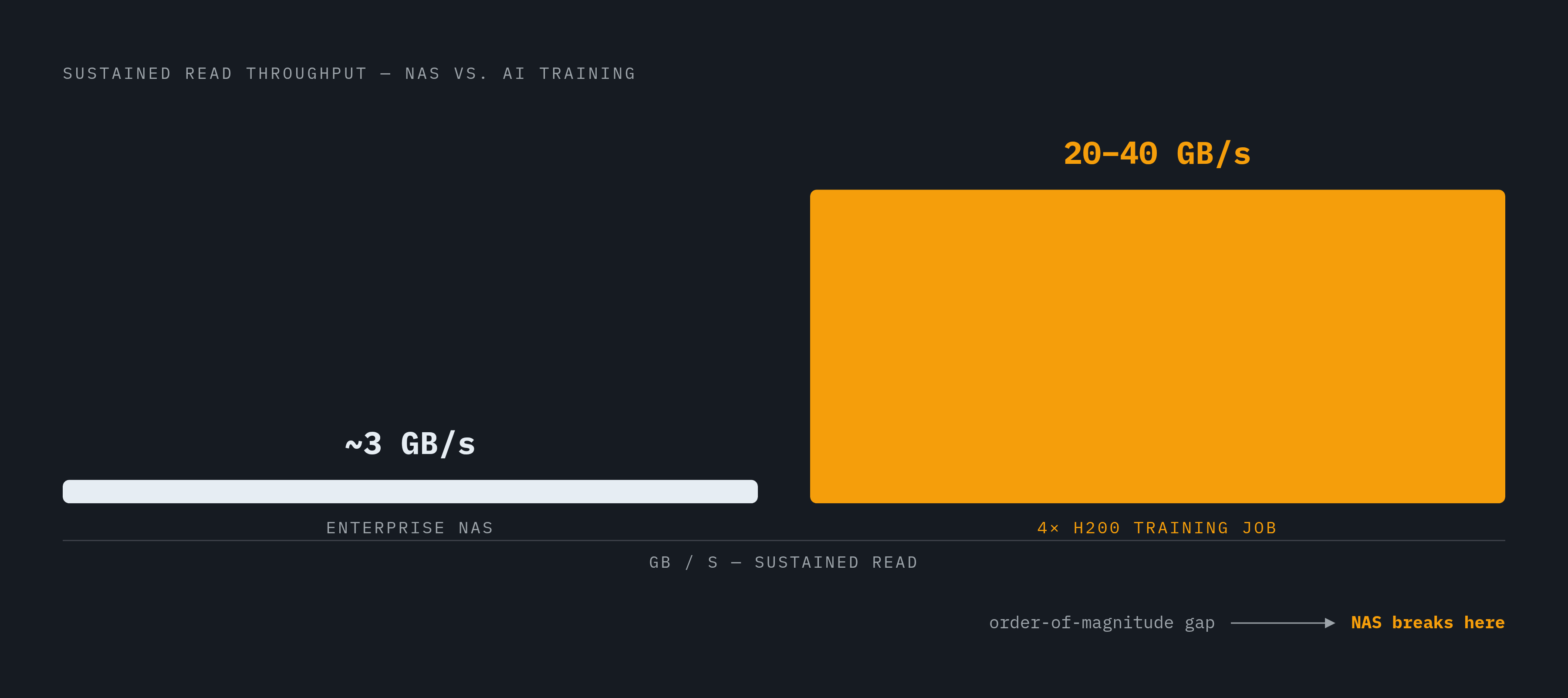
Both SAN and NAS were designed around the same basic assumption: throughput that's moderate and predictable, the kind of load an ERP system or a file server actually produces. A typical enterprise NAS box delivers somewhere in the low single-digit gigabytes-per-second range, with latency measured in milliseconds, and that's plenty for the workloads it was built to carry. None of this is a knock on either system. A delivery van is a fine vehicle until someone asks it to win a drag race, and NAS and SAN were never built for drag racing.
AI training workloads expose the architectural ceiling of NAS
AI training asks for throughput an order of magnitude beyond what NAS delivers, and it asks in a pattern NAS was never built to serve, which makes the mismatch structural rather than something a tuning pass can fix. Training jobs mix large sequential reads of batched data with random access for shuffled samples, then pile on bursty parallel writes every time a checkpoint saves, and none of that lines up with the moderate, sequential, transactional traffic NAS was optimized around. OneSource Cloud's AI storage guide puts a number on the gap: a single training job spread across four H200 GPUs can call for 20 to 40 GB/s of sustained read throughput. That is a different sport entirely from NAS's low single digits.
Small files make it worse. Deep learning datasets often consist of billions of them, and NAS file-system metadata handling slows down hard under that load, long before the disks themselves run out of speed. Add concurrency on top: distributed training means dozens of GPUs or TPUs all reaching for the same storage at once, and NAS pushes much of that traffic through its own onboard file-system processing one request at a time, which leaves GPUs sitting idle waiting on I/O. A GPU waiting on a file read is like a chef standing at an empty pantry: a single training job across four H200 GPUs can require 20 to 40 GB/s sustained read throughput, far more than traditional enterprise storage was built to deliver. The skill is still there. The ingredients just haven't shown up.
OneSource Cloud documents what that looks like in practice. A financial services team stood up eight H200 nodes, and six weeks later their training runs were finishing at a fraction of the speed they'd projected. The GPUs spent more time idle than working, the cause traced back to shared NAS, and fixing it meant a full storage redesign that tacked months onto the AI rollout. It's a story about an architecture doing what it was built to do, for a job it was never built to do.
NAS still has a place in this picture. Inference workloads tend to ask for far less than training does, and NAS can hold its own there. The ceiling is built into the design.
Where SAN reaches its own limits for AI teams
SAN performs better than NAS, and that part isn't in dispute, but the cost, the staffing, the coupling to compute, and the extra layer of a parallel file system it usually needs add up to a ceiling of their own. Give SAN its due first: it delivers high, consistent IOPS, low latency, and strong throughput, especially when run over NVMe-over-Fabrics, and it's a natural fit for model checkpointing and high-speed parallel writes with less protocol overhead than NAS carries. Complete AI Training backs this up directly, calling out SAN's raw performance, its IOPS, and its latency, particularly with NVMe-oF connectivity, as genuine strengths for AI workloads.
The sharpest problem with running SAN as the backbone of an AI stack is what it quietly demands alongside it. That's before counting the people. SAN management, Fibre Channel, and NVMe-oF expertise are genuinely hard to hire for, harder than NAS skills or general cloud storage skills, and that scarcity turns into real risk: the performance is there, but so is the room for the budget to run away or the operation to stumble. Complete AI Training notes the same thing in plainer terms: SAN runs expensive and complex, and the people who know how to run it well aren't easy to find.
SAN also scales well inside a rack, inside one fabric, and then stops. It doesn't extend naturally to training spread across regions or to teams that need the same data reachable from more than one site, and that constraint only gets sharper as AI workloads grow past a single data center. Picture SAN as a very well-run kitchen; it turns out exceptional food, but only within the four walls it was built in.
What object storage offers (and what it does not)
Object storage answers the scaling and coupling limits that cap both SAN and NAS, but it gives up low latency to do it, which makes it the right home for the data lake and the training pipeline rather than a wholesale replacement for everything else. Instead of folders nested inside folders, object storage keeps data in buckets with a flat namespace, scaling from gigabytes to petabytes without any architectural rework, and it lets many GPU nodes read and write at the same time without the serialization that slows NAS down. GreenNode's guide explains the mechanism: object storage supports multipart upload and parallel I/O natively, so multiple file segments can move in and out simultaneously, which answers the concurrency bottleneck NAS runs into directly.
The deeper shift is that compute and storage stop being locked together. A data engineering team can load more training data without pausing or reconfiguring the GPU fleet, and the AI team can add compute without touching storage at all, because the coupling that makes SAN hard to scale simply isn't part of this design. GreenNode frames this as the central advantage of the architecture: compute and storage run as genuinely separate systems.
Object storage also speaks a protocol every major AI framework already understands. TensorFlow, PyTorch, Apache Spark, Kubeflow, and MLflow all support the S3 API, built in or through an add-on, so object storage slots into an existing pipeline without anyone writing migration code. GreenNode is careful to note that the S3 API has become a de facto industry standard even though AWS still controls it rather than some neutral standards body. On top of that, object storage supports automated tiering across hot, warm, and cold classes to keep costs sane at petabyte scale, plus versioning that preserves every past version of a dataset for reproducibility and audits. GreenNode describes a common three-zone pattern, raw data, processed data, and curated data, all living inside one bucket and separated only by key prefix and metadata tags.
The latency problem remains, and nobody serious pretends otherwise. NVMe delivers sub-100-microsecond latency; object storage retrieval runs tens to hundreds of milliseconds, a gap of roughly two orders of magnitude, and that gap lands directly on inference performance. OneSource Cloud draws the line: that latency is fine for archival access and unacceptable for inference serving, where tail latency actually matters. Cloud object storage carries two more risks: egress fees every time data crosses a region boundary, and the noisy-neighbor effect, where shared infrastructure means a training run's throughput depends partly on what everyone else on that infrastructure happens to be doing that day. Object storage earns its place as the architecture behind the training data lake and the pipeline feeding it. It is not a drop-in answer for real-time inference without something sitting in front of it to absorb the latency.
Closing the latency gap: caching layers and hybrid architectures
A caching or acceleration layer placed between the bucket and the GPU fixes object storage's latency ceiling, and this pattern appears across multiple production deployments, not just one vendor's slide deck. The shape of it is consistent: a fast cache, NVMe-backed, in-memory, or purpose-built, sits in front of the object store; a read that hits the cache comes back fast, a read that misses falls through to the object store and gets cached on the way back, and the bucket never stops being the source of truth.
Archil runs on exactly this pattern. An SSD cache delivers sub-millisecond read latency, and on a cache miss, data gets pulled from S3, GCS, R2, or Azure Blob and cached for next time, while the original bucket stays authoritative and access to it can be revoked at any point. Capacity flexes with demand, and billing tracks only what's actively being cached, not some fixed reserved block. Having to requalify both storage and compute every time either one scales is a decoupling failure SAN can't escape, and this kind of architecture avoids it. A serverless filesystem layered on top of S3 or GCS takes that further still, separating where data lives from where compute runs, so a team adds training nodes without ever touching the storage layer underneath.
Archil isn't the only one to reach for this pattern, and the company it keeps here is a useful sanity check. Meta rebuilt its BLOB-storage architecture after finding that metadata-access latency was a showstopper for its AI workloads, and its distributed data cache now achieves high hit rates while pulling metadata access down into the low milliseconds. Google's Cloud Storage Rapid Bucket, generally available and announced at Google Cloud Next '26, reports up to 2.5 times faster data loading on multi-modal training runs, less blocked GPU time, and noticeably faster checkpoint restores and writes than traditional object storage manages. Dell Technologies, working with NVIDIA, contributed an accelerated engine for the NIXL OBJ plugin, now merged upstream, letting vLLM, LMCache, and NIXL offload KV cache to Dell ObjectScale over RDMA straight into GPU memory through cuObject, which cut context-rebuilding time from a long stretch of GPU time down to under one second of storage retrieval. At STN, an AI GPU-as-a-service provider, Pure Storage's FlashBlade//EXA reached very high per-node throughput in testing by disaggregating metadata from data nodes, the company's founder and CEO said, so a large configuration delivers multi-terabyte-per-second read throughput with metadata performance well above traditional scale-out designs.
The shared-access model NAS pioneered, many clients reading and writing against one logical filesystem, still has real value. That's the question a thin filesystem layer over existing cloud storage is built to answer: keep the familiar interface, lose the throughput ceiling. Every example above follows the same basic shape: object storage holds the data lake, a fast cache or acceleration tier sits in front of it, and nothing gets migrated off the bucket to make any of it work.