File Storage vs Object Storage vs Block Storage Decision Guide
Pick the right storage type for your workload, or watch performance and costs both suffer.
Picking a storage type used to be a budget line item. Now it decides whether a project ships on time or dies in a backlog. Take two companies from the same stretch of 2026: a SaaS company moved its user-uploaded media from block storage to object storage early in the year and called it the best infrastructure call they made all year, full stop. A financial services firm running a transactional database on that same object storage would watch performance fall apart, because databases need to update single records fast and object storage just doesn't work that way. A video editing studio that keeps raw footage archives on block storage would end up paying roughly three times what it needed to. Same year, same menu of choices, wildly different outcomes, because the question was never "which storage type is best." It's "which storage type fits this particular job," and most companies running real production systems end up needing at least two answers, not one.
AI has turned this from a cost question into a performance question. Block and object storage were built for transactional work and bulk data dumps respectively, not for dozens of GPUs hammering the same files at once. Teams that never once reconsidered their storage defaults are now rethinking them from scratch, and the money backs that up: AI infrastructure spending jumped 166% in 2025. The gap between a storage type that fits and one that doesn't isn't a rounding error. It appears in latency and throughput numbers that differ by orders of magnitude, and that gap widens as more data piles on top of it.
What block, object, and file storage are doing when data is read or written
Strip away the marketing and each of these three is just a different answer to one question: how does a computer find and grab a piece of data? Block storage is the plainest version of that answer. It slices data into fixed-size chunks, hands each one an address, and attaches no metadata, no filename, nothing. The operating system just sees a raw volume, the same way it would see a hard drive plugged straight into the machine. That simplicity is what makes it fast. Sub-millisecond latency is normal, and on the high end, provisioned volumes push serious numbers: AWS EBS io2 Block Express can deliver up to 256,000 IOPS. A block volume connects to one compute instance at a time. No sharing, no formatting itself, no scaling on its own. Somebody has to manage it by hand.
Object storage works more like a warehouse full of barcoded boxes than a hard drive. Every piece of data becomes a self-contained object: the actual content, a unique ID, and a pile of metadata describing it, all sitting in a flat space with no folders. You don't browse it the way you'd browse a desktop. You ask for it through an HTTP API, PUT to store something, GET to retrieve it, DELETE or LIST to manage it, because the API stands in for a filesystem rather than imitating one. Want to change one line inside a file? Too bad. You rewrite the whole object. That tradeoff buys scale: object storage adds capacity by adding nodes, and it's the cheapest storage per gigabyte in the cloud. Massive AI training datasets live there as a result. The price for that scale is a slower first byte, because every request has to travel over HTTPS and through an API gateway before anything comes back.
File storage splits the difference, and it does it by keeping a format everybody already knows. It puts a network layer over an ordinary filesystem, and multiple computers mount the same share and read or write as though it were a local drive, using NFS on Linux or SMB on Windows. Because it's POSIX-compliant, you use the exact same file commands you'd use on a laptop. No new API to learn. Latency for a local NFS mount in the same availability zone is typically 1 to 5 milliseconds, squarely between block's speed and object's scale. More than one client can read and write at once, something block storage never allows, and it scales in a middle lane too, somewhere between block's single-volume limits and object's horizontal sprawl, capped mainly by however much the file server or NAS head can push through. AWS EFS, Azure Files, and Google Cloud Filestore are the standard cloud versions of this.
The detail that decides everything downstream is how each type lets you get at the data, one client at a time, through an API, or shared across many clients at once. Whichever bottleneck a workload hits first tells you which of the three is the wrong fit.
Latency, IOPS, throughput, and cost across the three types
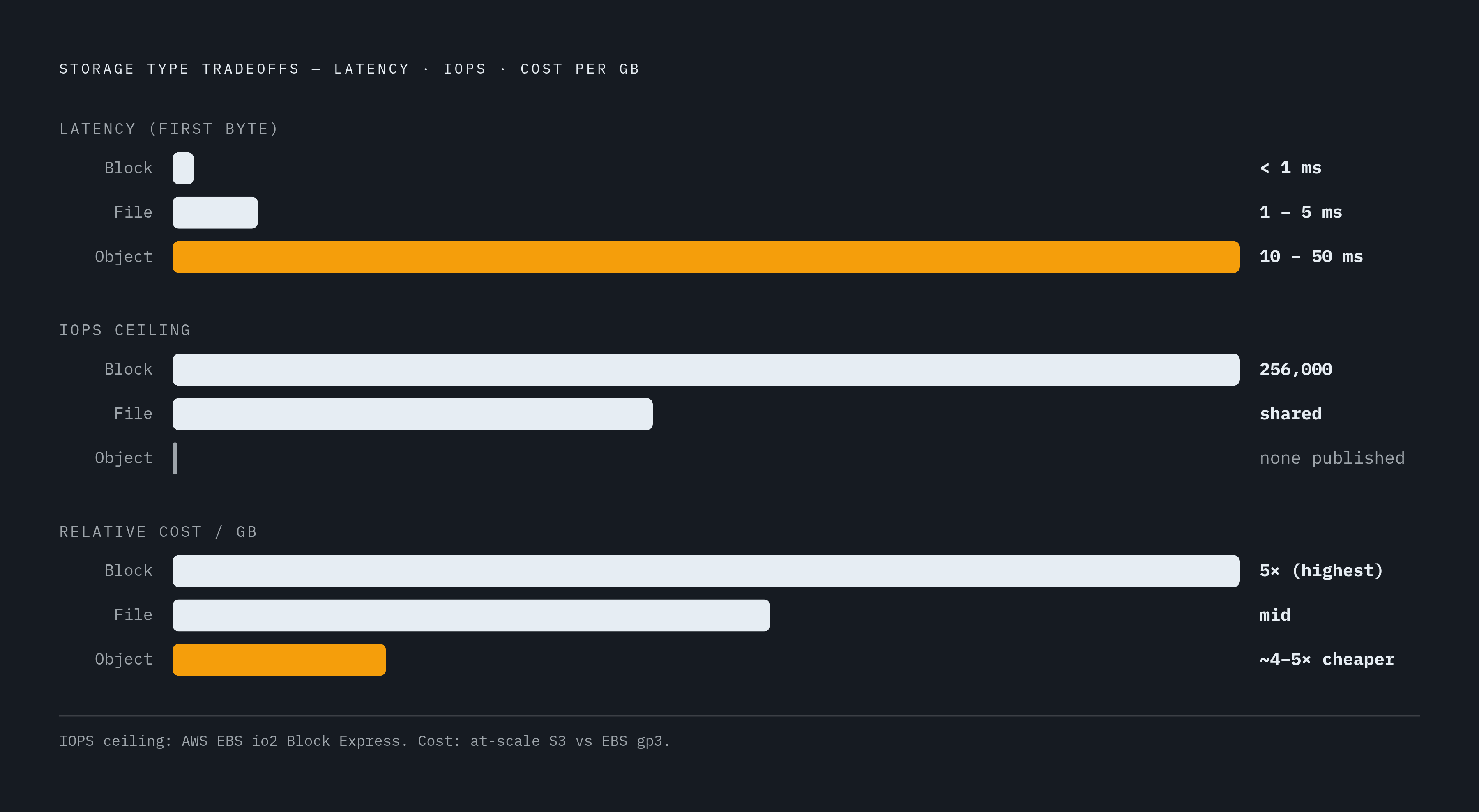
Block storage, something like AWS EBS io2, runs under 1 millisecond of latency. File storage is 1 to 5 milliseconds for a local NFS mount in the same availability zone. Object storage runs 10 to 50 milliseconds just for the first byte over HTTPS. EBS can outrun S3 by a wide margin on raw I/O speed, and object storage latency isn't even consistent across providers: Backblaze B2's upload latency is 517.84 milliseconds, an outlier so steep that every single upload eats that delay before any actual data moves. Cloudflare R2 does better at 171.58 milliseconds, but it's still several times slower than S3.
IOPS is where block storage pulls furthest ahead. High-end EBS io2 Block Express volumes deliver huge IOPS and throughput numbers because they're built around fixed-capacity disk channels designed for exactly that. Object storage doesn't even publish IOPS figures, because the concept barely applies to it. Requests move through distributed queues instead of a dedicated disk channel, so there's no fixed ceiling you can quote for it. File storage's IOPS depend on whatever tier you provisioned, and if several clients mount the share at once, they split that capacity between them.
Throughput flips the script back toward object storage, at least for big files moving in bulk. If it's well-built, an object storage system can saturate an entire high-speed network link by pushing large objects in parallel. A Ceph Object Gateway benchmark on a 12-node cluster scaled almost linearly as nodes were added, until the 100GE network connection itself became the limiting factor, not the storage. Block storage throughput, by contrast, is capped by whatever volume type you picked for it. An AWS EBS gp3 volume has a hard ceiling built into its tier. On the AI-specific end of this, CoreWeave rolled out general availability for CoreWeave AI Object Storage (CAIOS) in March 2025, an exabyte-scale, S3-compatible service built specifically for GPU training workloads, rated to support 2 GB/s per GPU across clusters running hundreds of thousands of GPUs.
Cost follows a similar split. Object storage usually costs a fraction of what block storage does per gigabyte at scale, and file storage sits in between the two. None of that is the whole picture, though. Egress fees, per-API-call charges, and minimum retention penalties can swing the real bill more than the sticker price per gigabyte ever will, so the number that matters is total cost, not the headline rate on a pricing page.
Matching storage type to workload: the decision logic
Every one of these decisions comes down to three questions. What does the application actually do when it touches data. How much latency can it tolerate before users notice or a job fails. And how big does this need to get. Answer those honestly and the storage type picks itself more often than not.
Block storage is the right call when an application needs sub-millisecond latency and heavy IOPS, the classic case being relational databases, transactional systems, and VM boot volumes. These workloads touch data in small, random chunks constantly, so if a database updates one record, it shouldn't have to rewrite anything else around it, and block storage is built exactly for that kind of surgical access. It also assumes one compute instance owns the volume at a time, so if several services need to share the same data, block storage adds friction rather than removing it. None of this comes free: someone still has to format, partition, and manage the volume, which is a fair trade when the performance payoff is there.
Object storage earns its keep when scale matters more than speed and the data itself is unstructured, think backups, media libraries, log archives, data lakes, and AI training datasets sitting at rest waiting to be used. It assumes the application can live with slower first-byte latency and doesn't need to edit files in place. On pure cost per gigabyte, object storage runs roughly 4 to 5 times cheaper than block storage at scale. That gap is why it's the default home for enormous training datasets. It also happens to plug straight into the tools already built around it: the S3 API has become the standard interface for data lake work, and tools like Spark, Trino, and TensorFlow (TensorFlow needs the separate tensorflow-io plugin to talk to S3) all speak it natively, so S3-compatible storage slots into that ecosystem without custom glue code. Object storage is a poor fit if an application needs to update data in place, needs POSIX file behavior, or runs a write-heavy pipeline where every extra millisecond of latency adds up fast.
File storage is the answer when the access pattern itself is the problem, specifically when several compute instances need to touch the same data at the same time, the way dozens of GPU nodes read from one shared training dataset during a run. It also fits when the software involved expects POSIX file behavior out of the box, since most training frameworks and data tools simply won't behave correctly without it, and when legacy systems or teams expect an ordinary folder structure rather than an API. Systems like Archil, which mount cloud object storage as a native filesystem, represent a newer category built specifically to close this gap: they keep object storage's low cost and scale while adding file system behavior and sub-millisecond latency through smart caching.
Object storage's HTTP-based access carries a structural latency ceiling, and a mixed AI pipeline hits that ceiling directly even when object storage is otherwise the correct choice on cost and scale grounds. The fix is layering storage types so each one handles the phase of work it's actually built for, and that's where production AI architecture ends up.
Why Production AI Architectures Use All Three Storage Types
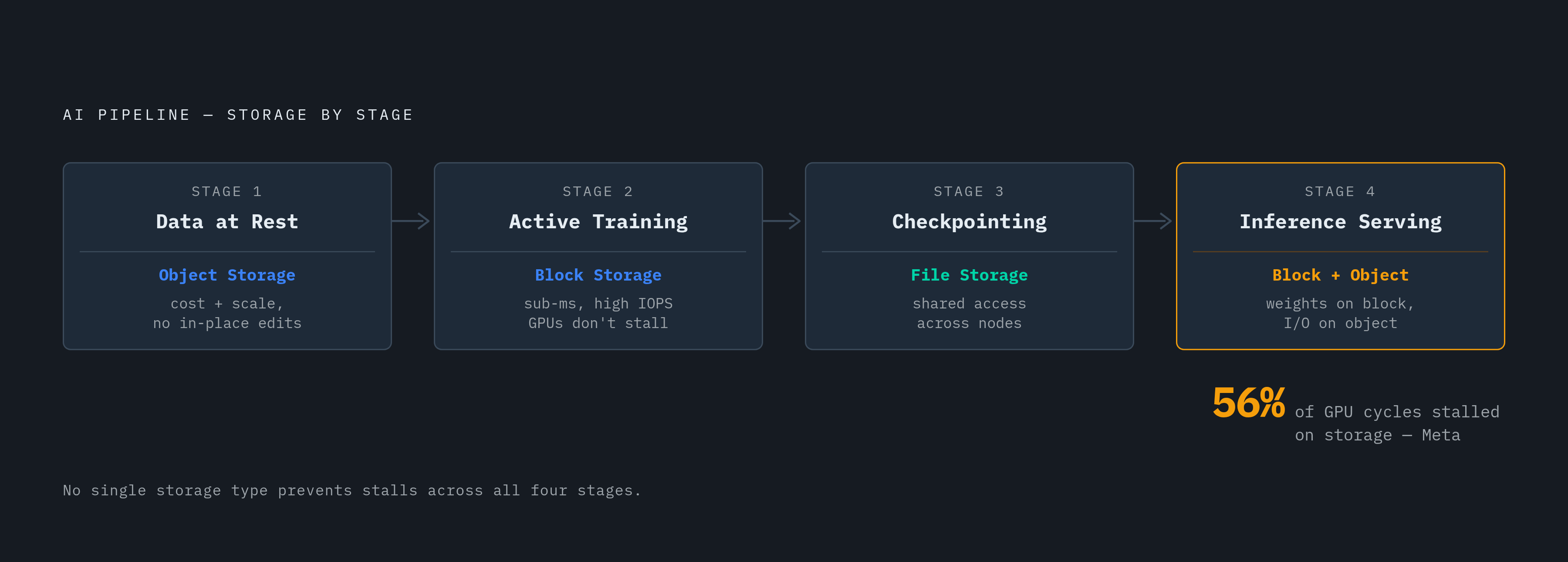
No single storage type covers every stage of a modern AI pipeline, and production systems have settled on the same answer: use all three, with each one assigned to the phase of the pipeline it's mechanically built to handle. Training data stays in object storage while at rest, because cost and scale matter most there, and nothing needs editing in place. Once training begins, you load that same data into block storage so the GPUs get the sub-millisecond, high-IOPS access they need to keep running without stalling. Checkpoints, meanwhile, get written to file storage, because multiple training nodes need to reach the same checkpoint files at the same time. Inference serving splits the same way: model weights sit on low-latency block storage, while the input and output data flowing through inference requests lives in object storage.
The scale involved makes this layering less a best practice and more a survival requirement. AI training can consume terabytes of data per hour, with dozens of processes across different servers all reaching for the same files at the same moment, and when the storage layer can't keep up, idle GPUs are the cost. Meta found that 56% of GPU cycles sat stalled waiting on training data rather than doing any actual computing. If a storage layer can't handle sustained sequential throughput and millions of small random file reads at the same time, it starves the GPUs sitting on top of it. For the largest LLM pretraining runs, that need becomes absolute: clusters running past a thousand GPUs require an all-flash parallel file system just to survive checkpointing, built with strong GPUDirect Storage support so data can move straight to the GPU without passing through the CPU first. Meta's own setup reflects this directly, training thousands of models on datasets ranging from terabytes to petabytes using Tectonic, its own exabyte-scale distributed file system, alongside a separate tier that handles decoding and converting raw data into tensor formats. At that scale, the storage and network paths matter to performance as much as the training code running on top of them.
A cloud-agnostic version of this same layered thinking has taken shape in what's called the open lakehouse pattern: cloud object storage handles durability and cost, an open table format like Apache Iceberg or Delta Lake manages transactions and schema changes on top of it, and a fast columnar store serves whatever data needs to answer in under a second. The lakehouse layer holds the actual source of truth. The fast serving layer is just a projection of it, built only to answer the parts of the workload that can't wait. Modern serverless file systems extend that same idea one layer further: tools like Archil mount existing cloud buckets, S3, or another compatible object store, directly as POSIX filesystems; this removes the need for a separate NAS appliance, and the original bucket remains the real source of truth.
Sources
- Object vs. File vs. Block Storage: What’s the Difference? | IBM
- File Storage vs Object Storage vs Block Storage
- File Storage Vs Block Storage Vs Object Storage: Key Differences And Enterprise Use Cases
- How Object vs Block vs File Storage differ | Google Cloud
- Block Storage vs Object Storage vs File Storage: Which One Does Your Workload Need?
- Object, Block, File Storage: 2026 Guide - Sesame Disk
- coreweave.com
- Object Storage Performance: Breakthrough for AI Workloads